Get certified for free when you join Fabric Data Days 2026 and dive into Fabric, Power BI, SQL, AI, and other essential data skills.
Join nowJuly 7 - July 17 | Round 2 of the Power BI Dataviz World Championships. Don't miss your chance! Learn more
Hello,
I have been trying to figure out why Power BI is taking up so much RAM and I just can't.
I have designed and shared a file with 5 other people. This file takes up to 1.2GB in my computer while taking around 200MB in theirs. This makes me believe that there is nothing wrong with the file.
I have tried to uninstall my application and reinstall it three times and also tried to go to options > disable background sync etc.
Nothing seems to work.
Solved! Go to Solution.
Hi @Anonymous ,
First of all, the consumption of RAM is dynamic. I have some suggestions you can try.
1. Do they have the same file size? The pbix file.
2. Did you apply any actions when you checked the Task Manager? Such as applying queries, refreshing.
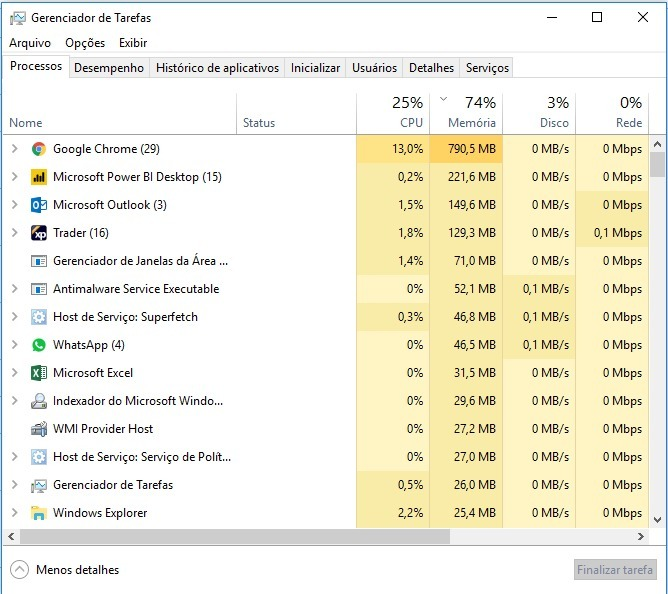
3. Please refer to the snapshot below to see which one consumes the most RAM.
4. Please use the x64 bit version of Desktop.
5. This article is good. Maybe you can have a look.
To be honest, it's hard to find the root cause without the file and the computer environment.
Please understand that this link is provided “AS IS” with no warranties or guarantees of content changes, and confers no rights.
Best Regards,
Hi @Anonymous ,
Could you please mark the proper answers as solutions?
Best Regards,
Hi @Anonymous ,
First of all, the consumption of RAM is dynamic. I have some suggestions you can try.
1. Do they have the same file size? The pbix file.
2. Did you apply any actions when you checked the Task Manager? Such as applying queries, refreshing.
3. Please refer to the snapshot below to see which one consumes the most RAM.
4. Please use the x64 bit version of Desktop.
5. This article is good. Maybe you can have a look.
To be honest, it's hard to find the root cause without the file and the computer environment.
Please understand that this link is provided “AS IS” with no warranties or guarantees of content changes, and confers no rights.
Best Regards,
Join us in Barcelona for FabCon and SQLCon, the Fabric, Power BI, SQL, and AI community event. Save €200 with code FABCMTY200.
Join Fabric Data Days 2026: 60 days of free live/on-demand sessions, challenges, study groups, and certification opportunities.
| User | Count |
|---|---|
| 23 | |
| 19 | |
| 18 | |
| 17 | |
| 13 |
| User | Count |
|---|---|
| 60 | |
| 52 | |
| 47 | |
| 40 | |
| 38 |