cancel
Showing results for 
Search instead for 
Did you mean: 

The Power BI Data Visualization World Championships is back! Get ahead of the game and start preparing now! Learn more

Reply
Anonymous
Not applicable

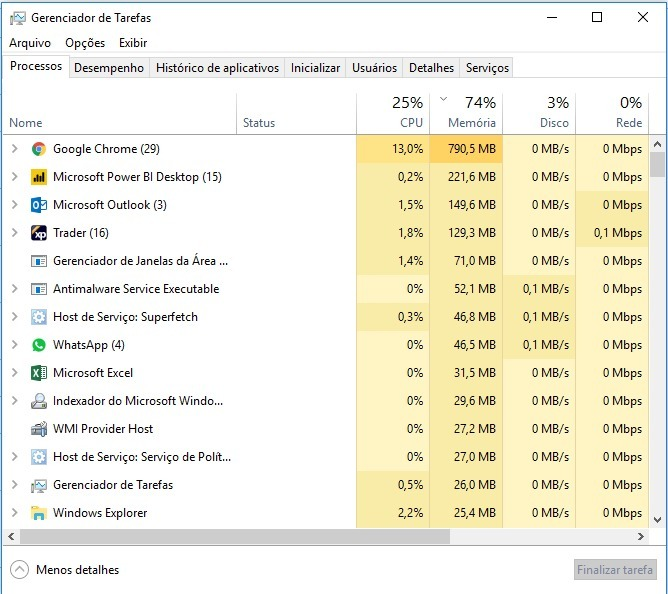
High RAM Consumption

Hello,


I have been trying to figure out why Power BI is taking up so much RAM and I just can't.


I have designed and shared a file with 5 other people. This file takes up to 1.2GB in my computer while taking around 200MB in theirs. This makes me believe that there is nothing wrong with the file.


I have tried to uninstall my application and reinstall it three times and also tried to go to options > disable background sync etc.


Nothing seems to work.


image 1.pngimage.png

1 ACCEPTED SOLUTION
v-jiascu-msft
Microsoft Employee
Microsoft Employee

Hi @Anonymous ,


First of all, the consumption of RAM is dynamic. I have some suggestions you can try.

1. Do they have the same file size? The pbix file.

2. Did you apply any actions when you checked the Task Manager? Such as applying queries, refreshing.

3. Please refer to the snapshot below to see which one consumes the most RAM.

High-RAM-Consumption4. Please use the x64 bit version of Desktop.

5. This article is good. Maybe you can have a look.


To be honest, it's hard to find the root cause without the file and the computer environment.


Please understand that this link is provided “AS IS” with no warranties or guarantees of content changes, and confers no rights.


Best Regards,

Community Support Team _ Dale
If this post helps, then please consider Accept it as the solution to help the other members find it more quickly.

View solution in original post

3 REPLIES 3
v-jiascu-msft
Microsoft Employee
Microsoft Employee

Hi @Anonymous ,


Could you please mark the proper answers as solutions?


Best Regards,

Community Support Team _ Dale
If this post helps, then please consider Accept it as the solution to help the other members find it more quickly.
v-jiascu-msft
Microsoft Employee
Microsoft Employee

Hi @Anonymous ,


First of all, the consumption of RAM is dynamic. I have some suggestions you can try.

1. Do they have the same file size? The pbix file.

2. Did you apply any actions when you checked the Task Manager? Such as applying queries, refreshing.

3. Please refer to the snapshot below to see which one consumes the most RAM.

High-RAM-Consumption4. Please use the x64 bit version of Desktop.

5. This article is good. Maybe you can have a look.


To be honest, it's hard to find the root cause without the file and the computer environment.


Please understand that this link is provided “AS IS” with no warranties or guarantees of content changes, and confers no rights.


Best Regards,

Community Support Team _ Dale
If this post helps, then please consider Accept it as the solution to help the other members find it more quickly.
Anonymous
Not applicable

I am so sorry for the late reply! The links you sent helped me a lot, but I wasn't able to figure out the root of the problem. I reorganized my data model and it has been working better now. Thank you!

Helpful resources

Announcements
Power BI DataViz World Championships

Power BI Dataviz World Championships

The Power BI Data Visualization World Championships is back! Get ahead of the game and start preparing now!

December 2025 Power BI Update Carousel

Power BI Monthly Update - December 2025

Check out the December 2025 Power BI Holiday Recap!

FabCon Atlanta 2026 carousel

FabCon Atlanta 2026

Join us at FabCon Atlanta, March 16-20, for the ultimate Fabric, Power BI, AI and SQL community-led event. Save $200 with code FABCOMM.