cancel
Showing results for 
Search instead for 
Did you mean: 

The Power BI Data Visualization World Championships is back! Get ahead of the game and start preparing now! Learn more

Reply
TejasK
Frequent Visitor

Hi,I am trying to design a function so that my slicer acts only in the way I want it to.

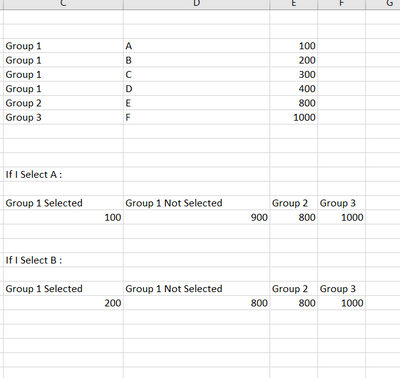
TejasK_0-1673306115884.png


So I have 3 main groups, Group1, group 2 and group 3. 
At this stage I am inclined towards building a up a matrix visual such that if I select A, then I automatically get 4 measures Group 1 selected which shows value 100, than sum of all the remaining in group 1 which is 900 and then separately also show Group 2 and Group 3. Is this possible? 


1 ACCEPTED SOLUTION

@TejasK , not sure why you intend to use distinctcount, is it because you got duplicate in type. I'm attaching PBIX File. Can I see a broader range of dummy datasets to investigate further, ideally PBIX File. Many Thanks PBIX FILE 

View solution in original post

4 REPLIES 4
TejasK
Frequent Visitor

@Manoj_Nair - Thank you for your help. 
I have changed your DAX measures to do a count distinct and GRP1 Selected works fine but GRP1 NotSelected does not work. 
My DAX measures are as follows: 

GRP 1_Selected ( This one works well ) =
var _Type = SELECTEDVALUE(TBL3[TYPE])
return
CALCULATE(distinctcount(TBL3[ID]),FILTER(TBL3,(TBL3[TYPE]) =_Type && (TBL3[GROUP]) = "GROUP 1"))

GRP 1_NotSelected ( This one does not work ) =
var _Type = SELECTEDVALUE(TBL3[TYPE])
return
CALCULATE(distinctcount(TBL3[ID]),FILTER(TBL3,(TBL3[TYPE]) <>_Type && (TBL3[GROUP]) = "GROUP 1"))


The GRP1_NotSelected gives blank result. 


@TejasK , not sure why you intend to use distinctcount, is it because you got duplicate in type. I'm attaching PBIX File. Can I see a broader range of dummy datasets to investigate further, ideally PBIX File. Many Thanks PBIX FILE 

@Manoj_Nair - Thanks Manoj.
While trying to prepare a dummy data set and looking at some of the DAX videos, I was able to achieve what I wanted.
Getting some ideas from your DAX, I also managed to create DAX's for Group 2 and Group 3 asked originally in my post.
Thank you so much for all your help 🙂

Manoj_Nair
Solution Supplier
Solution Supplier

@TejasK - pls try this two DAX

image.jpg

If this post helps to find solution would be happy if you could mark my post as a solution and give it a thumbs up


Best regards

Manoj Nair

Linkedin - https://www.linkedin.com/in/manoj-nair-%E2%98%81-344666104/


Helpful resources

Announcements
Power BI DataViz World Championships

Power BI Dataviz World Championships

The Power BI Data Visualization World Championships is back! Get ahead of the game and start preparing now!

November Power BI Update Carousel

Power BI Monthly Update - November 2025

Check out the November 2025 Power BI update to learn about new features.

FabCon Atlanta 2026 carousel

FabCon Atlanta 2026

Join us at FabCon Atlanta, March 16-20, for the ultimate Fabric, Power BI, AI and SQL community-led event. Save $200 with code FABCOMM.