Join us at FabCon Atlanta from March 16 - 20, 2026, for the ultimate Fabric, Power BI, AI and SQL community-led event. Save $200 with code FABCOMM.
Register now!The Power BI Data Visualization World Championships is back! Get ahead of the game and start preparing now! Learn more
Now my matrix visual looks like this: I placed status in the value field and the same status column in the row field. I used conditional formatting to color the background and also used green color on the blank value and 'D'.
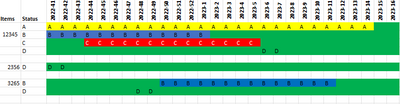
However, I would like the visual to appear like this.
The idea is simple. The D is the available item. D should appear after or before A, B, or C on the chart depending on the date. Some item statuses have only D, thus I can't filter them out.
It would be fantastic if anyone could assist with this report direct query method.
Hi @aslam-ansari ,
Try the following:
Values =
VAR calculationvalue =
CALCULATE (
MIN ( 'Item'[Status] ),
'Item'[Week] = SELECTEDVALUE ( Weeks[Week] )
)
RETURN
IF ( ISBLANK ( calculationvalue ), "D", calculationvalue )
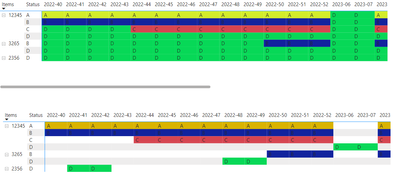
Top one is with the measure bottom one is you data raw:
Regards
Miguel Félix
Proud to be a Super User!
Check out my blog: Power BI em PortuguêsThe Power BI Data Visualization World Championships is back! Get ahead of the game and start preparing now!
| User | Count |
|---|---|
| 59 | |
| 45 | |
| 39 | |
| 39 | |
| 21 |
| User | Count |
|---|---|
| 176 | |
| 131 | |
| 118 | |
| 82 | |
| 54 |