This time we’re going bigger than ever. Fabric, Power BI, SQL, AI and more. We're covering it all. You won't want to miss it.
Learn moreLevel up your Power BI skills this month - build one visual each week and tell better stories with data! Get started
Now my matrix visual looks like this: I placed status in the value field and the same status column in the row field. I used conditional formatting to color the background and also used green color on the blank value and 'D'.
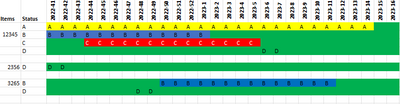
However, I would like the visual to appear like this.
The idea is simple. The D is the available item. D should appear after or before A, B, or C on the chart depending on the date. Some item statuses have only D, thus I can't filter them out.
It would be fantastic if anyone could assist with this report direct query method.
Hi @aslam-ansari ,
Try the following:
Values =
VAR calculationvalue =
CALCULATE (
MIN ( 'Item'[Status] ),
'Item'[Week] = SELECTEDVALUE ( Weeks[Week] )
)
RETURN
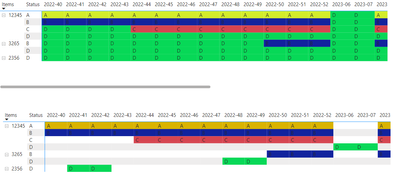
IF ( ISBLANK ( calculationvalue ), "D", calculationvalue )
Top one is with the measure bottom one is you data raw:
Regards
Miguel Félix
Proud to be a Super User!
Check out my blog: Power BI em PortuguêsCheck out the April 2026 Power BI update to learn about new features.
Sign up to receive a private message when registration opens and key events begin.
If you have recently started exploring Fabric, we'd love to hear how it's going. Your feedback can help with product improvements.
| User | Count |
|---|---|
| 39 | |
| 28 | |
| 27 | |
| 22 | |
| 18 |
| User | Count |
|---|---|
| 67 | |
| 37 | |
| 32 | |
| 26 | |
| 25 |