Join us at FabCon Atlanta from March 16 - 20, 2026, for the ultimate Fabric, Power BI, AI and SQL community-led event. Save $200 with code FABCOMM.
Register now!The Power BI Data Visualization World Championships is back! Get ahead of the game and start preparing now! Learn more
Hi Power BI Experts,
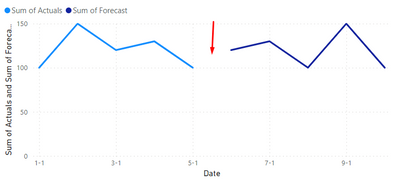
How can i reduce the gap between acutal & forecast data in Line chart. I am using date dimension in axis and there is no dates gap between them. How can i show continious data with out displaying the gap. Please help.
Solved! Go to Solution.
Hi @prakash11440278 ,
When you refer that there is no gap you mean that the actuals end in 5th January and the Forecast in 6 of January?
In this case you need to create a measure for the forecast to make the connection depends on how you have the calculation and the model on my case I have
forecast adjusted =
VAR maximumactual =
MAXX ( FILTER ( ALL ( 'Table' ), 'Table'[Actuals] > 0 ), 'Table'[Date] )
RETURN
IF (
SELECTEDVALUE ( 'Table'[Date] ) = maximumactual,
SUM ( 'Table'[Actuals] ),
SUM ( 'Table'[Forecast] )
)
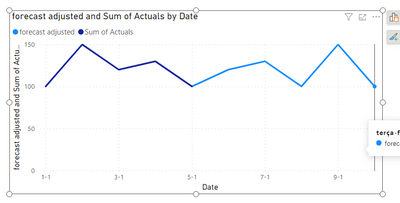
In this case I pick up the maximum date of actuals and for that date I return the actuals for any other date I return the forecast final result below:
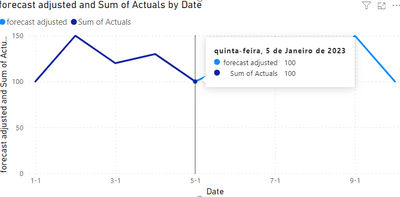
The only thing is that on the specific day you have both values on the tooltip for that day.
Regards
Miguel Félix
Proud to be a Super User!
Check out my blog: Power BI em PortuguêsHi @prakash11440278 ,
When you refer that there is no gap you mean that the actuals end in 5th January and the Forecast in 6 of January?
In this case you need to create a measure for the forecast to make the connection depends on how you have the calculation and the model on my case I have
forecast adjusted =
VAR maximumactual =
MAXX ( FILTER ( ALL ( 'Table' ), 'Table'[Actuals] > 0 ), 'Table'[Date] )
RETURN
IF (
SELECTEDVALUE ( 'Table'[Date] ) = maximumactual,
SUM ( 'Table'[Actuals] ),
SUM ( 'Table'[Forecast] )
)
In this case I pick up the maximum date of actuals and for that date I return the actuals for any other date I return the forecast final result below:
The only thing is that on the specific day you have both values on the tooltip for that day.
Regards
Miguel Félix
Proud to be a Super User!
Check out my blog: Power BI em PortuguêsThe Power BI Data Visualization World Championships is back! Get ahead of the game and start preparing now!
Check out the November 2025 Power BI update to learn about new features.
| User | Count |
|---|---|
| 59 | |
| 43 | |
| 42 | |
| 23 | |
| 17 |
| User | Count |
|---|---|
| 190 | |
| 122 | |
| 96 | |
| 66 | |
| 47 |