Share feedback directly with Fabric product managers, participate in targeted research studies and influence the Fabric roadmap.
Sign up nowGet Fabric certified for FREE! Don't miss your chance! Learn more
Hello guys, I have a data with the iformation below
I am pretty confused on how I can visualize this data. I want my X axis to be QRM, PL and CL
The Y-Axis will be Rarely being the lowest to Excellent being highest. I will have slicer on week and name.
| Week | Name | QRM | PL | CL |
| 1 | Miguel | Rarely | Good | Usually |
| 2 | Miguel | Sometimes | Usually | Excellent |
| 2 | John | Excellent | Rarely | Excellent |
| 1 | Julius | Rarely | Excellent | Rarely |
| 2 | Claire | Good | Sometimes | Sometimes |
I have a table for lookup values
| Id | Rating | Grade |
| 1 | Excellent | 4 |
| 3 | Usually | 3 |
| 5 | Sometimes | 2 |
| 6 | Rarely | 1 |
| 7 | Never | 0 |
Solved! Go to Solution.
Hi @Kalachuchi ,
Please follow these steps:
1. Select Week and Name columns -->unpivot other columns
2. Add Grade column to Table using the following formula:
Grade =
LOOKUPVALUE ( Rating[Grade], Rating[Rating], 'Table'[Value] )
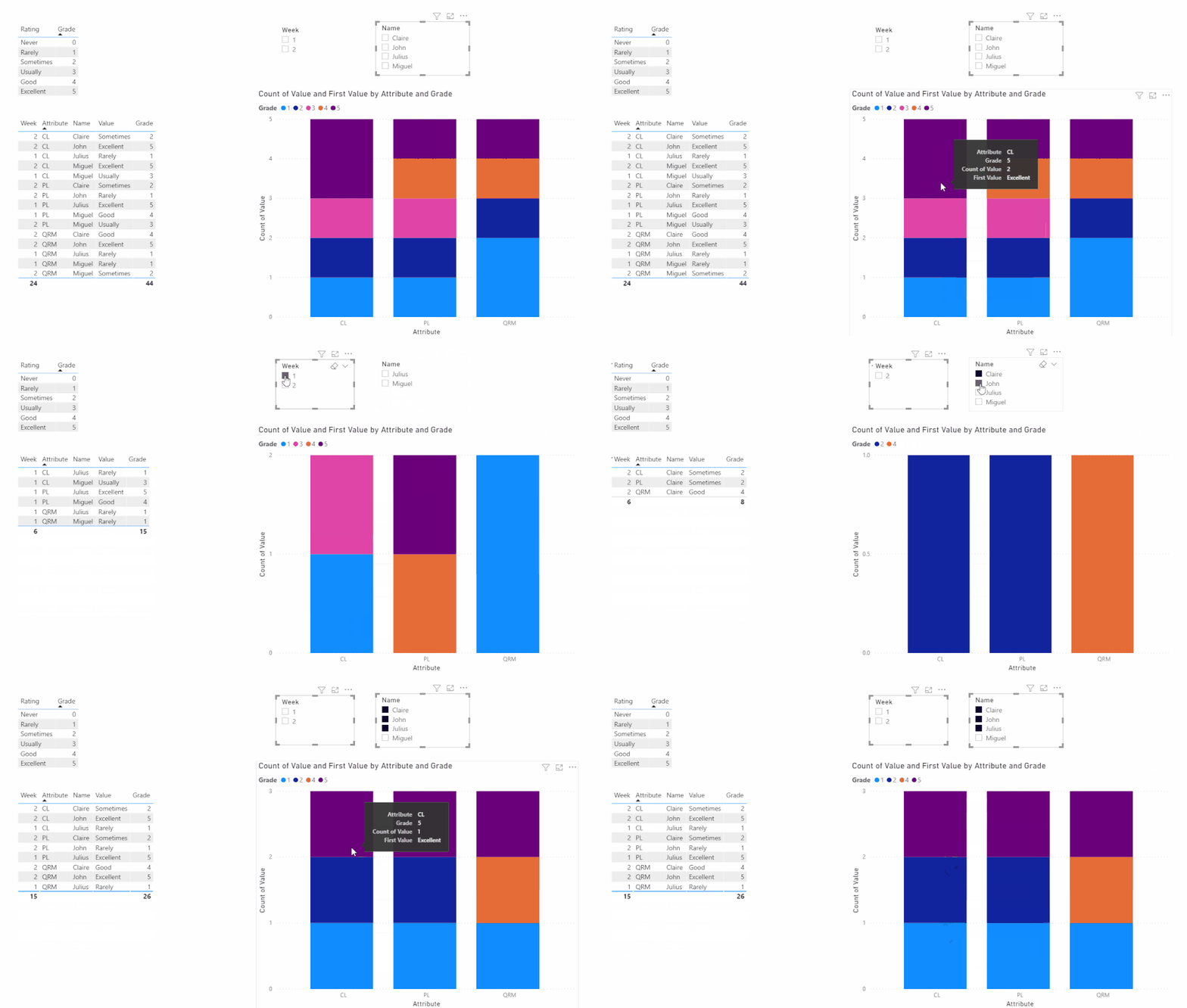
3. Create a visual like this:
My final output looks like this:
Did I answer your question ? Please mark my reply as solution. Thank you very much.
If not, please upload some insensitive data samples and expected output.
Best Regards,
Eyelyn Qin
Hi @Kalachuchi ,
Please follow these steps:
1. Select Week and Name columns -->unpivot other columns
2. Add Grade column to Table using the following formula:
Grade =
LOOKUPVALUE ( Rating[Grade], Rating[Rating], 'Table'[Value] )
3. Create a visual like this:
My final output looks like this:
Did I answer your question ? Please mark my reply as solution. Thank you very much.
If not, please upload some insensitive data samples and expected output.
Best Regards,
Eyelyn Qin
@Kalachuchi , unpivot the first table and join with second table on rating or merge the two
https://www.youtube.com/watch?v=2HjkBtxSM0g
https://radacad.com/pivot-and-unpivot-with-power-bi
Merge : https://radacad.com/append-vs-merge-in-power-bi-and-power-query
If you love stickers, then you will definitely want to check out our Community Sticker Challenge!
Check out the January 2026 Power BI update to learn about new features.
| User | Count |
|---|---|
| 65 | |
| 65 | |
| 48 | |
| 21 | |
| 18 |
| User | Count |
|---|---|
| 119 | |
| 117 | |
| 38 | |
| 36 | |
| 27 |