FabCon is coming to Atlanta
Join us at FabCon Atlanta from March 16 - 20, 2026, for the ultimate Fabric, Power BI, AI and SQL community-led event. Save $200 with code FABCOMM.
Register now!- Power BI forums
- Get Help with Power BI
- Desktop
- Service
- Report Server
- Power Query
- Mobile Apps
- Developer
- DAX Commands and Tips
- Custom Visuals Development Discussion
- Health and Life Sciences
- Power BI Spanish forums
- Translated Spanish Desktop
- Training and Consulting
- Instructor Led Training
- Dashboard in a Day for Women, by Women
- Galleries
- Data Stories Gallery
- Themes Gallery
- Contests Gallery
- QuickViz Gallery
- Quick Measures Gallery
- Visual Calculations Gallery
- Notebook Gallery
- Translytical Task Flow Gallery
- TMDL Gallery
- R Script Showcase
- Webinars and Video Gallery
- Ideas
- Custom Visuals Ideas (read-only)
- Issues
- Issues
- Events
- Upcoming Events
The Power BI Data Visualization World Championships is back! Get ahead of the game and start preparing now! Learn more
- Power BI forums
- Forums
- Get Help with Power BI
- Desktop
- Where can I see the last table refresh date?
- Subscribe to RSS Feed
- Mark Topic as New
- Mark Topic as Read
- Float this Topic for Current User
- Bookmark
- Subscribe
- Printer Friendly Page


- Mark as New
- Bookmark
- Subscribe
- Mute
- Subscribe to RSS Feed
- Permalink
- Report Inappropriate Content
Where can I see the last table refresh date?
As simple as that, I cannot find table's last refresh date. I don't want it on any report. I just want to inspect it for myself.
Solved! Go to Solution.
- Mark as New
- Bookmark
- Subscribe
- Mute
- Subscribe to RSS Feed
- Permalink
- Report Inappropriate Content

- Mark as New
- Bookmark
- Subscribe
- Mute
- Subscribe to RSS Feed
- Permalink
- Report Inappropriate Content
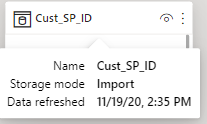
Now we just need to hover on the table name in the model view:


- Mark as New
- Bookmark
- Subscribe
- Mute
- Subscribe to RSS Feed
- Permalink
- Report Inappropriate Content

- Mark as New
- Bookmark
- Subscribe
- Mute
- Subscribe to RSS Feed
- Permalink
- Report Inappropriate Content
If you chose Import mode:
- You can check the Refresh dataset in Power BI Service, Go to the dataset settings and choose schedule refresh. In this place you can find History of refreshing.
If you chose Live connection and you have access to the model:
- You can connect to the model via SSMS, then right click on the selected table and select Partitions. There is information about the last refresh of a given table.
If you only have access to the report, unfortunately, without an additional column in the table that will have such information, you will not be able to check it. You can only check the refresh of the entire dataset.
_______________
If I helped, please accept the solution and give kudos! 😀
- Mark as New
- Bookmark
- Subscribe
- Mute
- Subscribe to RSS Feed
- Permalink
- Report Inappropriate Content
@lkalawski wrote:If you chose Import mode:
- You can check the Refresh dataset in Power BI Service, Go to the dataset settings and choose schedule refresh. In this place you can find History of refreshing.If you chose Live connection and you have access to the model:
- You can connect to the model via SSMS, then right click on the selected table and select Partitions. There is information about the last refresh of a given table.
Does this apply to the Desktop version of Power BI?
- Mark as New
- Bookmark
- Subscribe
- Mute
- Subscribe to RSS Feed
- Permalink
- Report Inappropriate Content
Unfortunately, in Power BI Dekstop you can't just check the last refresh of the table in normal way.
You need to create an additional column that will contain the refresh information.
Check the link sent by @amitchandak , it shows how to add such a field in Power Query. You can do this for each table and after refreshing the data, the date will update.
_______________
If I helped, please accept the solution and give kudos! 😀
- Mark as New
- Bookmark
- Subscribe
- Mute
- Subscribe to RSS Feed
- Permalink
- Report Inappropriate Content
@lkalawski wrote:Unfortunately, in Power BI Dekstop you can't just check the last refresh of the table in normal way.
You need to create an additional column that will contain the refresh information.
Check the link sent by @amitchandak , it shows how to add such a field in Power Query. You can do this for each table and after refreshing the data, the date will update.
Thank you for writing in human language that it is impossible, and workarounds will be needed. The other answer does not explicitly tell it, which is why I accepted your answer.

Helpful resources

Power BI Dataviz World Championships
The Power BI Data Visualization World Championships is back! Get ahead of the game and start preparing now!

Power BI Monthly Update - December 2025
Check out the December 2025 Power BI Holiday Recap!

FabCon Atlanta 2026
Join us at FabCon Atlanta, March 16-20, for the ultimate Fabric, Power BI, AI and SQL community-led event. Save $200 with code FABCOMM.

| User | Count |
|---|---|
| 41 | |
| 38 | |
| 36 | |
| 30 | |
| 28 |


| User | Count |
|---|---|
| 128 | |
| 88 | |
| 79 | |
| 67 | |
| 62 |


