Get certified for free when you join Fabric Data Days 2026 and dive into Fabric, Power BI, SQL, AI, and other essential data skills.
Join nowJuly 7 - July 17 | Round 2 of the Power BI Dataviz World Championships. Don't miss your chance! Learn more
Hello guys, I have a data with the iformation below
I am pretty confused on how I can visualize this data. I want my X axis to be QRM, PL and CL
The Y-Axis will be Rarely being the lowest to Excellent being highest. I will have slicer on week and name.
| Week | Name | QRM | PL | CL |
| 1 | Miguel | Rarely | Good | Usually |
| 2 | Miguel | Sometimes | Usually | Excellent |
| 2 | John | Excellent | Rarely | Excellent |
| 1 | Julius | Rarely | Excellent | Rarely |
| 2 | Claire | Good | Sometimes | Sometimes |
I have a table for lookup values
| Id | Rating | Grade |
| 1 | Excellent | 4 |
| 3 | Usually | 3 |
| 5 | Sometimes | 2 |
| 6 | Rarely | 1 |
| 7 | Never | 0 |
Solved! Go to Solution.
Hi @Kalachuchi ,
Please follow these steps:
1. Select Week and Name columns -->unpivot other columns
2. Add Grade column to Table using the following formula:
Grade =
LOOKUPVALUE ( Rating[Grade], Rating[Rating], 'Table'[Value] )
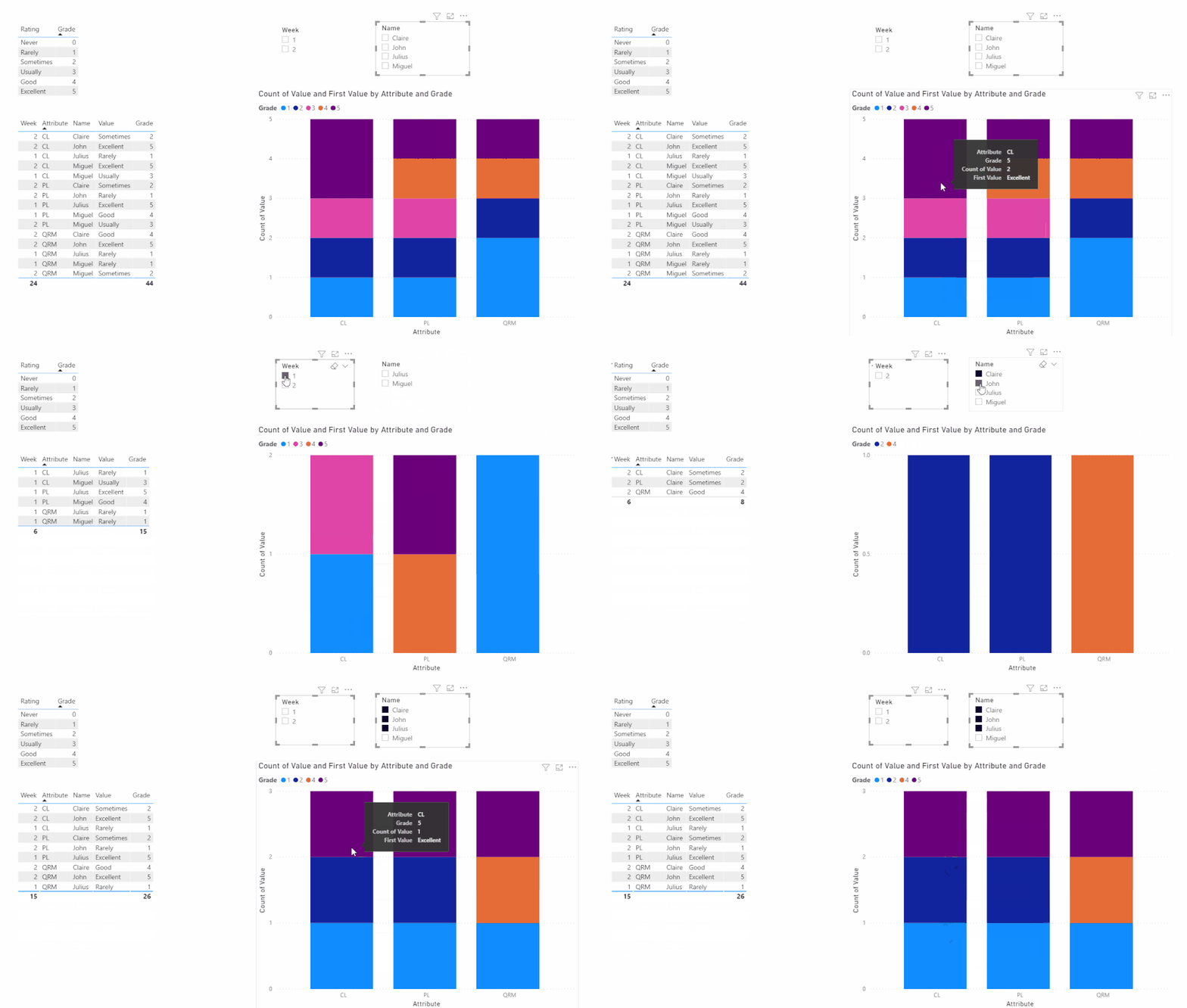
3. Create a visual like this:
My final output looks like this:
Did I answer your question ? Please mark my reply as solution. Thank you very much.
If not, please upload some insensitive data samples and expected output.
Best Regards,
Eyelyn Qin
Hi @Kalachuchi ,
Please follow these steps:
1. Select Week and Name columns -->unpivot other columns
2. Add Grade column to Table using the following formula:
Grade =
LOOKUPVALUE ( Rating[Grade], Rating[Rating], 'Table'[Value] )
3. Create a visual like this:
My final output looks like this:
Did I answer your question ? Please mark my reply as solution. Thank you very much.
If not, please upload some insensitive data samples and expected output.
Best Regards,
Eyelyn Qin
@Kalachuchi , unpivot the first table and join with second table on rating or merge the two
https://www.youtube.com/watch?v=2HjkBtxSM0g
https://radacad.com/pivot-and-unpivot-with-power-bi
Merge : https://radacad.com/append-vs-merge-in-power-bi-and-power-query
Join us in Barcelona for FabCon and SQLCon, the Fabric, Power BI, SQL, and AI community event. Save €200 with code FABCMTY200.
Join Fabric Data Days 2026: 60 days of free live/on-demand sessions, challenges, study groups, and certification opportunities.
| User | Count |
|---|---|
| 23 | |
| 19 | |
| 18 | |
| 17 | |
| 13 |
| User | Count |
|---|---|
| 60 | |
| 52 | |
| 47 | |
| 40 | |
| 38 |