Share feedback directly with Fabric product managers, participate in targeted research studies and influence the Fabric roadmap.
Sign up nowGet Fabric certified for FREE! Don't miss your chance! Learn more
Hello,
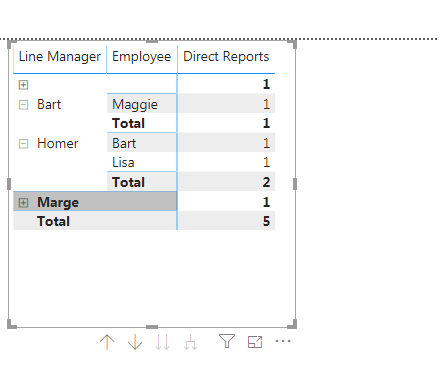
I've tried all the org chart visuals and to be honest the don't really work out for me. Had hopes for the visio one but we have over 1000 employees and the visual wouldnt accommodate it. So, just going to try and use a matrix table.
The example I have attached doesnt really work as I have put Bart as a manager but is there a way that when you expand Homer and then you can expand Bart?
Cheers
Ross
Solved! Go to Solution.
You can use Hierarchies by creating a set of level-columns. Have a look at this article:
https://www.daxpatterns.com/parent-child-hierarchies/
This will allow you to have a drill down you are looking for 🙂
Kind regards
Djerro123
-------------------------------
If this answered your question, please mark it as the Solution. This also helps others to find what they are looking for.
Kudo's are welcome 🙂
Proud to be a Super User!
You can use Hierarchies by creating a set of level-columns. Have a look at this article:
https://www.daxpatterns.com/parent-child-hierarchies/
This will allow you to have a drill down you are looking for 🙂
Kind regards
Djerro123
-------------------------------
If this answered your question, please mark it as the Solution. This also helps others to find what they are looking for.
Kudo's are welcome 🙂
Proud to be a Super User!
If you love stickers, then you will definitely want to check out our Community Sticker Challenge!
Check out the January 2026 Power BI update to learn about new features.
| User | Count |
|---|---|
| 65 | |
| 64 | |
| 49 | |
| 21 | |
| 18 |
| User | Count |
|---|---|
| 119 | |
| 117 | |
| 38 | |
| 36 | |
| 29 |