Join us at FabCon Atlanta from March 16 - 20, 2026, for the ultimate Fabric, Power BI, AI and SQL community-led event. Save $200 with code FABCOMM.
Register now!The Power BI Data Visualization World Championships is back! It's time to submit your entry. Live now!
Hello to all,
I have the following DAX formula to count unique values in Column1
= DISTINCTCOUNT(Table1[Column1])
How can I COUNT() values equal to "XYZ" and DISTINCTCOUNT() values different than "XYZ". I've tried something like this but is not working.
=IF(Table1[Column1] <> "XYZ",
DISTINCTCOUNT(Table1[Column1]),
COUNT(Table1[Column1])
)
Sample Input
| Column1 |
| ABC |
| DEF |
| GHI |
| ABC |
| XYZ |
| DEF |
| DEF |
| XYZ |
| XYZ |
| JKL |
Output would be:
Unique values = 4
Values equal to "XYZ" = 3
Thanks for any help.
Solved! Go to Solution.
Hi,
In the second formula, replace COUNT with COUNTA.
There can be better way but try
cal1 = var 1 _v1 = calculate(DISTINCTCOUNT(Table1[Column1]),Table1[Column1] <> "XYZ") var 1 _v2 = calculate(COUNT(Table1[Column1]),Table1[Column1] = "XYZ") Return V1+v2
Hi, thanks for your help.
I've tried in this way following your code:
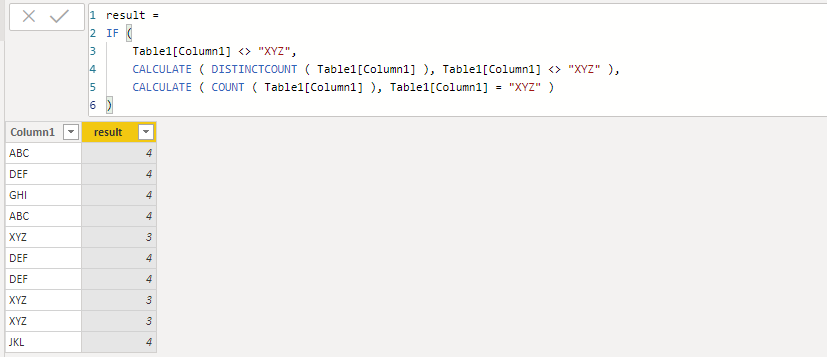
= IF(Table1[Column1] <> "XYZ", calculate(DISTINCTCOUNT(Table1[Column1]),Table1[Column1] <> "XYZ"), calculate(COUNT(Table1[Column1]),Table1[Column1] = "XYZ") )
But is not working as you suggest nor adding the IF(), I get numeric values for the part "calculate(DISTINCTCOUNT(...))" but I get error for the part " calculate(COUNT(...))"
This formula is invalid or incomplete: 'Calculation error in measure 'Table1'[Column1]:
The function COUNT takes an argument that evaluates to numbers or dates and cannot
work with values of type String.'.
Hi,
In the second formula, replace COUNT with COUNTA.
@Ashish_Mathur wrote:Hi,
In the second formula, replace COUNT with COUNTA.
Thanks for the suggestion. That was the issue, COUNTA instead of COUNT.
You are welcome.
@cgkas ,
I couldn't reproduce your issue, the calculate column works well on my side. Could you please share your sample data for further test?
Community Support Team _ Jimmy Tao
If this post helps, then please consider Accept it as the solution to help the other members find it more quickly.
| User | Count |
|---|---|
| 51 | |
| 38 | |
| 33 | |
| 22 | |
| 19 |
| User | Count |
|---|---|
| 136 | |
| 102 | |
| 58 | |
| 36 | |
| 35 |