
Join us at FabCon Atlanta from March 16 - 20, 2026, for the ultimate Fabric, Power BI, AI and SQL community-led event. Save $200 with code FABCOMM.
Register now!Vote for your favorite vizzies from the Power BI Dataviz World Championship submissions. Vote now!
Hi guys,
I have those databases for example:
categories.csv
id;name;category 1;fiat;ford 2;onix;gm 3;etios;toyota 4;macan;porsche 5;enzo;ferrari
history.csv
date;value;id 17/01/2019;1100;1 17/01/2019;1500;2 17/01/2019;700;3 17/01/2019;950;4 17/01/2019;230;5 18/01/2019;1100;1 18/01/2019;1500;2 18/01/2019;700;3 18/01/2019;950;4 18/01/2019;230;5 19/01/2019;1100;1 19/01/2019;1500;2 19/01/2019;700;3 19/01/2019;950;4 19/01/2019;230;5
predict_two.csv
date;value;id 20/01/2019;220;1 20/01/2019;500;2 20/01/2019;120;3 20/01/2019;230;4 20/01/2019;770;5
predict_one.csv
date;value;id 21/01/2019;830;1 21/01/2019;120;2 21/01/2019;250;3 21/01/2019;700;4 21/01/2019;430;5
I wish I could build this using matrix or maybe a table if it's possible:
I tried everything that I know, but I couldn't. I can't move data of predicts to history, because they need to be separated.
Thank you.
Solved! Go to Solution.
Hi @andfx,
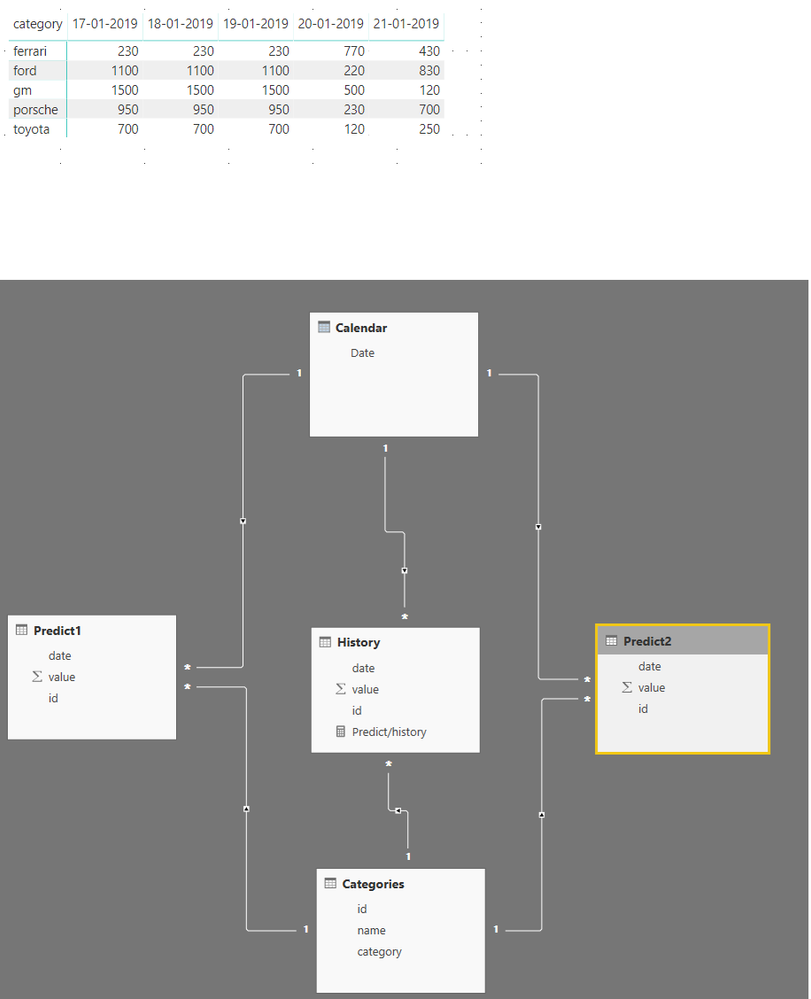
You need to have a 1 to Many relationship wiht a single cross filter direction, then add the following measure to your data:
Predict/history =
SWITCH (
TRUE ();
SUM ( History[value] ) <> 0; SUM ( History[value] );
SUM ( Predict1[value] ) <> 0; SUM ( Predict1[value] );
SUM ( Predict2[value] ) <> 0; SUM ( Predict2[value] );
BLANK ()
)
Be aware that this formula is assuming that predit 1 and predict 2 includes diferrente dates and they are also not on the history table.
Result is below and attached PBIX file.
Regards,
MFelix
Regards
Miguel Félix
Proud to be a Super User!
Check out my blog: Power BI em PortuguêsRegards
Miguel Félix
Proud to be a Super User!
Check out my blog: Power BI em PortuguêsI tried it.. Not worked.
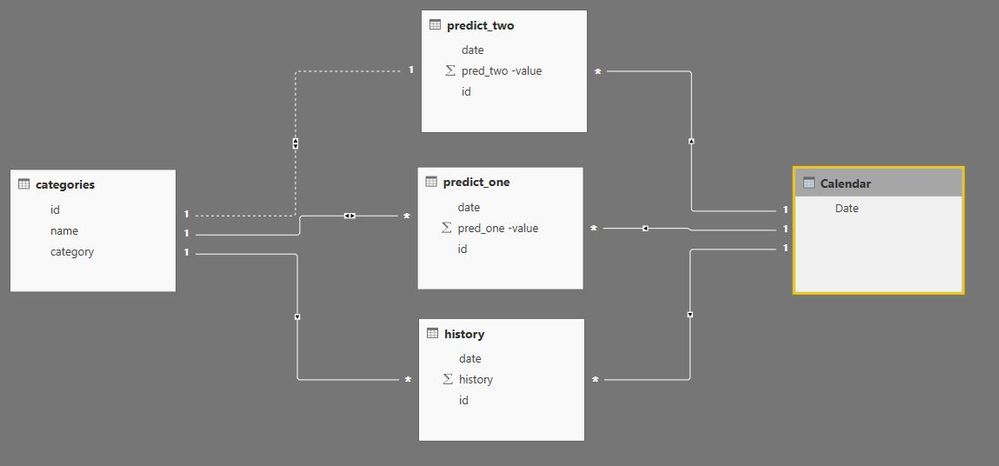
I made calendar
Calendar = CALENDAR ( MIN ( history[date] ); MAX ( predict_one[date] ) )
Did the relationships
The result:
Thank you.
Hi @andfx,
You need to have a 1 to Many relationship wiht a single cross filter direction, then add the following measure to your data:
Predict/history =
SWITCH (
TRUE ();
SUM ( History[value] ) <> 0; SUM ( History[value] );
SUM ( Predict1[value] ) <> 0; SUM ( Predict1[value] );
SUM ( Predict2[value] ) <> 0; SUM ( Predict2[value] );
BLANK ()
)
Be aware that this formula is assuming that predit 1 and predict 2 includes diferrente dates and they are also not on the history table.
Result is below and attached PBIX file.
Regards,
MFelix
Regards
Miguel Félix
Proud to be a Super User!
Check out my blog: Power BI em PortuguêsThanks a lot, you're the best!
Be aware that this formula is assuming that predit 1 and predict 2 includes diferrente dates and they are also not on the history table.
Do you think it's possible to adapt that formula if dates on predit 1 and 2 they are on the history table too ?
Thank yo :))
Regards
Miguel Félix
Proud to be a Super User!
Check out my blog: Power BI em PortuguêsVote for your favorite vizzies from the Power BI World Championship submissions!
If you love stickers, then you will definitely want to check out our Community Sticker Challenge!
Check out the January 2026 Power BI update to learn about new features.
| User | Count |
|---|---|
| 57 | |
| 52 | |
| 45 | |
| 17 | |
| 16 |
| User | Count |
|---|---|
| 108 | |
| 108 | |
| 39 | |
| 33 | |
| 26 |