This is best Fabric, Power BI, SQL and AI community event. How do we know? The last event sold out! Save €200 with code FABCMTY200.
Register nowJuly 28 - August 9 | Final Round of the Power BI Dataviz World Championships. This is your chance. Learn more
Hi Guys,
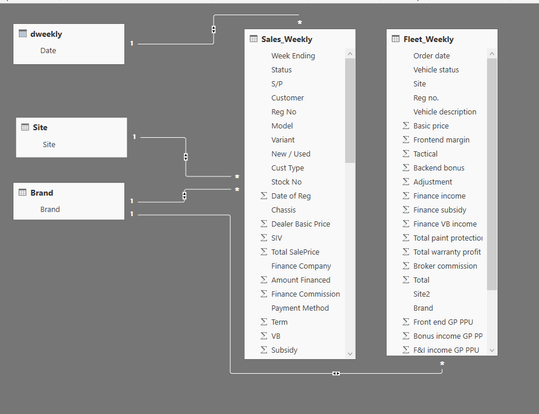
I am hoping someone can help me with the Power BI relationship. I have 5 tables:
See below
My relationships are as folows:
Dweekly table date = Sales Weekly Week Ending – Many to one and Both
Site table site = Sales Weekly Site - Many to one and Both
Brand table brand = Sales Weekly Brand - Many to one and Both
Brand table brand = Fleet Weekly Brand - Many to one and Both
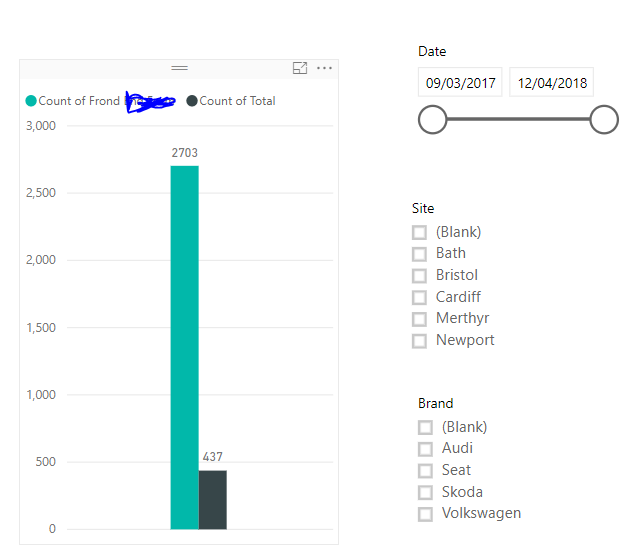
I now have a report which looks like the below:
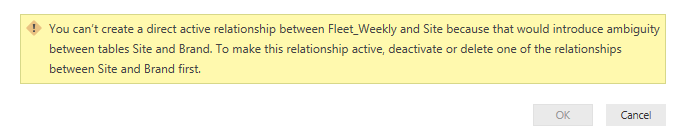
I can filter by Date and Brand and both sections in the graph will change accordingly which is great. However, I also want to be able to filter by Site and for some reason I cannot get this to work properly. If I try and create a relationship between the site table and site within the fleet weekly table, I get the following error message.
Is there a way to be able to also filter by site?
Many thanks
Solved! Go to Solution.
Hi @Anonymous,
First you should know that in Power BI, you are only able to create one inactive relationship between two tables.
However since all the relationships you have set to Both Cross Filter Direction. It means there already exists an inactive relationship between Site and Brand. The path will be Site -> Sales Weekly -> Brand.
And now you want to create a new relationship between Site and Fleet Weekly, then a second relationship between Site and Brand will be generated as Site -> Fleet Weekly -> Brand. That's why the error occurs.
To resolve your issue, you can set the Cross Filter Direction to Single for the relationships " Site and Sales Weekly " and " Brand and Fleet Weekly ".
Thanks,
Xi Jin.
Hi @Anonymous,
First you should know that in Power BI, you are only able to create one inactive relationship between two tables.
However since all the relationships you have set to Both Cross Filter Direction. It means there already exists an inactive relationship between Site and Brand. The path will be Site -> Sales Weekly -> Brand.
And now you want to create a new relationship between Site and Fleet Weekly, then a second relationship between Site and Brand will be generated as Site -> Fleet Weekly -> Brand. That's why the error occurs.
To resolve your issue, you can set the Cross Filter Direction to Single for the relationships " Site and Sales Weekly " and " Brand and Fleet Weekly ".
Thanks,
Xi Jin.
Join us in Barcelona for FabCon and SQLCon, the Fabric, Power BI, SQL, and AI community event. Save €200 with code FABCMTY200.
If you love stickers, then you will definitely want to check out our community sticker challenge, Barcelona edition!
Check out the July 2026 Power BI update to learn about new features.
| User | Count |
|---|---|
| 25 | |
| 23 | |
| 20 | |
| 18 | |
| 14 |
| User | Count |
|---|---|
| 24 | |
| 20 | |
| 20 | |
| 20 | |
| 19 |