Join us at FabCon Atlanta from March 16 - 20, 2026, for the ultimate Fabric, Power BI, AI and SQL community-led event. Save $200 with code FABCOMM.
Register now!The Power BI Data Visualization World Championships is back! Get ahead of the game and start preparing now! Learn more
Hi Guys,
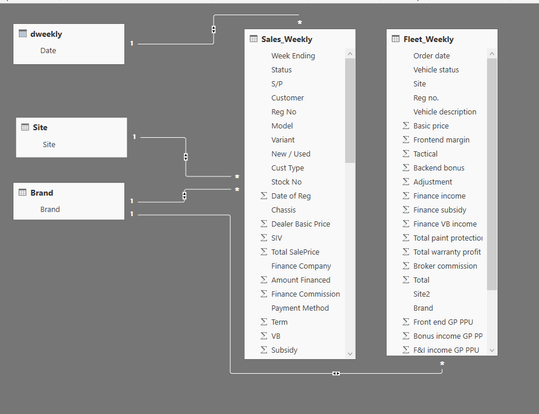
I am hoping someone can help me with the Power BI relationship. I have 5 tables:
See below
My relationships are as folows:
Dweekly table date = Sales Weekly Week Ending – Many to one and Both
Site table site = Sales Weekly Site - Many to one and Both
Brand table brand = Sales Weekly Brand - Many to one and Both
Brand table brand = Fleet Weekly Brand - Many to one and Both
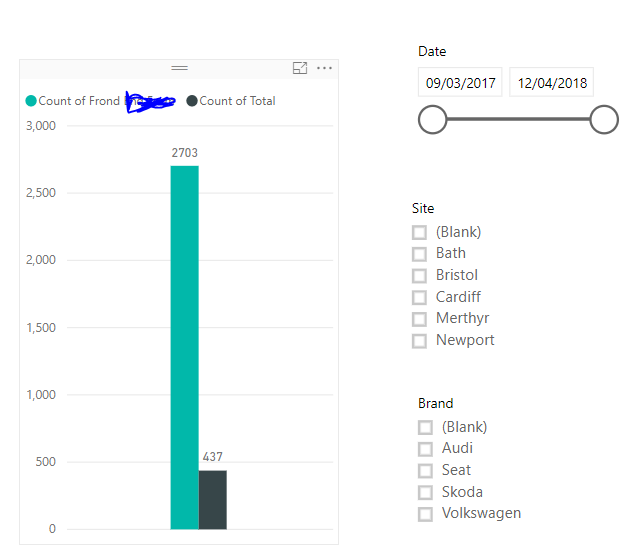
I now have a report which looks like the below:
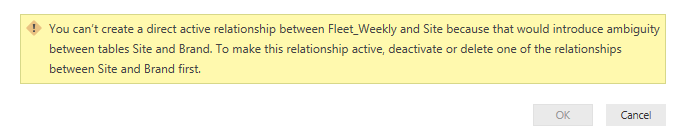
I can filter by Date and Brand and both sections in the graph will change accordingly which is great. However, I also want to be able to filter by Site and for some reason I cannot get this to work properly. If I try and create a relationship between the site table and site within the fleet weekly table, I get the following error message.
Is there a way to be able to also filter by site?
Many thanks
Solved! Go to Solution.
Hi @Anonymous,
First you should know that in Power BI, you are only able to create one inactive relationship between two tables.
However since all the relationships you have set to Both Cross Filter Direction. It means there already exists an inactive relationship between Site and Brand. The path will be Site -> Sales Weekly -> Brand.
And now you want to create a new relationship between Site and Fleet Weekly, then a second relationship between Site and Brand will be generated as Site -> Fleet Weekly -> Brand. That's why the error occurs.
To resolve your issue, you can set the Cross Filter Direction to Single for the relationships " Site and Sales Weekly " and " Brand and Fleet Weekly ".
Thanks,
Xi Jin.
Hi @Anonymous,
First you should know that in Power BI, you are only able to create one inactive relationship between two tables.
However since all the relationships you have set to Both Cross Filter Direction. It means there already exists an inactive relationship between Site and Brand. The path will be Site -> Sales Weekly -> Brand.
And now you want to create a new relationship between Site and Fleet Weekly, then a second relationship between Site and Brand will be generated as Site -> Fleet Weekly -> Brand. That's why the error occurs.
To resolve your issue, you can set the Cross Filter Direction to Single for the relationships " Site and Sales Weekly " and " Brand and Fleet Weekly ".
Thanks,
Xi Jin.
Check out the November 2025 Power BI update to learn about new features.
Advance your Data & AI career with 50 days of live learning, contests, hands-on challenges, study groups & certifications and more!