Get certified for free when you join Fabric Data Days 2026 and dive into Fabric, Power BI, SQL, AI, and other essential data skills.
Join nowTry your skills in the Power BI Dataviz World Championship! Round one ends June 26. Join now
Hi everyone....
I have the need to create categories of frequent users in a given period.
I have the IDs (about 1MM of unique IDS) and I wanted to define for example, who entered Category A more than 10 times a week, who entered Category B 15 times and so on .
Tks so much
Solved! Go to Solution.
Hi @Anonymous ,
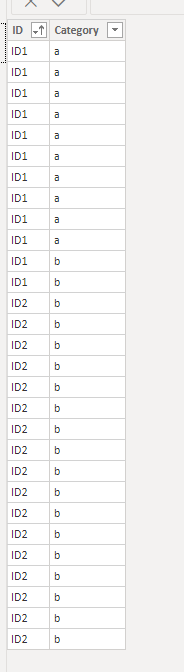
I created a sample table per your description as below:
Then you need a measure as below:
measure =
var a =CALCULATE(COUNT('Table'[Category]),ALLEXCEPT('Table','Table'[ID]),FILTER('Table','Table'[Category]="a"))
var b=CALCULATE(COUNT('Table'[Category]),ALLEXCEPT('Table','Table'[ID]),FILTER('Table','Table'[Category]="b"))
Return
IF(a>=10,SELECTEDVALUE('Table'[ID]),IF(b>=15,SELECTEDVALUE('Table'[ID]),BLANK()))
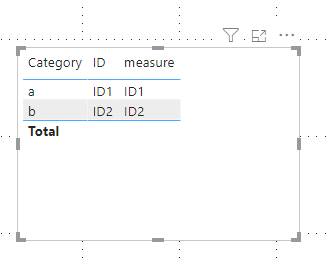
Finally you will see:
Here is the related .pbix file.
Hi @Anonymous ,
I created a sample table per your description as below:
Then you need a measure as below:
measure =
var a =CALCULATE(COUNT('Table'[Category]),ALLEXCEPT('Table','Table'[ID]),FILTER('Table','Table'[Category]="a"))
var b=CALCULATE(COUNT('Table'[Category]),ALLEXCEPT('Table','Table'[ID]),FILTER('Table','Table'[Category]="b"))
Return
IF(a>=10,SELECTEDVALUE('Table'[ID]),IF(b>=15,SELECTEDVALUE('Table'[ID]),BLANK()))
Finally you will see:
Here is the related .pbix file.
Please see this post regarding How to Get Your Question Answered Quickly: https://community.powerbi.com/t5/Community-Blog/How-to-Get-Your-Question-Answered-Quickly/ba-p/38490
| User | Count |
|---|---|
| 23 | |
| 19 | |
| 19 | |
| 17 | |
| 11 |
| User | Count |
|---|---|
| 55 | |
| 55 | |
| 41 | |
| 40 | |
| 30 |