cancel
Showing results for 
Search instead for 
Did you mean: 

July 7 - July 17 | Round 2 of the Power BI Dataviz World Championships. Don't miss your chance! Learn more

Reply
Anonymous
Not applicable

Heavy users

Hi everyone....


I have the need to create categories of frequent users in a given period.
I have the IDs (about 1MM of unique IDS) and I wanted to define for example, who entered Category A more than 10 times a week, who entered Category B 15 times and so on .


Tks so much


1 ACCEPTED SOLUTION
v-kelly-msft
Community Support
Community Support

Hi @Anonymous ,


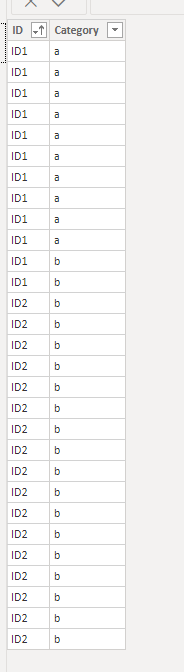
I created a sample table per your description as below:

Annotation 2020-03-16 130924.png

Then you need a measure as below:


measure = 
var a =CALCULATE(COUNT('Table'[Category]),ALLEXCEPT('Table','Table'[ID]),FILTER('Table','Table'[Category]="a"))
var b=CALCULATE(COUNT('Table'[Category]),ALLEXCEPT('Table','Table'[ID]),FILTER('Table','Table'[Category]="b"))
Return
IF(a>=10,SELECTEDVALUE('Table'[ID]),IF(b>=15,SELECTEDVALUE('Table'[ID]),BLANK()))


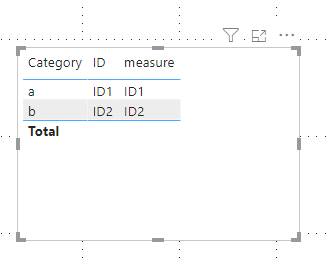
Finally you will see:

Annotation 2020-03-16 131051.png


Here is the related .pbix file.


Best Regards,
Kelly
Did I answer your question? Mark my post as a solution!


View solution in original post

3 REPLIES 3
v-kelly-msft
Community Support
Community Support

Hi @Anonymous ,


I created a sample table per your description as below:

Annotation 2020-03-16 130924.png

Then you need a measure as below:


measure = 
var a =CALCULATE(COUNT('Table'[Category]),ALLEXCEPT('Table','Table'[ID]),FILTER('Table','Table'[Category]="a"))
var b=CALCULATE(COUNT('Table'[Category]),ALLEXCEPT('Table','Table'[ID]),FILTER('Table','Table'[Category]="b"))
Return
IF(a>=10,SELECTEDVALUE('Table'[ID]),IF(b>=15,SELECTEDVALUE('Table'[ID]),BLANK()))


Finally you will see:

Annotation 2020-03-16 131051.png


Here is the related .pbix file.


Best Regards,
Kelly
Did I answer your question? Mark my post as a solution!


amitchandak
Super User
Super User

@Anonymous 

Can you share sample data and sample output.


Share with Power BI Enthusiasts: Full Power BI Video (20 Hours) YouTube
Microsoft Fabric Series 60+ Videos YouTube
Microsoft Fabric Hindi End to End YouTube
Greg_Deckler
Community Champion
Community Champion

Please see this post regarding How to Get Your Question Answered Quickly: https://community.powerbi.com/t5/Community-Blog/How-to-Get-Your-Question-Answered-Quickly/ba-p/38490


Follow on LinkedIn
@ me in replies or I'll lose your thread!!!
Instead of a Kudo, please vote for this idea
Become an expert!: Enterprise DNA
External Tools: MSHGQM
YouTube Channel!: Microsoft Hates Greg
Latest book!:
DAX For Humans

DAX is easy, CALCULATE makes DAX hard...

Helpful resources

Announcements
FabCon and SQLCon Barcelona 2026

FabCon & SQLCon – Barcelona 2026

Join us in Barcelona for FabCon and SQLCon, the Fabric, Power BI, SQL, and AI community event. Save €200 with code FABCMTY200.

60 days of Data Days Carousel

Data Days 2026

Join Fabric Data Days 2026: 60 days of free live/on-demand sessions, challenges, study groups, and certification opportunities.

Power BI DataViz World Championships carousel

Power BI DataViz World Championships - June 2026

A new Power BI DataViz World Championship is coming this June! Don't miss out on submitting your entry.