cancel
Showing results for 
Search instead for 
Did you mean: 

July 7 - July 17 | Round 2 of the Power BI Dataviz World Championships. Don't miss your chance! Learn more

Reply
Rajkumar07
Helper I
Helper I

Headcount Issue

Hi Team,

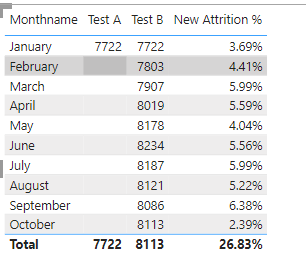
I'm unable to get the headcount for the required condition.

      1. Since we do not have data for 12 months yet, then we have to calculate average headcount to be = (Headcount of Jan +Headcount of current month)/2

        Rajkumar07_0-1666864995197.png


        This is my formula 


        X Headcount =

        var x = CALCULATE(DISTINCTCOUNT(EIR[Employee ID]),ALL(EIR[Date Relation]),EIR[Date Relation] = DATE(2022,01,27))

        var y = CALCULATE(DISTINCTCOUNT(EIR[Employee ID]),EIR[Date Relation] = MAX(EIR[Date Relation]))

        var Result = (x + y)/2
        return
        Result

        But I'm unable to meet the requirement. Could you please help me on this? 
3 REPLIES 3
Anonymous
Not applicable

Hi @Rajkumar07 ,

Please new a calendar table first, like:

Calendar = 
ADDCOLUMNS(
    CALENDAR(DATE(2022,1,1),DATE(2022,12,31)),
    "Month",FORMAT([Date],"mmmm"),
    "Month Number",MONTH([Date])
)

Relationship:
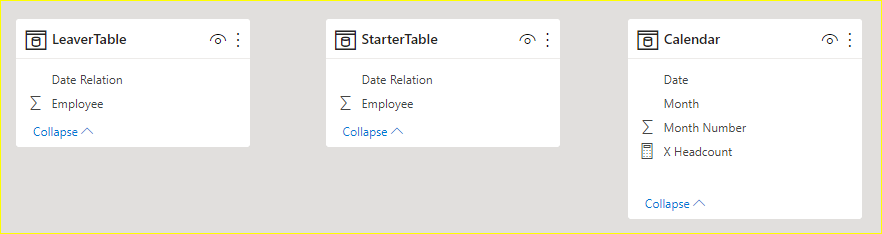
vcgaomsft_0-1667373208779.png

then new a measure:

X Headcount = 
VAR __MONTH =
    MAX ( 'Calendar'[Month Number] )
VAR __X =
    CALCULATE (
        COUNTROWS ( 'StarterTable' ),
        MONTH ( 'StarterTable'[Date Relation] ) <= 1
    )
VAR __Y =
    CALCULATE (
        COUNTROWS ( 'StarterTable' ),
        MONTH ( 'StarterTable'[Date Relation] ) <= __MONTH
    )
        - CALCULATE (
            COUNTROWS ( 'LeaverTable' ),
            MONTH ( 'LeaverTable'[Date Relation] ) <= __MONTH
        )
VAR __RESULT =
    DIVIDE ( __X + __Y, 2 )
RETURN
    __RESULT

apply the measure with 'calendar'[month] to the table visual, resilt:
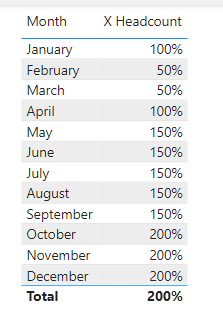
vcgaomsft_1-1667373299394.png

The PBIX file is attached for reference.

Best Regards,
Gao

Community Support Team


If there is any post helps, then please consider Accept it as the solution  to help the other members find it more quickly. If I misunderstand your needs or you still have problems on it, please feel free to let us know. Thanks a lot!

How to get your questions answered quickly -- How to provide sample data

mangaus1111
Solution Sage
Solution Sage

Hi, can you please past some sample data of your table EIR?

Hi,


Thank you for your qucki reply,

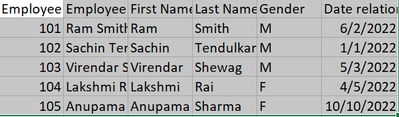
This is how look my sample data

Rajkumar07_0-1666866477734.png


I have a sperate Starter and Leaver Table this also looking like same.

Here is my requirement have to find the Attrition % 
I'm already having the Leavers count which numerator value. I need to find the Denominator. 
Like my first request.

Could you please help me to get it?

Helpful resources

Announcements
FabCon and SQLCon Barcelona 2026

FabCon & SQLCon – Barcelona 2026

Join us in Barcelona for FabCon and SQLCon, the Fabric, Power BI, SQL, and AI community event. Save €200 with code FABCMTY200.

60 days of Data Days Carousel

Data Days 2026

Join Data Days 2026: 60 days of free live/on-demand sessions, challenges, study groups, and certification opportunities.

Power BI DataViz World Championships carousel

Power BI DataViz World Championships - June 2026

A new Power BI DataViz World Championship is coming this June! Don't miss out on submitting your entry.

Top Solution Authors