
cancel
Showing results for 
Search instead for 
Did you mean: 

We've captured the moments from FabCon & SQLCon that everyone is talking about, and we are bringing them to the community, live and on-demand. Starts on April 14th. Register now

Reply
Anonymous
Not applicable

Having issues summing table

Hi

I want to calculate different totals for this table


CASE A - first column Raggruppamento = “Altro”

Capture.PNG

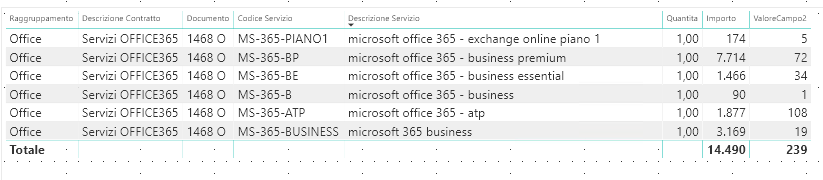
CASE B - first column Raggruppamento = “Office”

picture1.png

I need to calculate different total for the column “ValoreCampo2”.


CASE A

When I have the same codes for column “Documento”, and different codes for column “Codice Servizio”, the returned values in “ValoreCampo2” shouldn’t be the total (MIN. MAX, AVG?), i.e. 35 is the correct number, but 70 is wrong.


CASE B

When I have the same codes for column “Documento”, but different codes for column “Codice Servizio”,  the value returned in “ValoreCampo2” is correct (TOTAL), as in the picture (239).


Can you help me on using that to make the calculation with DAX?

Many thanks


Francesco


4 REPLIES 4
Anonymous
Not applicable

Hi @Anonymous  ,

Please see this post regarding How to Get Your Question Answered Quickly: https://community.powerbi.com/t5/Community-Blog/How-to-Get-Your-Question-Answered-Quickly/ba-p/38490


Cheers,
Robin

Anonymous
Not applicable

Hi @Anonymous  ,

In case A , what Total are you expecting? If you don't want the total to show, you can hide the Total for that table.


Cheers,

Robin

Anonymous
Not applicable

Hi Robin,


When I have the same values for column “Documento”, but different values for column “Codice Servizio”, the returned values in “ValoreCampo2” shouldn’t be the total. I want 35 to appear as total in bold and not 70.


When I have the same values for column “Documento”, and the same values for column “Codice Servizio”,  the value returned in “ValoreCampo2” is computed as total, as in the picture (239), and it's correct.

Best,

Francesco

Anonymous
Not applicable

Hi @Anonymous  , 

Please copy paste some sample data (not picture) or share your .pbix file. To make it easier for us to help you out.


Cheers,

Rob

Helpful resources

Announcements
New to Fabric survey Carousel

New to Fabric Survey

If you have recently started exploring Fabric, we'd love to hear how it's going. Your feedback can help with product improvements.

Power BI DataViz World Championships carousel

Power BI DataViz World Championships - June 2026

A new Power BI DataViz World Championship is coming this June! Don't miss out on submitting your entry.

Join our Fabric User Panel

Join our Fabric User Panel

Share feedback directly with Fabric product managers, participate in targeted research studies and influence the Fabric roadmap.

March Power BI Update Carousel

Power BI Community Update - March 2026

Check out the March 2026 Power BI update to learn about new features.