
This time we’re going bigger than ever. Fabric, Power BI, SQL, AI and more. We're covering it all. You won't want to miss it.
Learn moreLevel up your Power BI skills this month - build one visual each week and tell better stories with data! Get started
Hi
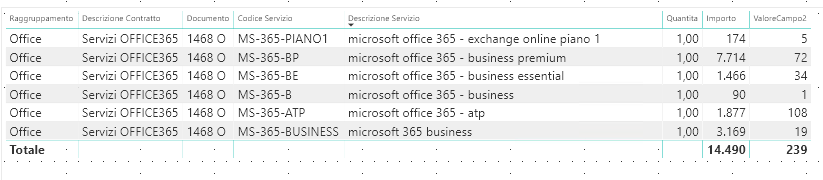
I want to calculate different totals for this table
CASE A - first column Raggruppamento = “Altro”
CASE B - first column Raggruppamento = “Office”
I need to calculate different total for the column “ValoreCampo2”.
CASE A
When I have the same codes for column “Documento”, and different codes for column “Codice Servizio”, the returned values in “ValoreCampo2” shouldn’t be the total (MIN. MAX, AVG?), i.e. 35 is the correct number, but 70 is wrong.
CASE B
When I have the same codes for column “Documento”, but different codes for column “Codice Servizio”, the value returned in “ValoreCampo2” is correct (TOTAL), as in the picture (239).
Can you help me on using that to make the calculation with DAX?
Many thanks
Francesco
Hi @Anonymous ,
Please see this post regarding How to Get Your Question Answered Quickly: https://community.powerbi.com/t5/Community-Blog/How-to-Get-Your-Question-Answered-Quickly/ba-p/38490
Cheers,
Robin
Hi @Anonymous ,
In case A , what Total are you expecting? If you don't want the total to show, you can hide the Total for that table.
Cheers,
Robin
Hi Robin,
When I have the same values for column “Documento”, but different values for column “Codice Servizio”, the returned values in “ValoreCampo2” shouldn’t be the total. I want 35 to appear as total in bold and not 70.
When I have the same values for column “Documento”, and the same values for column “Codice Servizio”, the value returned in “ValoreCampo2” is computed as total, as in the picture (239), and it's correct.
Best,
Francesco
Hi @Anonymous ,
Please copy paste some sample data (not picture) or share your .pbix file. To make it easier for us to help you out.
Cheers,
Rob
Check out the April 2026 Power BI update to learn about new features.
Sign up to receive a private message when registration opens and key events begin.
If you have recently started exploring Fabric, we'd love to hear how it's going. Your feedback can help with product improvements.
| User | Count |
|---|---|
| 35 | |
| 32 | |
| 25 | |
| 22 | |
| 18 |
| User | Count |
|---|---|
| 65 | |
| 35 | |
| 32 | |
| 25 | |
| 23 |