cancel
Showing results for 
Search instead for 
Did you mean: 

The Power BI Data Visualization World Championships is back! Get ahead of the game and start preparing now! Learn more

Reply
drallam
Helper II
Helper II

Handling Weekly data files and visualizing history

HI,


I have data sets (excel Files) from each week and a new file is generated every week. how do i visualize that data and be dynamic?


Any ideas?

1 ACCEPTED SOLUTION
v-ljerr-msft
Microsoft Employee
Microsoft Employee

Hi @drallam,


I have data sets (excel Files) from each week and a new file is generated every week. how do i visualize that data and be dynamic?


As @Phil_Seamark has mentioned above, using Folder connector could be a good choice here in your scenario. For more details about how to import data from a folder in Power BI Desktop, you can refer to this article. Smiley Happy

Excatly. I;m trying to assign the dates in another column. you replied to that post too. 

Based on my test, you should be able to follow steps below to get your expected result. Smiley Happy


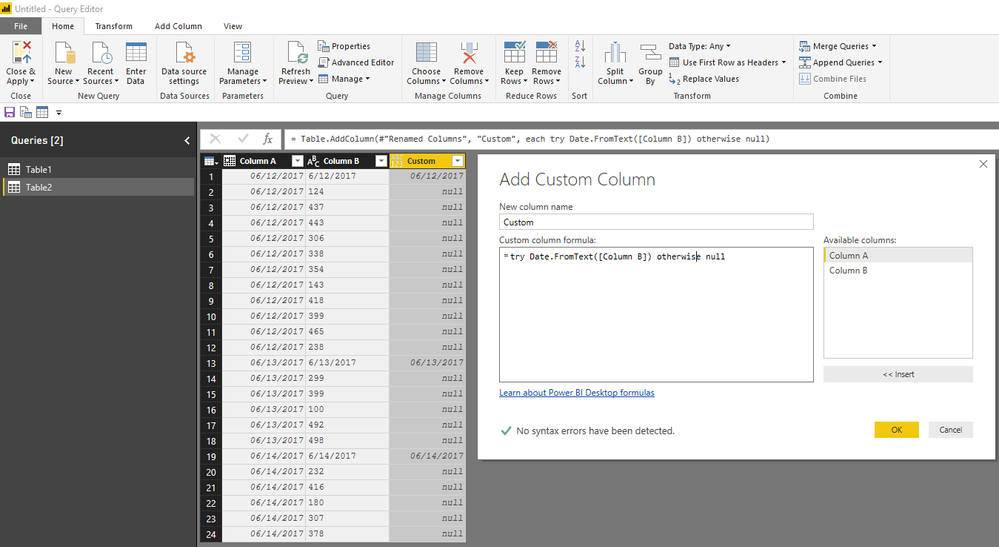
1. Use the formula below to add a custom column under Add Column tab in Query Editor.

=try Date.FromText([Column B]) otherwise null

c1.PNG


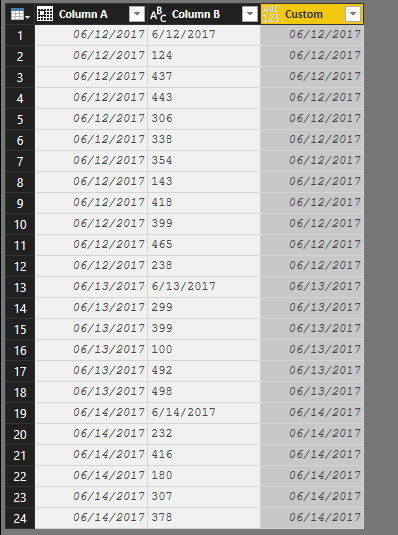
2. Use the Fill Down option to fill the null value with the corresponding date in the column.

filldown.PNG

r4.PNG


Regards

View solution in original post

5 REPLIES 5
v-ljerr-msft
Microsoft Employee
Microsoft Employee

Hi @drallam,


I have data sets (excel Files) from each week and a new file is generated every week. how do i visualize that data and be dynamic?


As @Phil_Seamark has mentioned above, using Folder connector could be a good choice here in your scenario. For more details about how to import data from a folder in Power BI Desktop, you can refer to this article. Smiley Happy

Excatly. I;m trying to assign the dates in another column. you replied to that post too. 

Based on my test, you should be able to follow steps below to get your expected result. Smiley Happy


1. Use the formula below to add a custom column under Add Column tab in Query Editor.

=try Date.FromText([Column B]) otherwise null

c1.PNG


2. Use the Fill Down option to fill the null value with the corresponding date in the column.

filldown.PNG

r4.PNG


Regards

Thanks for the solution. I was able to do this at 1 in the night lol. BUt I used a caveman's formula, instead of the nifty date from text.

= Table.AddColumn(#"Changed Type1", "Custom", each if Text.Contains([Employee ID],"AM") then [Employee ID] else "")

Then used fill down just like you did. 🙂 

Phil_Seamark
Microsoft Employee
Microsoft Employee

Hi @drallam


Power BI can import multiple files in the one folder including excel files and sew all the data together to be a single table.  Use the Query editor for this and make sure you deal with duplicates.


So long as you have a date column, you can aggregate this to weekly data and plot on any number of the visuals in Power BI.


To learn more about DAX visit : aka.ms/practicalDAX

Proud to be a Datanaut!

Excatly. I;m trying to assign the dates in another column. you replied to that post too. 🙂

Excatly, I'm trying to get the date column. You replied to that post too Man Happy

Helpful resources

Announcements
Power BI DataViz World Championships

Power BI Dataviz World Championships

The Power BI Data Visualization World Championships is back! Get ahead of the game and start preparing now!

December 2025 Power BI Update Carousel

Power BI Monthly Update - December 2025

Check out the December 2025 Power BI Holiday Recap!

FabCon Atlanta 2026 carousel

FabCon Atlanta 2026

Join us at FabCon Atlanta, March 16-20, for the ultimate Fabric, Power BI, AI and SQL community-led event. Save $200 with code FABCOMM.