Join us at FabCon Atlanta from March 16 - 20, 2026, for the ultimate Fabric, Power BI, AI and SQL community-led event. Save $200 with code FABCOMM.
Register now!Get Fabric Certified for FREE during Fabric Data Days. Don't miss your chance! Request now
Hi guys,
I don’t think that this is possible because I don’t see any extra options that I could do while making the bins.
I have one table with all the products prices and I created a group bin on the pricing field with the range of each $10.
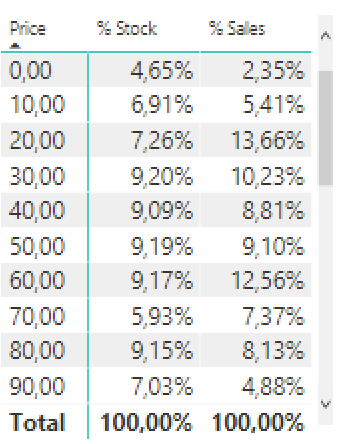
This is the visualization that I was able to get:
What I wanted to do is instead of showing the lowest number on the BIN I wanted to show the range of the grouped prices.
Like this:
0 – 9,99
10 – 19,99
30 – 39,99
40 – 49,99
And so on…
Regards,
Tiago
Solved! Go to Solution.
Hi tiago,
You are using power query, not dax, in power query, the if statement is like pattern below;
= Table.AddColumn(dbo_VW_PBI_PRECOS, "Faixa de Preço", each if [PRECO_ATUAL] <= 9.99 then "0 - 9.99" else if [PRECO_ATUAL] > 10.00 & [PRECO_ATUAL] <= 29.99 then "20 - 29.99" else if [PRECO_ATUAL] > 20.00 & [PRECO_ATUAL] <= 29.99 then "20 - 29.99" else if [PRECO_ATUAL] > 30.00 & [PRECO_ATUAL] <= 39.99 then "30 - 39.99" else if [PRECO_ATUAL] > 40.00 & [PRECO_ATUAL] <= 49.99 then "40 - 49.99" else if [PRECO_ATUAL] > 50.00 then "Maior que 50" )
Regards,
Jimmy Tao
If there is no way how to do it. I was thinking on adding a new colum on the table on the query editor with a DAX formula to solve this.
Something like IF price <=9,99, "0 - 9,99", IF price >9,99 and price <=19,99, "10 - 19,99". On Excel that would be easy, not sure whats the syntax on dax or power query. Can someone help ?
Thx
Hi tiago,
I'm afraid power bi cannot automately generate the group name, so you should create a new calculate column using DAX formula like below:
Result =
IF (
price <= 9.99,
"0 - 9.99",
IF ( price > 9.99 & price <= 19.99, "10 - 19.99" )
)
Regards,
Jimmy Tao
Hi Jimmy,
Thanks for your reply.
I will create the calculated colum. Could you please let me know tho what would be the correct syntax to keep making the binning groups, for for example. is this correct ?
Result =
IF (
price <= 9.99,
"0 - 9.99",
IF ( price > 9.99 & price <= 19.99, "10 - 19.99" )
IF ( price > 20.00 & price <= 29.99, "20 - 29.99" )
IF ( price > 30.00 & price <= 39.99, "30 - 39.99" )
IF ( price > 40.00 & price <= 49.99, "40 - 49.99" )
)
Regards,
Tiago
Hi guys,
Please help with the correct sytax, I've already tried to create a column with the Add personalized column function but id did not work.
I've tried these both, but they did not work, probably a syntax error.
Obs. PRECO_ATUAL is the name of my price field.
IF (
[PRECO_ATUAL] <= 9.99, "0 - 9.99",
IF ( [PRECO_ATUAL] > 10.00 & [PRECO_ATUAL] <= 29.99, "20 - 29.99",
IF ( [PRECO_ATUAL] > 20.00 & [PRECO_ATUAL] <= 29.99, "20 - 29.99",
IF ( [PRECO_ATUAL] > 30.00 & [PRECO_ATUAL] <= 39.99, "30 - 39.99",
IF ( [PRECO_ATUAL] > 40.00 & [PRECO_ATUAL] <= 49.99, "40 - 49.99",
IF ( [PRECO_ATUAL] > 50.00, "> 50" )
)))))
it tried to do this it tried to create a column like this
= Table.AddColumn(dbo_VW_PBI_PRECOS, "Faixa de Preço", each IF (
[PRECO_ATUAL] <= 9.99, "0 - 9.99",
IF ( [PRECO_ATUAL] > 10.00 & [PRECO_ATUAL] <= 29.99, "20 - 29.99",
IF ( [PRECO_ATUAL] > 20.00 & [PRECO_ATUAL] <= 29.99, "20 - 29.99",
IF ( [PRECO_ATUAL] > 30.00 & [PRECO_ATUAL] <= 39.99, "30 - 39.99",
IF ( [PRECO_ATUAL] > 40.00 & [PRECO_ATUAL] <= 49.99, "40 - 49.99",
IF ( [PRECO_ATUAL] > 50.00, "Maior que 50" )
))))))
And the error that it returns is that the name IF was not reckognized... Strange no?
SWITCH (
TRUE (),
[PRECO_ATUAL] <= 9.99, "0 - 9.99"
[PRECO_ATUAL] > 9.99 && [PRECO_ATUAL] <= 19.99, "10 - 19.99",
[PRECO_ATUAL] > 20.00 && [PRECO_ATUAL] <= 29.99, "20 - 29.99",
[PRECO_ATUAL] > 30.00 && [PRECO_ATUAL] <= 39.99, "30 - 39.99",
[PRECO_ATUAL] > 40.00 && [PRECO_ATUAL] <= 49.99, "40 - 49.99",
[PRECO_ATUAL] > 50.00 && [PRECO_ATUAL] <= 59.99, "50 - 59.99",,
[PRECO_ATUAL] > 60.00, "> 60"
)
Hi tiago,
You are using power query, not dax, in power query, the if statement is like pattern below;
= Table.AddColumn(dbo_VW_PBI_PRECOS, "Faixa de Preço", each if [PRECO_ATUAL] <= 9.99 then "0 - 9.99" else if [PRECO_ATUAL] > 10.00 & [PRECO_ATUAL] <= 29.99 then "20 - 29.99" else if [PRECO_ATUAL] > 20.00 & [PRECO_ATUAL] <= 29.99 then "20 - 29.99" else if [PRECO_ATUAL] > 30.00 & [PRECO_ATUAL] <= 39.99 then "30 - 39.99" else if [PRECO_ATUAL] > 40.00 & [PRECO_ATUAL] <= 49.99 then "40 - 49.99" else if [PRECO_ATUAL] > 50.00 then "Maior que 50" )
Regards,
Jimmy Tao
Check out the November 2025 Power BI update to learn about new features.
Advance your Data & AI career with 50 days of live learning, contests, hands-on challenges, study groups & certifications and more!