Join us at FabCon Atlanta from March 16 - 20, 2026, for the ultimate Fabric, Power BI, AI and SQL community-led event. Save $200 with code FABCOMM.
Register now!The Power BI Data Visualization World Championships is back! Get ahead of the game and start preparing now! Learn more
Hi guys,
I don’t think that this is possible because I don’t see any extra options that I could do while making the bins.
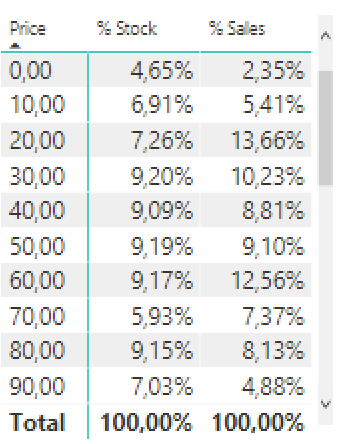
I have one table with all the products prices and I created a group bin on the pricing field with the range of each $10.
This is the visualization that I was able to get:
What I wanted to do is instead of showing the lowest number on the BIN I wanted to show the range of the grouped prices.
Like this:
0 – 9,99
10 – 19,99
30 – 39,99
40 – 49,99
And so on…
Regards,
Tiago
Solved! Go to Solution.
Hi tiago,
You are using power query, not dax, in power query, the if statement is like pattern below;
= Table.AddColumn(dbo_VW_PBI_PRECOS, "Faixa de Preço", each if [PRECO_ATUAL] <= 9.99 then "0 - 9.99" else if [PRECO_ATUAL] > 10.00 & [PRECO_ATUAL] <= 29.99 then "20 - 29.99" else if [PRECO_ATUAL] > 20.00 & [PRECO_ATUAL] <= 29.99 then "20 - 29.99" else if [PRECO_ATUAL] > 30.00 & [PRECO_ATUAL] <= 39.99 then "30 - 39.99" else if [PRECO_ATUAL] > 40.00 & [PRECO_ATUAL] <= 49.99 then "40 - 49.99" else if [PRECO_ATUAL] > 50.00 then "Maior que 50" )
Regards,
Jimmy Tao
If there is no way how to do it. I was thinking on adding a new colum on the table on the query editor with a DAX formula to solve this.
Something like IF price <=9,99, "0 - 9,99", IF price >9,99 and price <=19,99, "10 - 19,99". On Excel that would be easy, not sure whats the syntax on dax or power query. Can someone help ?
Thx
Hi tiago,
I'm afraid power bi cannot automately generate the group name, so you should create a new calculate column using DAX formula like below:
Result =
IF (
price <= 9.99,
"0 - 9.99",
IF ( price > 9.99 & price <= 19.99, "10 - 19.99" )
)
Regards,
Jimmy Tao
Hi Jimmy,
Thanks for your reply.
I will create the calculated colum. Could you please let me know tho what would be the correct syntax to keep making the binning groups, for for example. is this correct ?
Result =
IF (
price <= 9.99,
"0 - 9.99",
IF ( price > 9.99 & price <= 19.99, "10 - 19.99" )
IF ( price > 20.00 & price <= 29.99, "20 - 29.99" )
IF ( price > 30.00 & price <= 39.99, "30 - 39.99" )
IF ( price > 40.00 & price <= 49.99, "40 - 49.99" )
)
Regards,
Tiago
Hi guys,
Please help with the correct sytax, I've already tried to create a column with the Add personalized column function but id did not work.
I've tried these both, but they did not work, probably a syntax error.
Obs. PRECO_ATUAL is the name of my price field.
IF (
[PRECO_ATUAL] <= 9.99, "0 - 9.99",
IF ( [PRECO_ATUAL] > 10.00 & [PRECO_ATUAL] <= 29.99, "20 - 29.99",
IF ( [PRECO_ATUAL] > 20.00 & [PRECO_ATUAL] <= 29.99, "20 - 29.99",
IF ( [PRECO_ATUAL] > 30.00 & [PRECO_ATUAL] <= 39.99, "30 - 39.99",
IF ( [PRECO_ATUAL] > 40.00 & [PRECO_ATUAL] <= 49.99, "40 - 49.99",
IF ( [PRECO_ATUAL] > 50.00, "> 50" )
)))))
it tried to do this it tried to create a column like this
= Table.AddColumn(dbo_VW_PBI_PRECOS, "Faixa de Preço", each IF (
[PRECO_ATUAL] <= 9.99, "0 - 9.99",
IF ( [PRECO_ATUAL] > 10.00 & [PRECO_ATUAL] <= 29.99, "20 - 29.99",
IF ( [PRECO_ATUAL] > 20.00 & [PRECO_ATUAL] <= 29.99, "20 - 29.99",
IF ( [PRECO_ATUAL] > 30.00 & [PRECO_ATUAL] <= 39.99, "30 - 39.99",
IF ( [PRECO_ATUAL] > 40.00 & [PRECO_ATUAL] <= 49.99, "40 - 49.99",
IF ( [PRECO_ATUAL] > 50.00, "Maior que 50" )
))))))
And the error that it returns is that the name IF was not reckognized... Strange no?
SWITCH (
TRUE (),
[PRECO_ATUAL] <= 9.99, "0 - 9.99"
[PRECO_ATUAL] > 9.99 && [PRECO_ATUAL] <= 19.99, "10 - 19.99",
[PRECO_ATUAL] > 20.00 && [PRECO_ATUAL] <= 29.99, "20 - 29.99",
[PRECO_ATUAL] > 30.00 && [PRECO_ATUAL] <= 39.99, "30 - 39.99",
[PRECO_ATUAL] > 40.00 && [PRECO_ATUAL] <= 49.99, "40 - 49.99",
[PRECO_ATUAL] > 50.00 && [PRECO_ATUAL] <= 59.99, "50 - 59.99",,
[PRECO_ATUAL] > 60.00, "> 60"
)
Hi tiago,
You are using power query, not dax, in power query, the if statement is like pattern below;
= Table.AddColumn(dbo_VW_PBI_PRECOS, "Faixa de Preço", each if [PRECO_ATUAL] <= 9.99 then "0 - 9.99" else if [PRECO_ATUAL] > 10.00 & [PRECO_ATUAL] <= 29.99 then "20 - 29.99" else if [PRECO_ATUAL] > 20.00 & [PRECO_ATUAL] <= 29.99 then "20 - 29.99" else if [PRECO_ATUAL] > 30.00 & [PRECO_ATUAL] <= 39.99 then "30 - 39.99" else if [PRECO_ATUAL] > 40.00 & [PRECO_ATUAL] <= 49.99 then "40 - 49.99" else if [PRECO_ATUAL] > 50.00 then "Maior que 50" )
Regards,
Jimmy Tao
The Power BI Data Visualization World Championships is back! Get ahead of the game and start preparing now!
Check out the November 2025 Power BI update to learn about new features.
| User | Count |
|---|---|
| 59 | |
| 43 | |
| 42 | |
| 23 | |
| 17 |
| User | Count |
|---|---|
| 190 | |
| 122 | |
| 96 | |
| 66 | |
| 47 |