Join us at FabCon Atlanta from March 16 - 20, 2026, for the ultimate Fabric, Power BI, AI and SQL community-led event. Save $200 with code FABCOMM.
Register now!The Power BI Data Visualization World Championships is back! It's time to submit your entry. Live now!
Hi all,
I have sales data upto one laks, I want to group the data like "<1000, 1000-5000", "5000-7000" and <7000.
How to do it in dax function?
somebody help me on this ?
thanks
Solved! Go to Solution.
Hi @AmalrajRRD1,
Add calculated column with below DAX formual.
Group =
IF (
Table1[Sales] < 1000,
"<=1000",
IF (
Table1[Sales] > 1000
&& Table1[Sales] <= 5000,
"1000-5000",
IF ( Table1[Sales] > 5000 && Table1[Sales] <= 7000, "5000-7000", ">7000" )
)
)
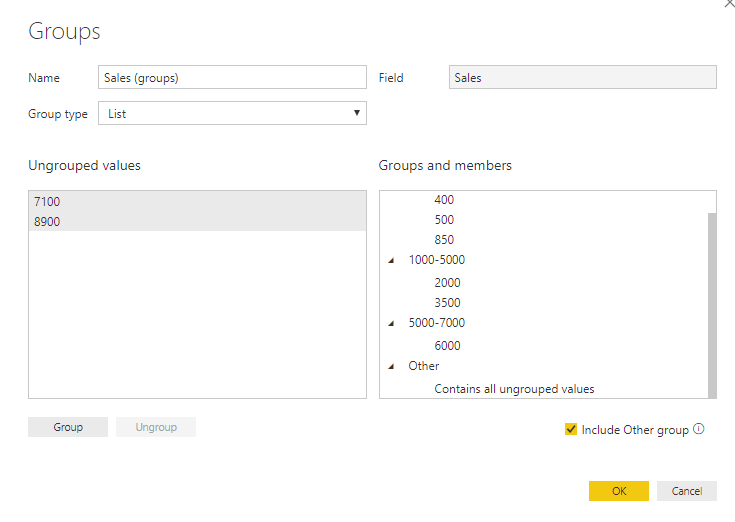
Alternatively, you can right click the [sales] field and choose "new group".
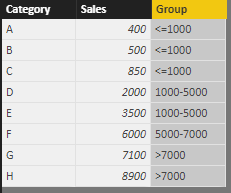
Result.
Best regards,
Yuliana Gu
Hi @AmalrajRRD1,
Add calculated column with below DAX formual.
Group =
IF (
Table1[Sales] < 1000,
"<=1000",
IF (
Table1[Sales] > 1000
&& Table1[Sales] <= 5000,
"1000-5000",
IF ( Table1[Sales] > 5000 && Table1[Sales] <= 7000, "5000-7000", ">7000" )
)
)
Alternatively, you can right click the [sales] field and choose "new group".
Result.
Best regards,
Yuliana Gu
Thanks for your Reply.
Please see this post regarding How to Get Your Question Answered Quickly: https://community.powerbi.com/t5/Community-Blog/How-to-Get-Your-Question-Answered-Quickly/ba-p/38490
Need sample data but generally this involves a caculated column or a disconnected table trick measure.
The Power BI Data Visualization World Championships is back! It's time to submit your entry.
Check out the January 2026 Power BI update to learn about new features.
| User | Count |
|---|---|
| 56 | |
| 40 | |
| 38 | |
| 21 | |
| 21 |
| User | Count |
|---|---|
| 141 | |
| 103 | |
| 63 | |
| 36 | |
| 35 |