Join us at FabCon Atlanta from March 16 - 20, 2026, for the ultimate Fabric, Power BI, AI and SQL community-led event. Save $200 with code FABCOMM.
Register now!The Power BI Data Visualization World Championships is back! Get ahead of the game and start preparing now! Learn more
Hi all,
I have sales data upto one laks, I want to group the data like "<1000, 1000-5000", "5000-7000" and <7000.
How to do it in dax function?
somebody help me on this ?
thanks
Solved! Go to Solution.
Hi @AmalrajRRD1,
Add calculated column with below DAX formual.
Group =
IF (
Table1[Sales] < 1000,
"<=1000",
IF (
Table1[Sales] > 1000
&& Table1[Sales] <= 5000,
"1000-5000",
IF ( Table1[Sales] > 5000 && Table1[Sales] <= 7000, "5000-7000", ">7000" )
)
)
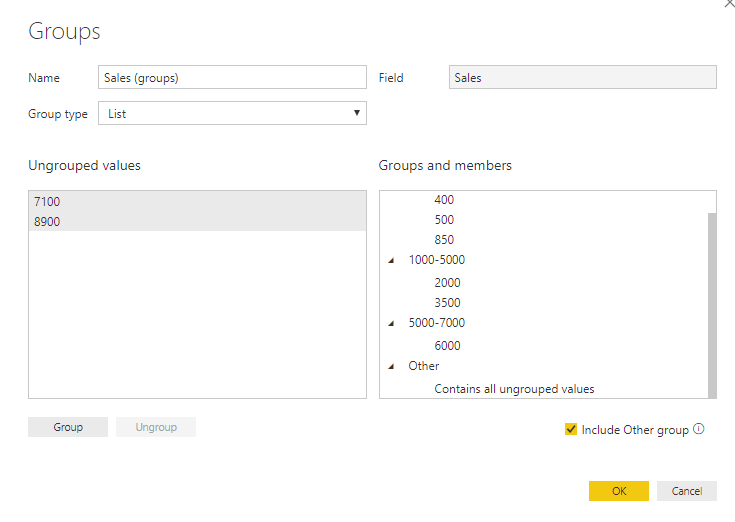
Alternatively, you can right click the [sales] field and choose "new group".
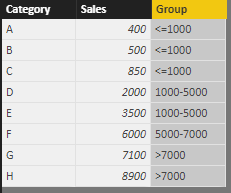
Result.
Best regards,
Yuliana Gu
Hi @AmalrajRRD1,
Add calculated column with below DAX formual.
Group =
IF (
Table1[Sales] < 1000,
"<=1000",
IF (
Table1[Sales] > 1000
&& Table1[Sales] <= 5000,
"1000-5000",
IF ( Table1[Sales] > 5000 && Table1[Sales] <= 7000, "5000-7000", ">7000" )
)
)
Alternatively, you can right click the [sales] field and choose "new group".
Result.
Best regards,
Yuliana Gu
Thanks for your Reply.
Please see this post regarding How to Get Your Question Answered Quickly: https://community.powerbi.com/t5/Community-Blog/How-to-Get-Your-Question-Answered-Quickly/ba-p/38490
Need sample data but generally this involves a caculated column or a disconnected table trick measure.
The Power BI Data Visualization World Championships is back! Get ahead of the game and start preparing now!
| User | Count |
|---|---|
| 40 | |
| 35 | |
| 34 | |
| 31 | |
| 28 |
| User | Count |
|---|---|
| 137 | |
| 102 | |
| 71 | |
| 67 | |
| 65 |