
Get certified for free when you join Fabric Data Days 2026 and dive into Fabric, Power BI, SQL, AI, and other essential data skills.
Join nowJuly 7 - July 17 | Round 2 of the Power BI Dataviz World Championships. Don't miss your chance! Learn more
Solved! Go to Solution.
I created a column in the Promo Table that had all dates and the corresponding promo (promodates) - this then has a field with the promo codes for each date. Related the workdate with the promodate with a many to many relationship filtering both ways and got the answer I was looking for
Hi @Anonymous
It would help if you provide some sample data and an example. Try creating a calculated column in your fist table:
RangeCol =
CALCULATE (
DISTINCT ( Table2[Promotion Code] ),
FILTER (
Table2,
Table2[StartDate] <= Table1[Ship date] && Table2[EndDate] > Table1[Ship date]
)
)
Please mark the question solved when we get to the solution and consider kudoing if posts are helpful.
Cheers ![]()
The code is assuming no relationships
Just use 'Copy table' in Power BI and paste it here. Or, ideally, share the pbix (beware of confidential data). You have to share the URL to the file hosted elsewhere: Dropbox, Onedrive... or just upload the file to a site like tinyupload.com (no sign-up required).
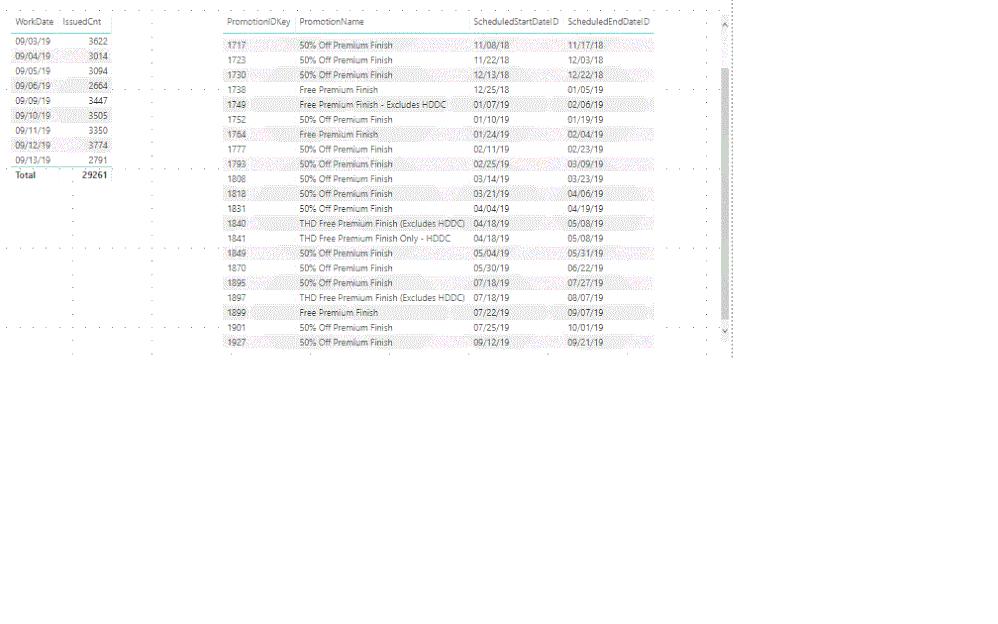
So here are the two tables. I need to know which PromoIDkey in the second table where the date from the first table (workdate) correlates to in the second table where it falls between the ScheduledStartDateID and the ScheduledEndDateID. I hope this helps.
tables
I created a column in the Promo Table that had all dates and the corresponding promo (promodates) - this then has a field with the promo codes for each date. Related the workdate with the promodate with a many to many relationship filtering both ways and got the answer I was looking for
Join us in Barcelona for FabCon and SQLCon, the Fabric, Power BI, SQL, and AI community event. Save €200 with code FABCMTY200.
Join Fabric Data Days 2026: 60 days of free live/on-demand sessions, challenges, study groups, and certification opportunities.
| User | Count |
|---|---|
| 22 | |
| 22 | |
| 18 | |
| 17 | |
| 13 |
| User | Count |
|---|---|
| 61 | |
| 52 | |
| 47 | |
| 41 | |
| 38 |