
cancel
Showing results for 
Search instead for 
Did you mean: 

Join the FabCon + SQLCon recap series. Up next: Power BI, Real-Time Intelligence, IQ and AI, and Data Factory take center stage. All sessions are available on-demand after the live show. Register now

Reply
Anonymous
Not applicable

Grouping by Date Ranges

I would like to group my data by date ranges. These ranges have a startdate and an enddate in a table along with a promotion code. My data contains production data that has a ship date that I would like to group the data into the date ranges for the promotion code by the ship date. Unfortunately, I cannot relate the two tables so I need a different method. All help and suggestions are appreciated.
1 ACCEPTED SOLUTION
Anonymous
Not applicable

I created a column in the Promo Table that had all dates and the corresponding promo (promodates) - this then has a field with the promo codes for each date. Related the workdate with the promodate with a many to many relationship filtering both ways and got the answer I was looking forExample2.gif

View solution in original post

5 REPLIES 5
AlB
Community Champion
Community Champion

Hi @Anonymous 

It would help if you provide some sample data and an example. Try creating a calculated column in your fist table:

RangeCol =
CALCULATE (
    DISTINCT ( Table2[Promotion Code] ),
    FILTER (
        Table2,
        Table2[StartDate] <= Table1[Ship date] && Table2[EndDate] > Table1[Ship date]
    )
)

Please mark the question solved when we get to the solution and consider kudoing if posts are helpful.

Cheers  Datanaut


Anonymous
Not applicable

AIB - Thanks so much for your help! After I was able to finally get the two tables related, I tried your code as in your previous post. However, when I hit enter at the end of typing my code I get the following message: 'A table of multiple values was supplied where a single value was expected." Still trying to remember how I can send you some sample tables. Thanks in advance!
AlB
Community Champion
Community Champion

The code is assuming no relationships

Just use 'Copy table' in Power BI and paste it here. Or, ideally, share the pbix (beware of confidential data). You have to share the URL to the file hosted elsewhere: Dropbox, Onedrive... or just upload the file to a site like tinyupload.com (no sign-up required).

Anonymous
Not applicable

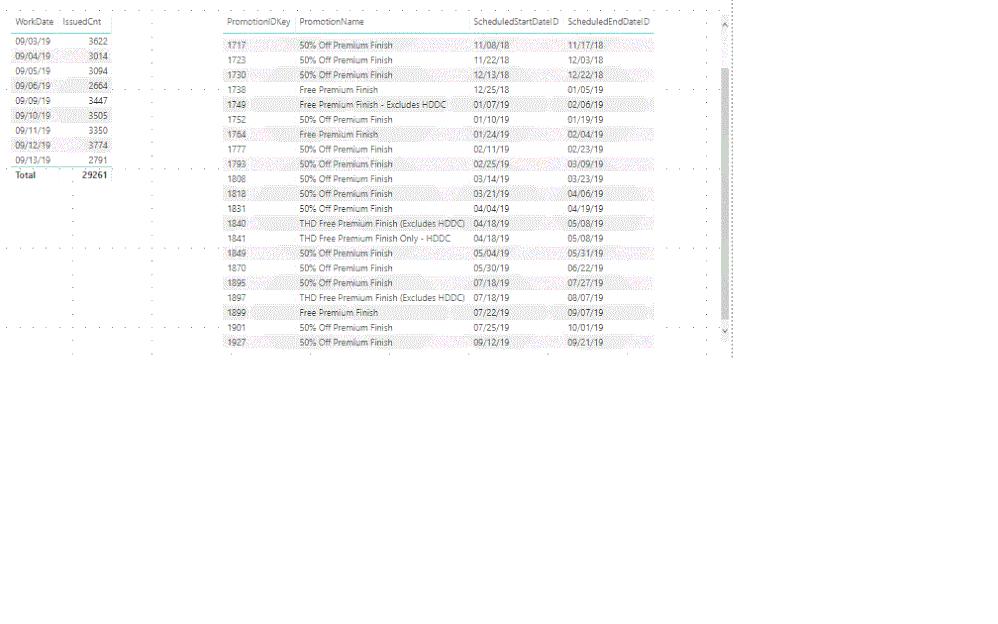
So here are the two tables.   I need to know which PromoIDkey in the second table where the date from the first table (workdate) correlates to in the second table where it falls between the ScheduledStartDateID and the ScheduledEndDateID.  I hope this helps.   


tablestables

Anonymous
Not applicable

I created a column in the Promo Table that had all dates and the corresponding promo (promodates) - this then has a field with the promo codes for each date. Related the workdate with the promodate with a many to many relationship filtering both ways and got the answer I was looking forExample2.gif

Helpful resources

Announcements
April Power BI Update Carousel

Power BI Monthly Update - April 2026

Check out the April 2026 Power BI update to learn about new features.

New to Fabric survey Carousel

New to Fabric Survey

If you have recently started exploring Fabric, we'd love to hear how it's going. Your feedback can help with product improvements.

Power BI DataViz World Championships carousel

Power BI DataViz World Championships - June 2026

A new Power BI DataViz World Championship is coming this June! Don't miss out on submitting your entry.

FabCon and SQLCon Highlights Carousel

FabCon &SQLCon Highlights

Experience the highlights from FabCon & SQLCon, available live and on-demand starting April 14th.