Learn from the best! Meet the four finalists headed to the FINALS of the Power BI Dataviz World Championships! Register now
Hi all,
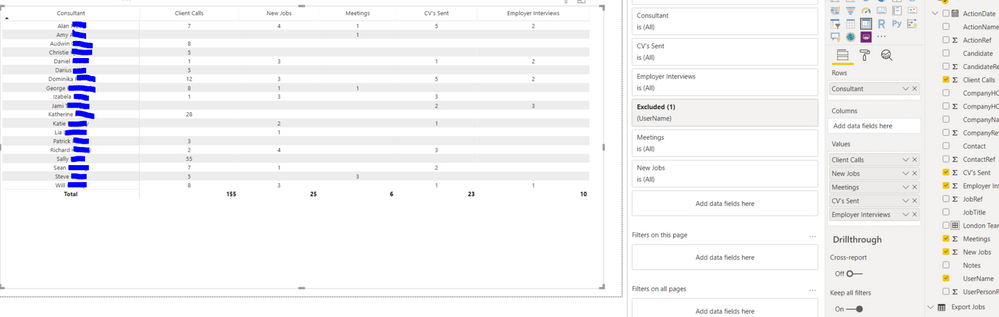
I have created a Matrix and was wondering if it is possible to organise the 'Consultant' Column into labelled subgroups.
For example the top five consultants into a 'London Team' subgroup and a subtotal below this.
Thanks,
Henry
Hi @HenryJS ,
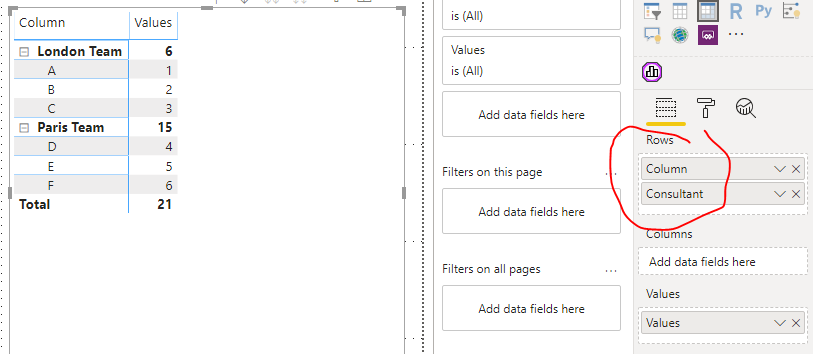
Do you have a "team" column/table which is related to "[Consultant]" column?
If not, you can realize that, but it's not dynamic.
If you want to create the column with DAX, it maybe be complex when you have a large amount of data.
Column =
SWITCH(
[Consultant],
"A", "London Team",
"B", "London Team",
"C", "London Team",
"D", "Paris Team",
"E", "Paris Team",
"F", "Paris Team"
)
Best regards,
Lionel Chen
If this post helps, then please consider Accept it as the solution to help the other members find it more quickly.
A new Power BI DataViz World Championship is coming this June! Don't miss out on submitting your entry.
Share feedback directly with Fabric product managers, participate in targeted research studies and influence the Fabric roadmap.
| User | Count |
|---|---|
| 53 | |
| 33 | |
| 32 | |
| 18 | |
| 16 |
| User | Count |
|---|---|
| 68 | |
| 67 | |
| 45 | |
| 29 | |
| 25 |