Join us at FabCon Atlanta from March 16 - 20, 2026, for the ultimate Fabric, Power BI, AI and SQL community-led event. Save $200 with code FABCOMM.
Register now!The Power BI Data Visualization World Championships is back! It's time to submit your entry. Live now!
Hi all,
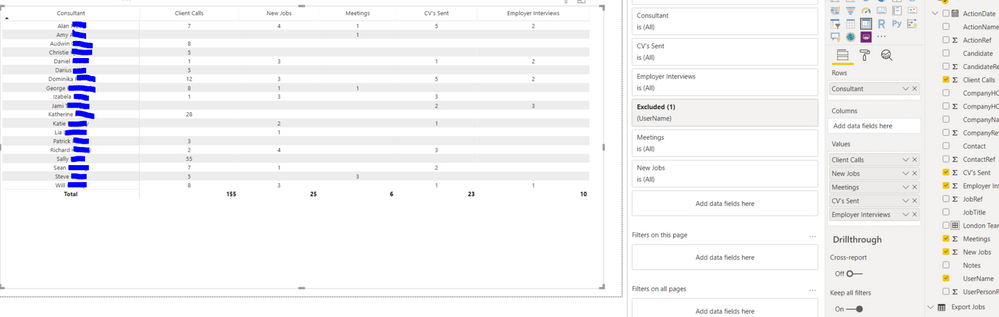
I have created a Matrix and was wondering if it is possible to organise the 'Consultant' Column into labelled subgroups.
For example the top five consultants into a 'London Team' subgroup and a subtotal below this.
Thanks,
Henry
Hi @HenryJS ,
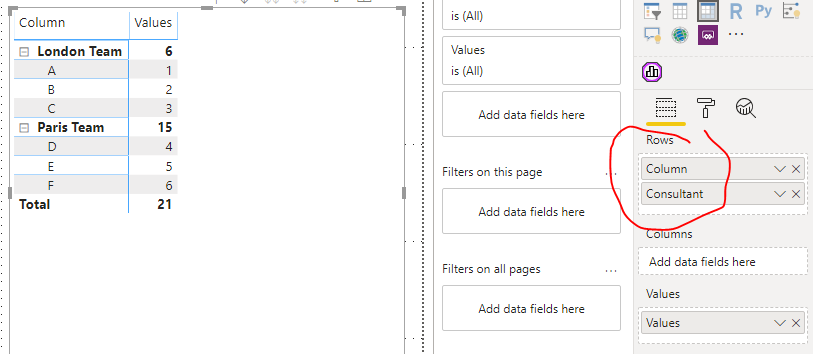
Do you have a "team" column/table which is related to "[Consultant]" column?
If not, you can realize that, but it's not dynamic.
If you want to create the column with DAX, it maybe be complex when you have a large amount of data.
Column =
SWITCH(
[Consultant],
"A", "London Team",
"B", "London Team",
"C", "London Team",
"D", "Paris Team",
"E", "Paris Team",
"F", "Paris Team"
)
Best regards,
Lionel Chen
If this post helps, then please consider Accept it as the solution to help the other members find it more quickly.
| User | Count |
|---|---|
| 50 | |
| 43 | |
| 36 | |
| 33 | |
| 29 |
| User | Count |
|---|---|
| 139 | |
| 129 | |
| 61 | |
| 59 | |
| 57 |