cancel
Showing results for 
Search instead for 
Did you mean: 

A new Data Days event is coming soon! This time we’re going bigger than ever. Fabric, Power BI, SQL, AI and more. Don't miss out.

Reply
MSanchez_2502
New Member

Graphs Lineas

Dear a query on the charts there is a way to place on the Y axis fixed fixed values, in my case I want to put 0 25 50 75 100% for example. Now show me 0 20 40 60 80 100%.

Thank you in advance.

1 ACCEPTED SOLUTION
Anonymous
Not applicable

Hi @MSanchez_2502 ,

According to my understanding ,you want to custom the Y-axis 'percentage, right?
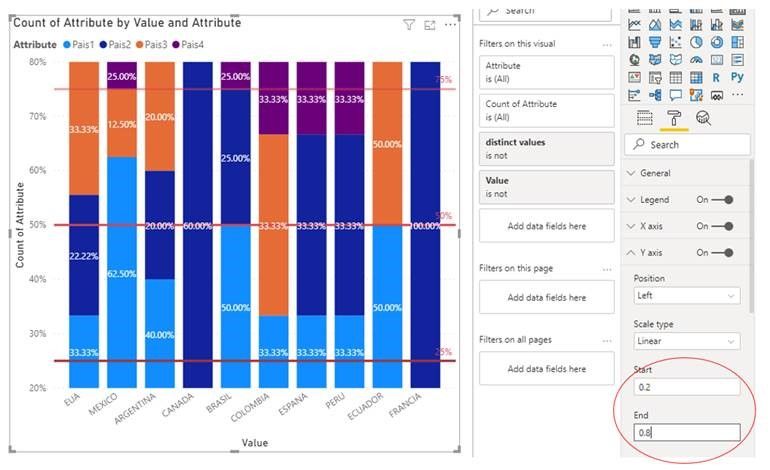
Judging from my test results, it doesn't seem to work. We could custom the Start and End percentage but not the interval value.
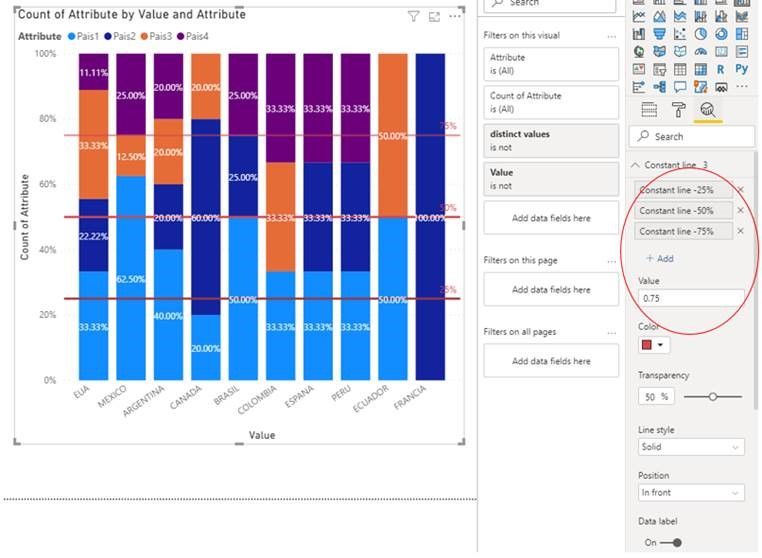
As @mahoneypat  said, maybe you could add some Constant lines in Analytics pane instead.
 
My visualizations look like this:
1.jpg2.jpg
 
Is the result what you want? If not, please upload some data samples and expected output.
Please do mask sensitive data before uploading.
 
Best Regards,
Eyelyn Qin

View solution in original post

2 REPLIES 2
Anonymous
Not applicable

Hi @MSanchez_2502 ,

According to my understanding ,you want to custom the Y-axis 'percentage, right?
Judging from my test results, it doesn't seem to work. We could custom the Start and End percentage but not the interval value.
As @mahoneypat  said, maybe you could add some Constant lines in Analytics pane instead.
 
My visualizations look like this:
1.jpg2.jpg
 
Is the result what you want? If not, please upload some data samples and expected output.
Please do mask sensitive data before uploading.
 
Best Regards,
Eyelyn Qin
mahoneypat
Microsoft Employee
Microsoft Employee

You can use the Analytics pane on some charts to add fixed lines.  Please see this link

https://docs.microsoft.com/en-us/power-bi/transform-model/desktop-analytics-pane


If this works for you, please mark it as the solution.  Kudos are appreciated too.  Please let me know if not.

Regards,

Pat


Did I answer your question? Mark my post as a solution! Kudos are also appreciated!

To learn more about Power BI, follow me on Twitter or subscribe on YouTube.


@mahoneypa HoosierBI on YouTube


Helpful resources

Announcements
May Power BI Update Carousel

Power BI Monthly Update - May 2026

Check out the May 2026 Power BI update to learn about new features.

Fabric SQL PBI Data Days

Data Days 2026 coming soon!

Sign up to receive a private message when registration opens and key events begin.

New to Fabric survey Carousel

New to Fabric Survey

If you have recently started exploring Fabric, we'd love to hear how it's going. Your feedback can help with product improvements.

Power BI DataViz World Championships carousel

Power BI DataViz World Championships - June 2026

A new Power BI DataViz World Championship is coming this June! Don't miss out on submitting your entry.