Join us at FabCon Atlanta from March 16 - 20, 2026, for the ultimate Fabric, Power BI, AI and SQL community-led event. Save $200 with code FABCOMM.
Register now!Learn from the best! Meet the four finalists headed to the FINALS of the Power BI Dataviz World Championships! Register now
Dear All,
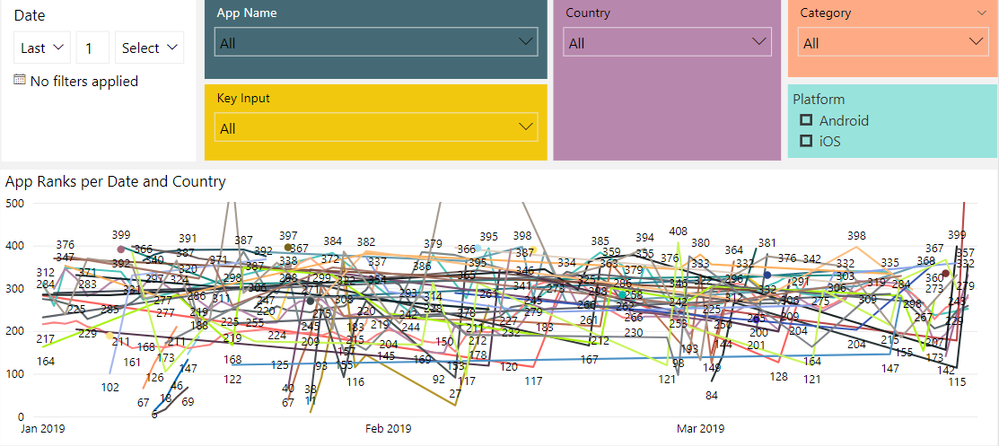
I have a Line Graph where it should display different measures based on filter selection.
I have a table that contains these following columns:
1) App Name (more than 100 units)
2) Platform
3) Country
4) Category
5) Ranking
Currently, the graph is very messy as it has all of these elements display at the same time.
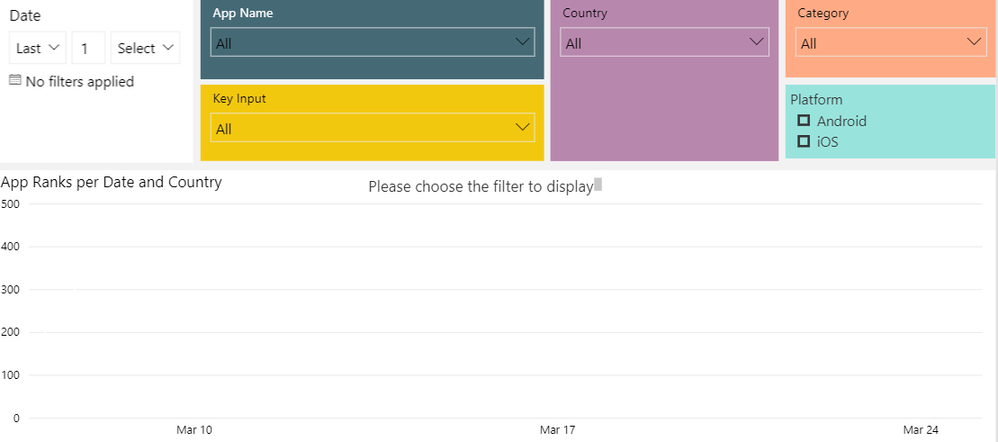
Is there a way that the graph will not display anything unless user chooses a specific value in the filter selection? I would like to have something like the attached screenshot (Desired State)
Many thanks in advance for your time and support. It is very much appreciated.
Best regards,
Trang
Current Graph
Desired State
@Anonymous ,
You may take a look at the post below.
https://community.powerbi.com/t5/Desktop/Filtering-a-Demension-Filter/m-p/601883#M286404
Hi @v-chuncz-msft , thank you very much for your help. I tried the solution in the message that you have sent me:
Measure = CALCULATE ( SELECTEDVALUE ( Table1[Name] ), ALLSELECTED ( Table1[Name] ) )
However, it only works with 1 column. I have 4 columns that users must choose before so the graph can populate the correct data. Do you know how to use the above expression with 4 columns?
Many thanks,
Trang
Share feedback directly with Fabric product managers, participate in targeted research studies and influence the Fabric roadmap.
Check out the February 2026 Power BI update to learn about new features.
| User | Count |
|---|---|
| 66 | |
| 59 | |
| 45 | |
| 19 | |
| 15 |