cancel
Showing results for 
Search instead for 
Did you mean: 

July 7 - July 17 | Round 2 of the Power BI Dataviz World Championships. Don't miss your chance! Learn more

Reply
bhartsell
Frequent Visitor

Getting distinct values for multiple columns

Hi 


I tried looking through previous threads, but I'm not sure what exactly what I'm looking for would be called. 


I have a table with several columns, but I'm concerned with two of them: BundleID (a number associated with a "bundle" of files) and UserEmail. I'm trying to find out a way to count how many distinct UserEmails have downloaded distinct BundleIDs--how would I do this?


Thank you for your time!

2 ACCEPTED SOLUTIONS

@bhartsell


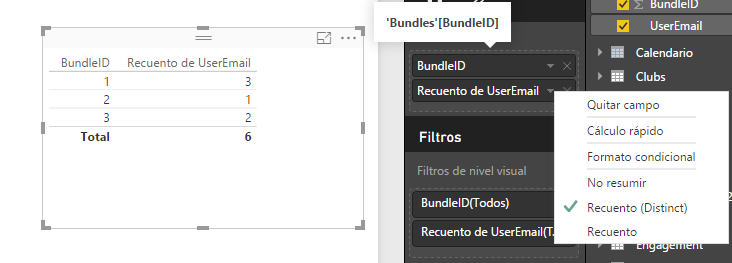
1. Insert a Table Visual and put in Values: BundleID and UserEmail.

2. In UserEmail select Count(Distinct).


Datas.png


Lima - Peru

View solution in original post

@bhartsell


If you want a visual by date, use the same solution provided by Vvelarde and just change the visual from Table to Line and clustered column chart as below.


Getting distinct values for multiple columns_1.jpg


Best Regards,

Herbert

View solution in original post

5 REPLIES 5
v-haibl-msft
Microsoft Employee
Microsoft Employee

@bhartsell


Please try the solution provided by ankitpatira. In case that’s not what you expected, please post back with expected output.


Best Regards,

Herbert

ankitpatira
Community Champion
Community Champion

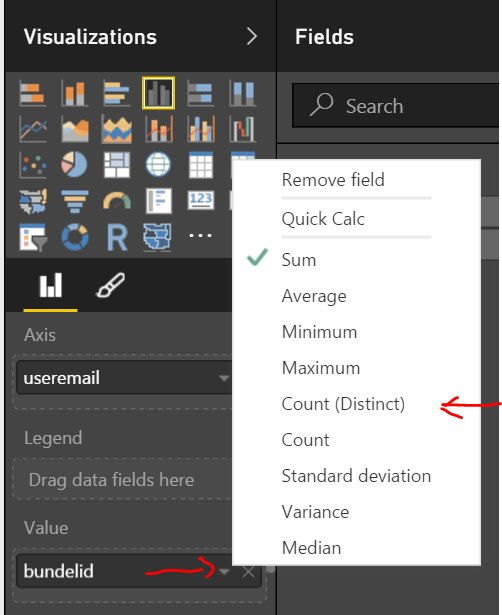
@bhartsell i think all you need to do is use a visual such as column chart and drop useremail field to the axis area and drop bundleID field to the values area and under Values for the bundleID field click on dropdown icon and choose distinct count.


Capture.PNG

Thanks for the response!


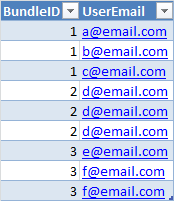
I'm sorry if I wasn't clear, but I'm trying to find a measure (or series of measures) that allows me to put this in a visual by date. I need it to be non-repeating by BundleID for every UserEmail. So if the data set I'm using is the below, then the count for BundleID 1 is three (three different emails), the count for 2 is 1 (one different email), the count for three is 2 (two different emails), and the total count is six.


Emails.png

@bhartsell


If you want a visual by date, use the same solution provided by Vvelarde and just change the visual from Table to Line and clustered column chart as below.


Getting distinct values for multiple columns_1.jpg


Best Regards,

Herbert

@bhartsell


1. Insert a Table Visual and put in Values: BundleID and UserEmail.

2. In UserEmail select Count(Distinct).


Datas.png


Lima - Peru

Helpful resources

Announcements
FabCon and SQLCon Barcelona 2026

FabCon & SQLCon – Barcelona 2026

Join us in Barcelona for FabCon and SQLCon, the Fabric, Power BI, SQL, and AI community event. Save €200 with code FABCMTY200.

60 days of Data Days Carousel

Data Days 2026

Join Fabric Data Days 2026: 60 days of free live/on-demand sessions, challenges, study groups, and certification opportunities.

Power BI DataViz World Championships carousel

Power BI DataViz World Championships - June 2026

A new Power BI DataViz World Championship is coming this June! Don't miss out on submitting your entry.