This is best Fabric, Power BI, SQL and AI community event. How do we know? The last event sold out! Save €200 with code FABCMTY200.
Register nowA new Data Days event is coming soon! This time we’re going bigger than ever. Fabric, Power BI, SQL, AI and more. Don't miss out.
Hi
I tried looking through previous threads, but I'm not sure what exactly what I'm looking for would be called.
I have a table with several columns, but I'm concerned with two of them: BundleID (a number associated with a "bundle" of files) and UserEmail. I'm trying to find out a way to count how many distinct UserEmails have downloaded distinct BundleIDs--how would I do this?
Thank you for your time!
Solved! Go to Solution.
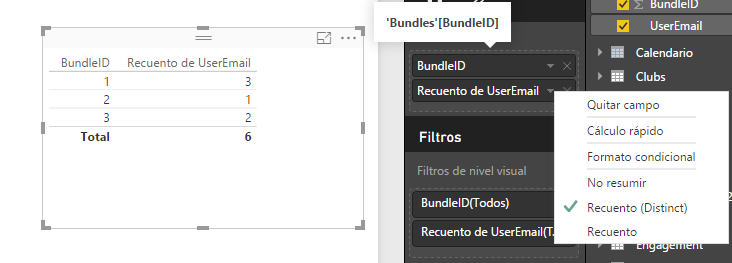
1. Insert a Table Visual and put in Values: BundleID and UserEmail.
2. In UserEmail select Count(Distinct).
If you want a visual by date, use the same solution provided by Vvelarde and just change the visual from Table to Line and clustered column chart as below.
Best Regards,
Herbert
Please try the solution provided by ankitpatira. In case that’s not what you expected, please post back with expected output.
Best Regards,
Herbert
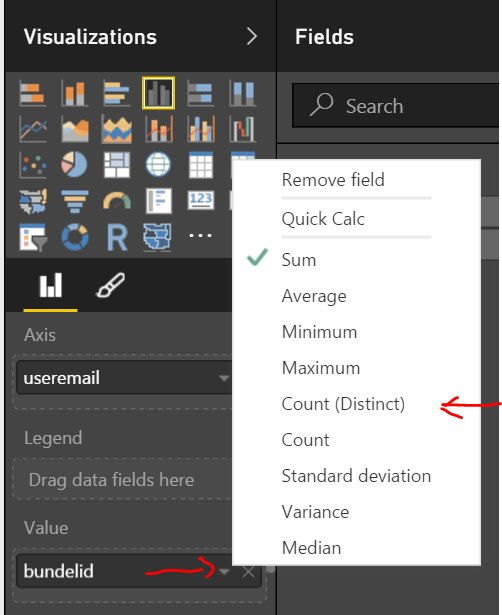
@bhartsell i think all you need to do is use a visual such as column chart and drop useremail field to the axis area and drop bundleID field to the values area and under Values for the bundleID field click on dropdown icon and choose distinct count.
Thanks for the response!
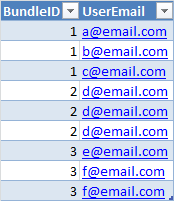
I'm sorry if I wasn't clear, but I'm trying to find a measure (or series of measures) that allows me to put this in a visual by date. I need it to be non-repeating by BundleID for every UserEmail. So if the data set I'm using is the below, then the count for BundleID 1 is three (three different emails), the count for 2 is 1 (one different email), the count for three is 2 (two different emails), and the total count is six.
If you want a visual by date, use the same solution provided by Vvelarde and just change the visual from Table to Line and clustered column chart as below.
Best Regards,
Herbert
1. Insert a Table Visual and put in Values: BundleID and UserEmail.
2. In UserEmail select Count(Distinct).
Check out the May 2026 Power BI update to learn about new features.
Sign up to receive a private message when registration opens and key events begin.
If you have recently started exploring Fabric, we'd love to hear how it's going. Your feedback can help with product improvements.
| User | Count |
|---|---|
| 32 | |
| 26 | |
| 23 | |
| 22 | |
| 15 |
| User | Count |
|---|---|
| 63 | |
| 45 | |
| 28 | |
| 24 | |
| 22 |