cancel
Showing results for 
Search instead for 
Did you mean: 

Vote for your favorite vizzies from the Power BI Dataviz World Championship submissions. Vote now!

Reply
ChrisPBI
Advocate III
Advocate III

Getting Year from date.

Hello,


I try to get only the year from my date.


The function YEAR(date) always deliveres me the sum.


Only whe I use a table I can say don't summarize.


But the column can't be used for any visual this way.


Thanks for helping.


Regards,

Chris

1 ACCEPTED SOLUTION
jahida
Impactful Individual

Ah ok. Try this:


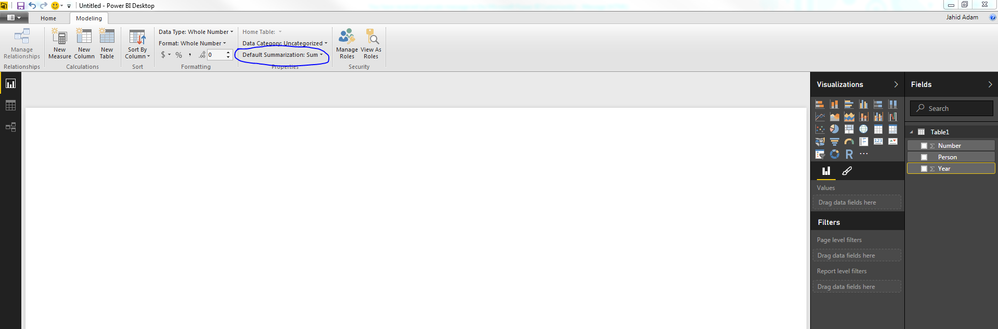
Click on the year column in your data model, go to the Modeling tab at the top, and then go to Default Summarization and select "Do Not Summarize". That should solve many of your problems.

Capture2.PNG

Hope that helps!

View solution in original post

3 REPLIES 3
jahida
Impactful Individual

Not quite sure what the objective is. YEAR(Date) is definitely the way to get the year of a date, why isn't that working for you? Do you have a particular use case in mind?

Hi,


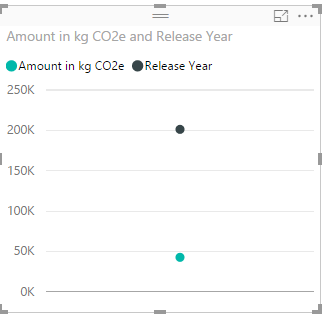
a use case could be to show the total emissions over the years.


Here the result:


1.PNG


But the result should be a line with the years as X-Axis.


I would expect when I do: Release Year = YEAR('Models'[Release Date]) that the resulting column always shows the years without summing everything.


Thanks,

Chris

jahida
Impactful Individual

Ah ok. Try this:


Click on the year column in your data model, go to the Modeling tab at the top, and then go to Default Summarization and select "Do Not Summarize". That should solve many of your problems.

Capture2.PNG

Hope that helps!

Helpful resources

Announcements
Power BI DataViz World Championships

Power BI Dataviz World Championships

Vote for your favorite vizzies from the Power BI World Championship submissions!

Sticker Challenge 2026 Carousel

Join our Community Sticker Challenge 2026

If you love stickers, then you will definitely want to check out our Community Sticker Challenge!

January Power BI Update Carousel

Power BI Monthly Update - January 2026

Check out the January 2026 Power BI update to learn about new features.

FabCon Atlanta 2026 carousel

FabCon Atlanta 2026

Join us at FabCon Atlanta, March 16-20, for the ultimate Fabric, Power BI, AI and SQL community-led event. Save $200 with code FABCOMM.