Don't miss your chance to take the Fabric Data Engineer (DP-600) exam for FREE! Find out how by watching the DP-600 session on-demand now through April 28th.
Learn moreJoin the FabCon + SQLCon recap series. Up next: Power BI, Real-Time Intelligence, IQ and AI, and Data Factory take center stage. All sessions are available on-demand after the live show. Register now
Hello,
I try to get only the year from my date.
The function YEAR(date) always deliveres me the sum.
Only whe I use a table I can say don't summarize.
But the column can't be used for any visual this way.
Thanks for helping.
Regards,
Chris
Solved! Go to Solution.
Ah ok. Try this:
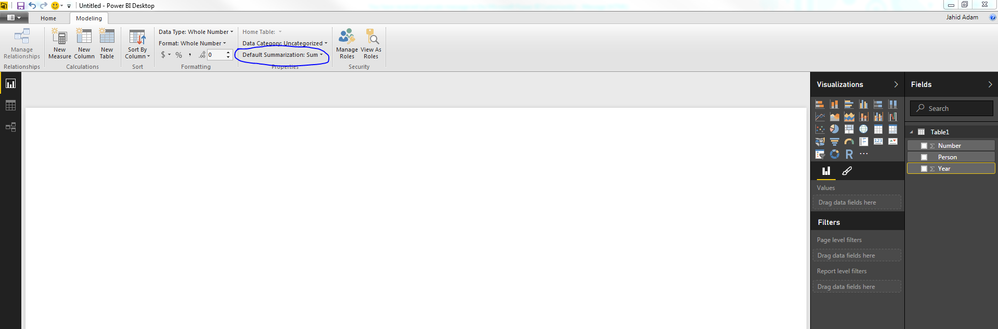
Click on the year column in your data model, go to the Modeling tab at the top, and then go to Default Summarization and select "Do Not Summarize". That should solve many of your problems.
Hope that helps!
Not quite sure what the objective is. YEAR(Date) is definitely the way to get the year of a date, why isn't that working for you? Do you have a particular use case in mind?
Hi,
a use case could be to show the total emissions over the years.
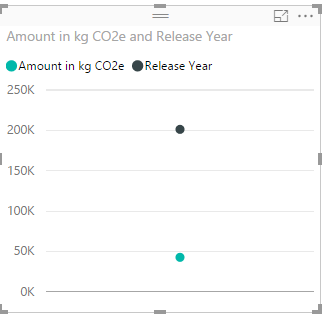
Here the result:
But the result should be a line with the years as X-Axis.
I would expect when I do: Release Year = YEAR('Models'[Release Date]) that the resulting column always shows the years without summing everything.
Thanks,
Chris
Ah ok. Try this:
Click on the year column in your data model, go to the Modeling tab at the top, and then go to Default Summarization and select "Do Not Summarize". That should solve many of your problems.
Hope that helps!
Check out the April 2026 Power BI update to learn about new features.
If you have recently started exploring Fabric, we'd love to hear how it's going. Your feedback can help with product improvements.
A new Power BI DataViz World Championship is coming this June! Don't miss out on submitting your entry.
| User | Count |
|---|---|
| 45 | |
| 38 | |
| 34 | |
| 21 | |
| 17 |
| User | Count |
|---|---|
| 68 | |
| 64 | |
| 31 | |
| 26 | |
| 26 |