Join us at FabCon Atlanta from March 16 - 20, 2026, for the ultimate Fabric, Power BI, AI and SQL community-led event. Save $200 with code FABCOMM.
Register now!Learn from the best! Meet the four finalists headed to the FINALS of the Power BI Dataviz World Championships! Register now
Hi,
How do i calculate values based on criteria referring single column, for example
Column 1 is week number and column 2 is Booking Amt
Now how can i get variance of booking amt like Booking Amt for Week 1 - Booking Amt for Week 2
thank you!!
Solved! Go to Solution.
Hi @AllG,
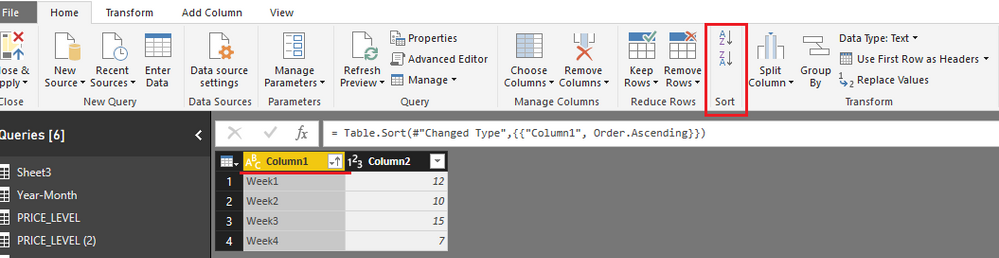
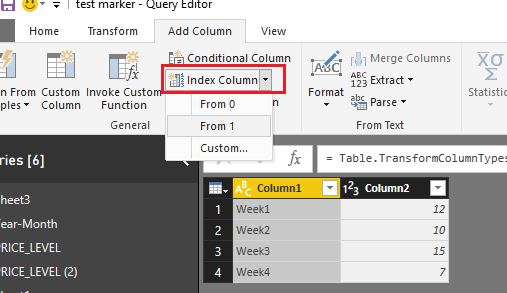
Add an index column in Query Editor mode. Before adding an index column, please sort data based on week number column.
Close and apply all these operations. But if [Column1] values are whole number type rather than text, there is no need to do above changes.
In design surface, add a calculated column using below formula:
variance of booking amt = IF ( 'booking amt'[Column1] = "Week1", BLANK (), LOOKUPVALUE ( 'booking amt'[Column2], 'booking amt'[Index], 'booking amt'[Index] - 1 ) - 'booking amt'[Column2] )
Best regards,
Yuliana Gu
Hi @AllG,
Add an index column in Query Editor mode. Before adding an index column, please sort data based on week number column.
Close and apply all these operations. But if [Column1] values are whole number type rather than text, there is no need to do above changes.
In design surface, add a calculated column using below formula:
variance of booking amt = IF ( 'booking amt'[Column1] = "Week1", BLANK (), LOOKUPVALUE ( 'booking amt'[Column2], 'booking amt'[Index], 'booking amt'[Index] - 1 ) - 'booking amt'[Column2] )
Best regards,
Yuliana Gu
Awesome!!! ![]()
thank you very much Yuliana Gu
Share feedback directly with Fabric product managers, participate in targeted research studies and influence the Fabric roadmap.
Check out the February 2026 Power BI update to learn about new features.
| User | Count |
|---|---|
| 52 | |
| 51 | |
| 39 | |
| 15 | |
| 14 |
| User | Count |
|---|---|
| 93 | |
| 82 | |
| 34 | |
| 29 | |
| 25 |