Join us at FabCon Atlanta from March 16 - 20, 2026, for the ultimate Fabric, Power BI, AI and SQL community-led event. Save $200 with code FABCOMM.
Register now!The Power BI Data Visualization World Championships is back! Get ahead of the game and start preparing now! Learn more
Hi,
How do i calculate values based on criteria referring single column, for example
Column 1 is week number and column 2 is Booking Amt
Now how can i get variance of booking amt like Booking Amt for Week 1 - Booking Amt for Week 2
thank you!!
Solved! Go to Solution.
Hi @AllG,
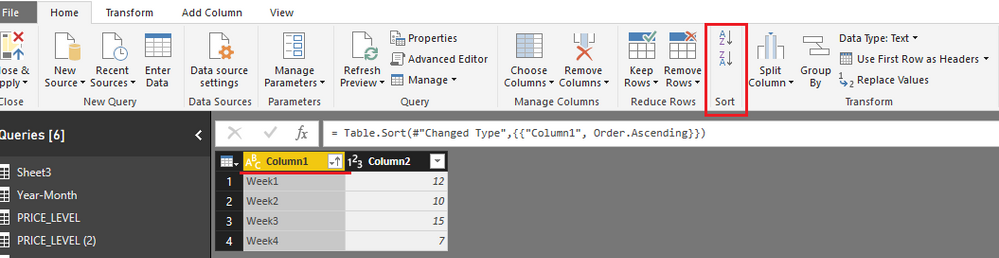
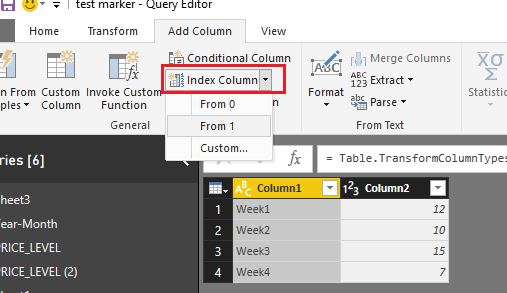
Add an index column in Query Editor mode. Before adding an index column, please sort data based on week number column.
Close and apply all these operations. But if [Column1] values are whole number type rather than text, there is no need to do above changes.
In design surface, add a calculated column using below formula:
variance of booking amt = IF ( 'booking amt'[Column1] = "Week1", BLANK (), LOOKUPVALUE ( 'booking amt'[Column2], 'booking amt'[Index], 'booking amt'[Index] - 1 ) - 'booking amt'[Column2] )
Best regards,
Yuliana Gu
Hi @AllG,
Add an index column in Query Editor mode. Before adding an index column, please sort data based on week number column.
Close and apply all these operations. But if [Column1] values are whole number type rather than text, there is no need to do above changes.
In design surface, add a calculated column using below formula:
variance of booking amt = IF ( 'booking amt'[Column1] = "Week1", BLANK (), LOOKUPVALUE ( 'booking amt'[Column2], 'booking amt'[Index], 'booking amt'[Index] - 1 ) - 'booking amt'[Column2] )
Best regards,
Yuliana Gu
Awesome!!! ![]()
thank you very much Yuliana Gu
The Power BI Data Visualization World Championships is back! Get ahead of the game and start preparing now!
| User | Count |
|---|---|
| 38 | |
| 35 | |
| 33 | |
| 32 | |
| 29 |
| User | Count |
|---|---|
| 134 | |
| 96 | |
| 78 | |
| 67 | |
| 65 |