Get certified for free when you join Fabric Data Days 2026 and dive into Fabric, Power BI, SQL, AI, and other essential data skills.
Join nowJuly 28 - August 9 | Final Round of the Power BI Dataviz World Championships. This is your chance. Learn more
Is it possible to Get only a select number of columns in an Excel File without bringing in the entire page to Power BI Desktop? For example, i have an excel file that my coworker updates. on the left side of the excel sheet he has a " raw data " form of data and to the right of that he has tables that have formulas that add up different parts of the "raw data " next t it. is it possible for me to just select the left "raw data" side of the excel file and bring that in without bringing in the full sheet?
Solved! Go to Solution.
Sure, just pull it up in Query Editor, select the columns that you want and then right-click and Remove Other Columns.
Hi @kbrewer,
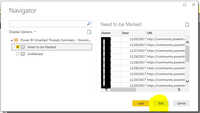
As what @Greg_Deckler said, when you get data from excel, please select the sheet or table name, then click Edit(highlighted in yellow background), you will go to Edit Quey, you can remove any columns you don't need.
Best Regards,
Angelia
Sure, just pull it up in Query Editor, select the columns that you want and then right-click and Remove Other Columns.
If you love stickers, then you will definitely want to check out our community sticker challenge, Barcelona edition!
Check out the July 2026 Power BI update to learn about new features.
| User | Count |
|---|---|
| 29 | |
| 28 | |
| 20 | |
| 20 | |
| 19 |
| User | Count |
|---|---|
| 35 | |
| 26 | |
| 20 | |
| 18 | |
| 17 |