Join us in Barcelona for FabCon and SQLCon, September 28 - October 1, 2026.
This is best Fabric, Power BI, SQL and AI community event. How do we know? The last event sold out! Save €200 with code FABCMTY200.
Register now- Power BI forums
- Get Help with Power BI
- Desktop
- Service
- Report Server
- Power Query
- Mobile Apps
- Developer
- DAX Commands and Tips
- Custom Visuals Development Discussion
- Health and Life Sciences
- Power BI Spanish forums
- Translated Spanish Desktop
- Training and Consulting
- Instructor Led Training
- Dashboard in a Day for Women, by Women
- Galleries
- Data Stories Gallery
- Themes Gallery
- Contests Gallery
- QuickViz Gallery
- Quick Measures Gallery
- Visual Calculations Gallery
- Fabric Apps Gallery
- Notebook Gallery
- Translytical Task Flow Gallery
- TMDL Gallery
- R Script Showcase
- Webinars and Video Gallery
- Ideas
- Custom Visuals Ideas (read-only)
- Issues
- Issues
- Events
- Upcoming Events
The Fabric community is upgrading! Read all of the details including the timeline and what you can expect. Learn more
- Power BI forums
- Forums
- Get Help with Power BI
- Desktop
- Re: Get Count of Rows for Table Visual Filtered by...
- Subscribe to RSS Feed
- Mark Topic as New
- Mark Topic as Read
- Float this Topic for Current User
- Bookmark
- Subscribe
- Printer Friendly Page

- Mark as New
- Bookmark
- Subscribe
- Mute
- Subscribe to RSS Feed
- Permalink
- Report Inappropriate Content
Get Count of Rows for Table Visual Filtered by Measure
Hello,
I am having issues getting a row count of results based off a table being filtered by a measure.
Simplified current table layout is:
Table 1: Groups
Table 2: Activities
Each group has a set of activities associated with them. Activities can have a status of completed, open, canceled and have a date field for when they were completed.
My requirement is that I want to get a list of groups that have no completed activities within a certain date range. I have achieved this by creating the following measure;
Completed Activities = COUNTAX(FILTER('Activties', Activties[Status] = "Completed"), 'Activties'[ActivityID]) + 0
I add this to a table visual, and filter to "Completed Activities is 0", along with the ID of the group and I get a list of every group with 0 completed activities for that period.
What I now need is a count of the groups. It appears you cannot change the aggregation of the Total row so all I am able to do is get a sum which equals 0.
Ideally I would like a Card to show the number, however you cannot apply the measure per group so I do not get a correct result.
A similar question was asked here https://community.powerbi.com/t5/Desktop/Count-of-rows-after-filtering-by-a-measure/m-p/64259#M26546 but did not address the grouping and has not been active since 2018.
Any help will be greatly appreciated!
Solved! Go to Solution.


- Mark as New
- Bookmark
- Subscribe
- Mute
- Subscribe to RSS Feed
- Permalink
- Report Inappropriate Content
@daniel_digi , Can you share sample data and sample output in table format? Or a sample pbix after removing sensitive data.
I doubt anything I added to remove date filter.
Add this to table as well Card and check
countx(filter(summarize(Groups, Groups[group code],"_1",COUNTX(FILTER('Activties', Activties[Status] = "Completed"), 'Activties'[ActivityID]) + 0),[_1]>0),[group code])

- Mark as New
- Bookmark
- Subscribe
- Mute
- Subscribe to RSS Feed
- Permalink
- Report Inappropriate Content
Hello! Is there a way I can apply this solution but filtering measures? I've tried replicating it but it doesn't work for me because I don't want to filter a table by a measure, but to filter a measure by another measure.
- Mark as New
- Bookmark
- Subscribe
- Mute
- Subscribe to RSS Feed
- Permalink
- Report Inappropriate Content
@daniel_digi , Assumed two table are connected and the group has an ID column it can be a name too
Try
countx(filter(summarize(Groups, Groups[ID],"_1",COUNTAX(FILTER('Activties', Activties[Status] = "Completed"), 'Activties'[ActivityID]) + 0),[_1]>0),[ID])
- Mark as New
- Bookmark
- Subscribe
- Mute
- Subscribe to RSS Feed
- Permalink
- Report Inappropriate Content
Unfortunately that does not return the expected result. If I add a count column to the table I can see my expected result is 169 however this returns 609.
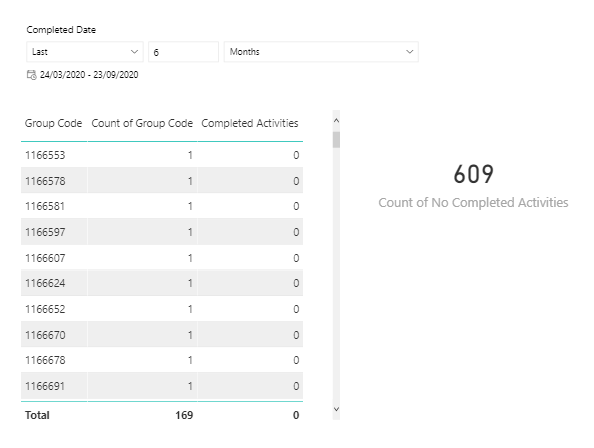
While this does give me the count it's a bit ridiculous to have to include an entire column of 1s.
Additionally, the measure you provided does not update when I change the date period. Apologies I initially included the above screen shot indicating I was also filtering dates by a slicer but it doesn't appear to have been embedded correctly.
- Mark as New
- Bookmark
- Subscribe
- Mute
- Subscribe to RSS Feed
- Permalink
- Report Inappropriate Content
@daniel_digi , Can you share sample data and sample output in table format? Or a sample pbix after removing sensitive data.
I doubt anything I added to remove date filter.
Add this to table as well Card and check
countx(filter(summarize(Groups, Groups[group code],"_1",COUNTX(FILTER('Activties', Activties[Status] = "Completed"), 'Activties'[ActivityID]) + 0),[_1]>0),[group code])
- Mark as New
- Bookmark
- Subscribe
- Mute
- Subscribe to RSS Feed
- Permalink
- Report Inappropriate Content
Your solution worked with 1 edit. I changed the > 0 to = 0.
Group Count = countx(filter(summarize(Groups, Groups[group code],"_1",COUNTX(FILTER('Activities', Activities[Status] = "Completed"), 'Activities'[ActivityID]) + 0),[_1]=0),[group code])
This gave me the 169 result I expected, and changes correctly when I update the date slicer.
Thank you very much for your assitance!
Helpful resources

FabCon & SQLCon – Barcelona 2026
Join us in Barcelona for FabCon and SQLCon, the Fabric, Power BI, SQL, and AI community event. Save €200 with code FABCMTY200.

Power BI DataViz World Championships - June 2026
A new Power BI DataViz World Championship is coming this June! Don't miss out on submitting your entry.

| User | Count |
|---|---|
| 27 | |
| 22 | |
| 20 | |
| 18 | |
| 14 |


| User | Count |
|---|---|
| 25 | |
| 20 | |
| 20 | |
| 20 | |
| 20 |


