This time we’re going bigger than ever. Fabric, Power BI, SQL, AI and more. We're covering it all. You won't want to miss it.
Learn moreLevel up your Power BI skills this month - build one visual each week and tell better stories with data! Get started
Good Morning All,
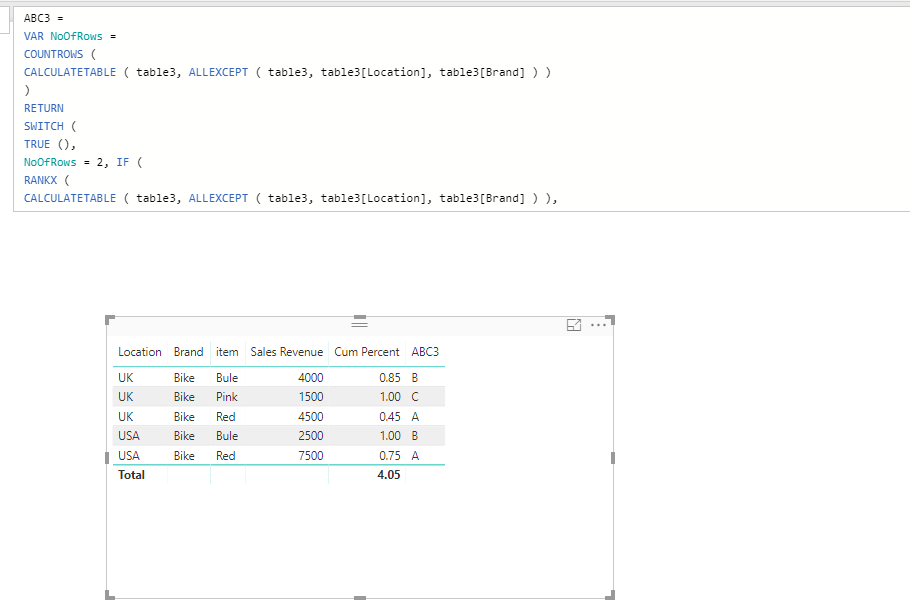
I am struggling with this formula it works for when the number of rows is 2 and the cumulated segmentation however when i put in the the extra count of 3 rows it doesn't classify them "A","B" and "C", instead it comes up with an error. Any help would be greatly appreciated.
Many Thanks
ABC Product =
VAR NoOfRows =
COUNTROWS (
CALCULATETABLE ( ABC, ALLEXCEPT ( ABC, ABC[Location], ABC[Brand] ) )
)
RETURN
SWITCH (
TRUE (),
NoOfRows = 2, IF (
RANKX (
CALCULATETABLE ( ABC, ALLEXCEPT ( ABC, ABC[Location], ABC[Brand] ) ),
ABC[Sales Revenue]
)
= 1,
"A",
"B"
),
NoOfRows = 3, IF (
RANKX (
CALCULATETABLE ( ABC, ALLEXCEPT ( ABC, ABC[Location], ABC[Brand] ) ),
ABC[Sales Revenue]
)
= 1,
"A",
"B",
“C”
),
ABC[Cumulated Percentage] <= 0.8, "A",
ABC[Cumulated Percentage] <= 0.95, "B",
"C"
)
Solved! Go to Solution.
@Mack1int,
Please change your DAX formula to the following:
ABC Product = VAR NoOfRows = COUNTROWS ( CALCULATETABLE ( ABC, ALLEXCEPT ( ABC, ABC[Location], ABC[Brand] ) ) ) RETURN SWITCH ( TRUE (), NoOfRows = 2, IF ( RANKX ( CALCULATETABLE ( ABC, ALLEXCEPT ( ABC, ABC[Location], ABC[Brand] ) ), ABC[Sales Revenue] ) = 1, "A", "B" ), NoOfRows = 3, IF ( RANKX ( CALCULATETABLE ( ABC, ALLEXCEPT ( ABC, ABC[Location], ABC[Brand] ) ), ABC[Sales Revenue] ) = 1, "A", IF ( RANKX ( CALCULATETABLE ( ABC, ALLEXCEPT ( ABC, ABC[Location], ABC[Brand] ) ), ABC[Sales Revenue] ) = 2,"B", "C" )), ABC[Cum Percent] <= 0.8, "A", ABC[Cum Percent] <= 0.95, "B", "C" )
Regards,
Lydia
@Mack1int,
Please change your DAX formula to the following:
ABC Product = VAR NoOfRows = COUNTROWS ( CALCULATETABLE ( ABC, ALLEXCEPT ( ABC, ABC[Location], ABC[Brand] ) ) ) RETURN SWITCH ( TRUE (), NoOfRows = 2, IF ( RANKX ( CALCULATETABLE ( ABC, ALLEXCEPT ( ABC, ABC[Location], ABC[Brand] ) ), ABC[Sales Revenue] ) = 1, "A", "B" ), NoOfRows = 3, IF ( RANKX ( CALCULATETABLE ( ABC, ALLEXCEPT ( ABC, ABC[Location], ABC[Brand] ) ), ABC[Sales Revenue] ) = 1, "A", IF ( RANKX ( CALCULATETABLE ( ABC, ALLEXCEPT ( ABC, ABC[Location], ABC[Brand] ) ), ABC[Sales Revenue] ) = 2,"B", "C" )), ABC[Cum Percent] <= 0.8, "A", ABC[Cum Percent] <= 0.95, "B", "C" )
Regards,
Lydia
Thank you so much @Anonymous
Check out the April 2026 Power BI update to learn about new features.
Sign up to receive a private message when registration opens and key events begin.
If you have recently started exploring Fabric, we'd love to hear how it's going. Your feedback can help with product improvements.
| User | Count |
|---|---|
| 35 | |
| 32 | |
| 25 | |
| 22 | |
| 18 |
| User | Count |
|---|---|
| 66 | |
| 36 | |
| 32 | |
| 25 | |
| 23 |