Get certified for free when you join Fabric Data Days 2026 and dive into Fabric, Power BI, SQL, AI, and other essential data skills.
Join nowData Days is here! Join us now for 60+ days of learning, challenges, and connection. Learn more
Good Morning All,
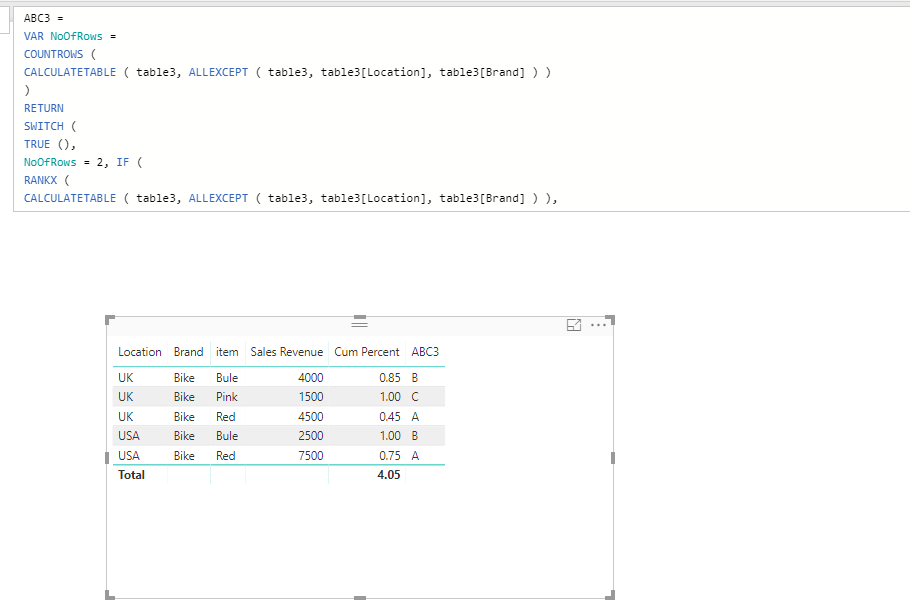
I am struggling with this formula it works for when the number of rows is 2 and the cumulated segmentation however when i put in the the extra count of 3 rows it doesn't classify them "A","B" and "C", instead it comes up with an error. Any help would be greatly appreciated.
Many Thanks
ABC Product =
VAR NoOfRows =
COUNTROWS (
CALCULATETABLE ( ABC, ALLEXCEPT ( ABC, ABC[Location], ABC[Brand] ) )
)
RETURN
SWITCH (
TRUE (),
NoOfRows = 2, IF (
RANKX (
CALCULATETABLE ( ABC, ALLEXCEPT ( ABC, ABC[Location], ABC[Brand] ) ),
ABC[Sales Revenue]
)
= 1,
"A",
"B"
),
NoOfRows = 3, IF (
RANKX (
CALCULATETABLE ( ABC, ALLEXCEPT ( ABC, ABC[Location], ABC[Brand] ) ),
ABC[Sales Revenue]
)
= 1,
"A",
"B",
“C”
),
ABC[Cumulated Percentage] <= 0.8, "A",
ABC[Cumulated Percentage] <= 0.95, "B",
"C"
)
Solved! Go to Solution.
@Mack1int,
Please change your DAX formula to the following:
ABC Product = VAR NoOfRows = COUNTROWS ( CALCULATETABLE ( ABC, ALLEXCEPT ( ABC, ABC[Location], ABC[Brand] ) ) ) RETURN SWITCH ( TRUE (), NoOfRows = 2, IF ( RANKX ( CALCULATETABLE ( ABC, ALLEXCEPT ( ABC, ABC[Location], ABC[Brand] ) ), ABC[Sales Revenue] ) = 1, "A", "B" ), NoOfRows = 3, IF ( RANKX ( CALCULATETABLE ( ABC, ALLEXCEPT ( ABC, ABC[Location], ABC[Brand] ) ), ABC[Sales Revenue] ) = 1, "A", IF ( RANKX ( CALCULATETABLE ( ABC, ALLEXCEPT ( ABC, ABC[Location], ABC[Brand] ) ), ABC[Sales Revenue] ) = 2,"B", "C" )), ABC[Cum Percent] <= 0.8, "A", ABC[Cum Percent] <= 0.95, "B", "C" )
Regards,
Lydia
@Mack1int,
Please change your DAX formula to the following:
ABC Product = VAR NoOfRows = COUNTROWS ( CALCULATETABLE ( ABC, ALLEXCEPT ( ABC, ABC[Location], ABC[Brand] ) ) ) RETURN SWITCH ( TRUE (), NoOfRows = 2, IF ( RANKX ( CALCULATETABLE ( ABC, ALLEXCEPT ( ABC, ABC[Location], ABC[Brand] ) ), ABC[Sales Revenue] ) = 1, "A", "B" ), NoOfRows = 3, IF ( RANKX ( CALCULATETABLE ( ABC, ALLEXCEPT ( ABC, ABC[Location], ABC[Brand] ) ), ABC[Sales Revenue] ) = 1, "A", IF ( RANKX ( CALCULATETABLE ( ABC, ALLEXCEPT ( ABC, ABC[Location], ABC[Brand] ) ), ABC[Sales Revenue] ) = 2,"B", "C" )), ABC[Cum Percent] <= 0.8, "A", ABC[Cum Percent] <= 0.95, "B", "C" )
Regards,
Lydia
Thank you so much @Anonymous
Don't miss out on Data Days, June 15 through August 7. Learn Fabric, Power BI, SQL, AI and more.
Check out the May 2026 Power BI update to learn about new features.
| User | Count |
|---|---|
| 23 | |
| 21 | |
| 20 | |
| 17 | |
| 13 |
| User | Count |
|---|---|
| 58 | |
| 51 | |
| 37 | |
| 30 | |
| 26 |