cancel
Showing results for 
Search instead for 
Did you mean: 

The Power BI Data Visualization World Championships is back! Get ahead of the game and start preparing now! Learn more

Reply
spandy34
Responsive Resident
Responsive Resident

Formatting / Padding Numbers with Zero

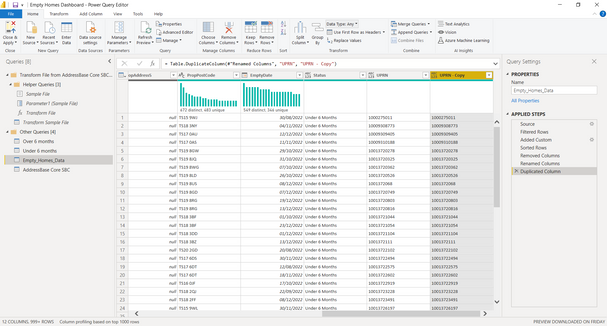
I have the table below and if the UPRN has a 10 digit number I want a Zero adding to the end of the number so all the UPRN's have 11 


spandy34_0-1674949725768.png

@macmy034 @Bryn-MH  @tamerj1 @danextian 


1 REPLY 1
macmy034
Resolver I
Resolver I

https://learn.microsoft.com/en-us/powerquery-m/text-padend


You can use a find-and-replace or a custom column to utilise


Text.PadEnd([UPRN], 10, "0")


The below code changes it to a string and adds "0"s as doing it with Int seems to cause issues.


Code Example


let
    Source = Table.FromRows(Json.Document(Binary.Decompress(Binary.FromText("i45WMjQyNjE1M7ewVIrViVYyMjM1sTAxt4BwDE3NwAygGqAwUEUsAA==", BinaryEncoding.Base64), Compression.Deflate)), let _t = ((type nullable text) meta [Serialized.Text = true]) in type table [UPRN = _t]),
    #"Changed Type1" = Table.TransformColumnTypes(Source,{{"UPRN", type text}}),
    #"Replaced Value" = Table.ReplaceValue(#"Changed Type1",each [UPRN],each Text.PadEnd([UPRN],10,"0"),Replacer.ReplaceValue,{"UPRN"}),
    #"Changed Type" = Table.TransformColumnTypes(#"Replaced Value",{{"UPRN", Int64.Type}})
in
    #"Changed Type"


Helpful resources

Announcements
Power BI DataViz World Championships

Power BI Dataviz World Championships

The Power BI Data Visualization World Championships is back! Get ahead of the game and start preparing now!

November Power BI Update Carousel

Power BI Monthly Update - November 2025

Check out the November 2025 Power BI update to learn about new features.

FabCon Atlanta 2026 carousel

FabCon Atlanta 2026

Join us at FabCon Atlanta, March 16-20, for the ultimate Fabric, Power BI, AI and SQL community-led event. Save $200 with code FABCOMM.