Don't miss your chance to take exam DP-600 or DP-700 on us!
Request nowLearn from the best! Meet the four finalists headed to the FINALS of the Power BI Dataviz World Championships! Register now
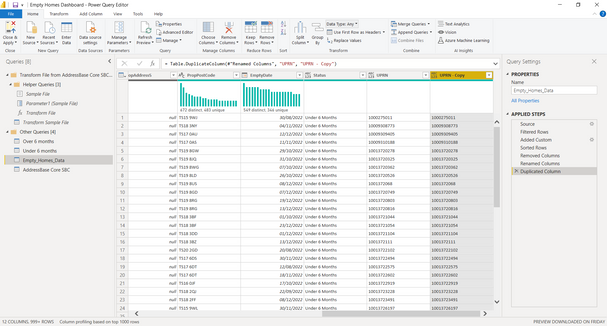
I have the table below and if the UPRN has a 10 digit number I want a Zero adding to the end of the number so all the UPRN's have 11
@macmy034 @Bryn-MH @tamerj1 @danextian
https://learn.microsoft.com/en-us/powerquery-m/text-padend
You can use a find-and-replace or a custom column to utilise
Text.PadEnd([UPRN], 10, "0")
The below code changes it to a string and adds "0"s as doing it with Int seems to cause issues.
Code Example
let
Source = Table.FromRows(Json.Document(Binary.Decompress(Binary.FromText("i45WMjQyNjE1M7ewVIrViVYyMjM1sTAxt4BwDE3NwAygGqAwUEUsAA==", BinaryEncoding.Base64), Compression.Deflate)), let _t = ((type nullable text) meta [Serialized.Text = true]) in type table [UPRN = _t]),
#"Changed Type1" = Table.TransformColumnTypes(Source,{{"UPRN", type text}}),
#"Replaced Value" = Table.ReplaceValue(#"Changed Type1",each [UPRN],each Text.PadEnd([UPRN],10,"0"),Replacer.ReplaceValue,{"UPRN"}),
#"Changed Type" = Table.TransformColumnTypes(#"Replaced Value",{{"UPRN", Int64.Type}})
in
#"Changed Type"
Share feedback directly with Fabric product managers, participate in targeted research studies and influence the Fabric roadmap.
Check out the February 2026 Power BI update to learn about new features.
| User | Count |
|---|---|
| 50 | |
| 40 | |
| 37 | |
| 14 | |
| 14 |
| User | Count |
|---|---|
| 85 | |
| 69 | |
| 37 | |
| 29 | |
| 27 |