This time we’re going bigger than ever. Fabric, Power BI, SQL, AI and more. We're covering it all. You won't want to miss it.
Learn moreDid you hear? There's a new SQL AI Developer certification (DP-800). Start preparing now and be one of the first to get certified. Register now
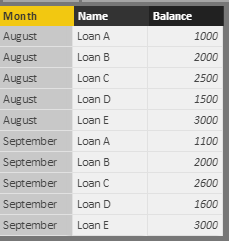
Month | Name | Balance |
| August | Loan A | 1000 |
| August | Loan B | 2000 |
| August | Loan C | 2500 |
| August | Loan D | 1500 |
| August | Loan E | 3000 |
| September | Loan A | 1100 |
| September | Loan B | 2000 |
| September | Loan C | 2600 |
| September | Loan D | 1600 |
| September | Loan E | 3000 |
I receive external monthly data and I add it to a table as above. I use a columnar approach rather than matrix.
Can I use DAX to compare the change in value at loan level and in total? The data will build as the year progresses.
Many thanks
Nick
Solved! Go to Solution.
Hi @ndna74,
>>Could you also show me how to show the change in value each month? For example, how to show that loan A has increased by 100 between August and September.
For your requirement, I merge the month and name columns to create a detail name column.
Formula: Table = SELECTCOLUMNS(Sheet2,"Name",CONCATENATE([Month]&"-",[Name]),"Balance",[Balance])
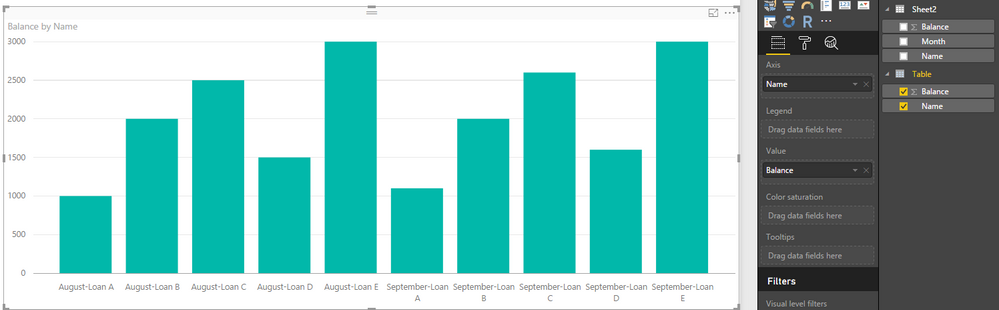
Create a visual with new columns:
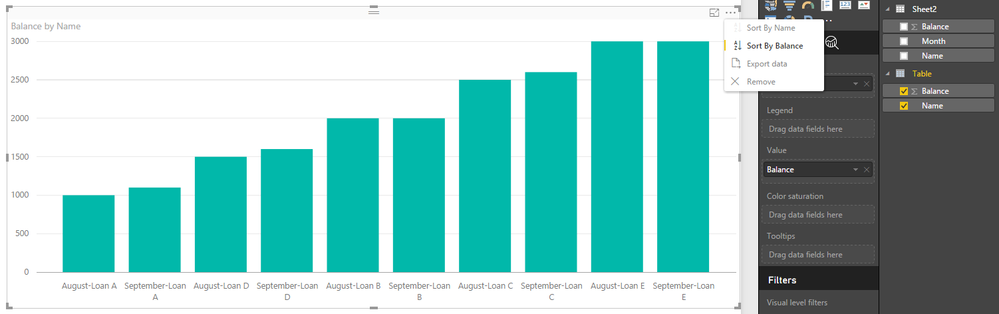
Click on "..." button to modify the sort column:
Regards,
Xiaoxin Sheng
Hi @ndna74,
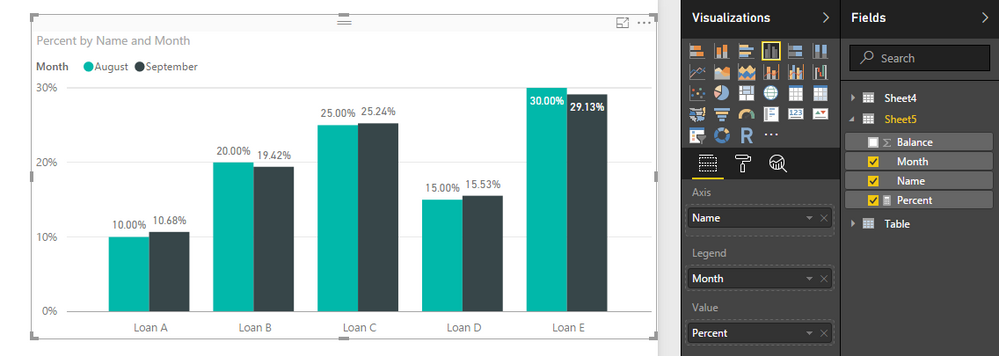
Based on my understanding, you want to get the result of current month balance/ total balance, right?
If it is a case, you can follow below steps to achieve your requirement.
Table:
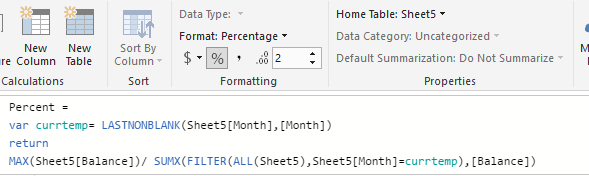
Measure:
Percent =
var currtemp= LASTNONBLANK(Sheet5[Month],[Month])
return
MAX(Sheet5[Balance])/ SUMX(FILTER(ALL(Sheet5),Sheet5[Month]=currtemp),[Balance])
Format the value to "%":
Create the visual:
Regards,
Xiaoxin Sheng
Thanks that's really helpful.
Could you also show me how to show the change in value each month? For example, how to show that loan A has increased by 100 between August and September.
Regards
Nick
Hi @ndna74,
>>Could you also show me how to show the change in value each month? For example, how to show that loan A has increased by 100 between August and September.
For your requirement, I merge the month and name columns to create a detail name column.
Formula: Table = SELECTCOLUMNS(Sheet2,"Name",CONCATENATE([Month]&"-",[Name]),"Balance",[Balance])
Create a visual with new columns:
Click on "..." button to modify the sort column:
Regards,
Xiaoxin Sheng
Thanks very much
Check out the April 2026 Power BI update to learn about new features.
Sign up to receive a private message when registration opens and key events begin.
If you have recently started exploring Fabric, we'd love to hear how it's going. Your feedback can help with product improvements.
| User | Count |
|---|---|
| 35 | |
| 32 | |
| 27 | |
| 23 | |
| 16 |
| User | Count |
|---|---|
| 65 | |
| 50 | |
| 30 | |
| 25 | |
| 24 |