Join us in Barcelona for FabCon and SQLCon, September 28 - October 1, 2026.
This is best Fabric, Power BI, SQL and AI community event. How do we know? The last event sold out! Save €200 with code FABCMTY200.
Register now- Power BI forums
- Get Help with Power BI
- Desktop
- Service
- Report Server
- Power Query
- Mobile Apps
- Developer
- DAX Commands and Tips
- Custom Visuals Development Discussion
- Health and Life Sciences
- Power BI Spanish forums
- Translated Spanish Desktop
- Training and Consulting
- Instructor Led Training
- Dashboard in a Day for Women, by Women
- Galleries
- Data Stories Gallery
- Themes Gallery
- Contests Gallery
- QuickViz Gallery
- Quick Measures Gallery
- Visual Calculations Gallery
- Fabric Apps Gallery
- Notebook Gallery
- Translytical Task Flow Gallery
- TMDL Gallery
- R Script Showcase
- Webinars and Video Gallery
- Ideas
- Custom Visuals Ideas (read-only)
- Issues
- Issues
- Events
- Upcoming Events
The Fabric community is now in read-only for platform upgrade. Learn more
- Power BI forums
- Forums
- Get Help with Power BI
- Desktop
- Re: Forecasting feature
- Subscribe to RSS Feed
- Mark Topic as New
- Mark Topic as Read
- Float this Topic for Current User
- Bookmark
- Subscribe
- Printer Friendly Page

- Mark as New
- Bookmark
- Subscribe
- Mute
- Subscribe to RSS Feed
- Permalink
Forecasting feature
Hi,
I am trying to do a forecast as it is described in this article:
https://powerbi.microsoft.com/en-us/documentation/powerbi-desktop-analytics-pane/
But i cannot see the Forecast group. I see all the other groups like Max line, Min line etc. but not the Forecast group.
Any ideas?
I am using the line chart and a dataset with dates/values.
Solved! Go to Solution.


- Mark as New
- Bookmark
- Subscribe
- Mute
- Subscribe to RSS Feed
- Permalink
Do you have more than 6 data points?
Follow on LinkedIn
@ me in replies or I'll lose your thread!!!
Instead of a Kudo, please vote for this idea
Become an expert!: Enterprise DNA
External Tools: MSHGQM
YouTube Channel!: Microsoft Hates Greg
Latest book!: DAX For Humans
DAX is easy, CALCULATE makes DAX hard...
- Mark as New
- Bookmark
- Subscribe
- Mute
- Subscribe to RSS Feed
- Permalink
Can you post a screen shot of your visualization that includes the fields being used? When I have gotten this to work, I have had a Date Hierarchy in my Axis. This is a field with a Data Type of "Date". Then I had a Decimal Number field in my Values. Visualization is a Line chart.
Forecasting does not work in the Service yet. Version is 2.39.4526.362 64-bit (September 2016). English language. I have all of the Preview features enabled, File | Options and settings | Options | Preview Features. You need to restart Power BI Desktop after enabling Preview Features.
Follow on LinkedIn
@ me in replies or I'll lose your thread!!!
Instead of a Kudo, please vote for this idea
Become an expert!: Enterprise DNA
External Tools: MSHGQM
YouTube Channel!: Microsoft Hates Greg
Latest book!: DAX For Humans
DAX is easy, CALCULATE makes DAX hard...
- Mark as New
- Bookmark
- Subscribe
- Mute
- Subscribe to RSS Feed
- Permalink
Do you have more than 6 data points?
Follow on LinkedIn
@ me in replies or I'll lose your thread!!!
Instead of a Kudo, please vote for this idea
Become an expert!: Enterprise DNA
External Tools: MSHGQM
YouTube Channel!: Microsoft Hates Greg
Latest book!: DAX For Humans
DAX is easy, CALCULATE makes DAX hard...
- Mark as New
- Bookmark
- Subscribe
- Mute
- Subscribe to RSS Feed
- Permalink
Thanks for replying.
I have now tried with 3, 12 and 30 datapoints. Always same result, no Forecast group.
Also, I doublechecked the version of PowerBI Desktop it is updated to the latest version.
- Mark as New
- Bookmark
- Subscribe
- Mute
- Subscribe to RSS Feed
- Permalink
Can you post a screen shot of your visualization that includes the fields being used? When I have gotten this to work, I have had a Date Hierarchy in my Axis. This is a field with a Data Type of "Date". Then I had a Decimal Number field in my Values. Visualization is a Line chart.
Forecasting does not work in the Service yet. Version is 2.39.4526.362 64-bit (September 2016). English language. I have all of the Preview features enabled, File | Options and settings | Options | Preview Features. You need to restart Power BI Desktop after enabling Preview Features.
Follow on LinkedIn
@ me in replies or I'll lose your thread!!!
Instead of a Kudo, please vote for this idea
Become an expert!: Enterprise DNA
External Tools: MSHGQM
YouTube Channel!: Microsoft Hates Greg
Latest book!: DAX For Humans
DAX is easy, CALCULATE makes DAX hard...
- Mark as New
- Bookmark
- Subscribe
- Mute
- Subscribe to RSS Feed
- Permalink
Thansk smoupre.
Converting the columns to date types did the trick. I can now see the Forecast group.
🙂

- Mark as New
- Bookmark
- Subscribe
- Mute
- Subscribe to RSS Feed
- Permalink
Hi,
I tried to apply forcasting on my sample data, but I could not see any forcast option in the analytics pane.
- Mark as New
- Bookmark
- Subscribe
- Mute
- Subscribe to RSS Feed
- Permalink
@m1032499 impossible to diagnose if you don't tell us anything about the chart and what's on it. What type of column are you using for the axis?
- Mark as New
- Bookmark
- Subscribe
- Mute
- Subscribe to RSS Feed
- Permalink
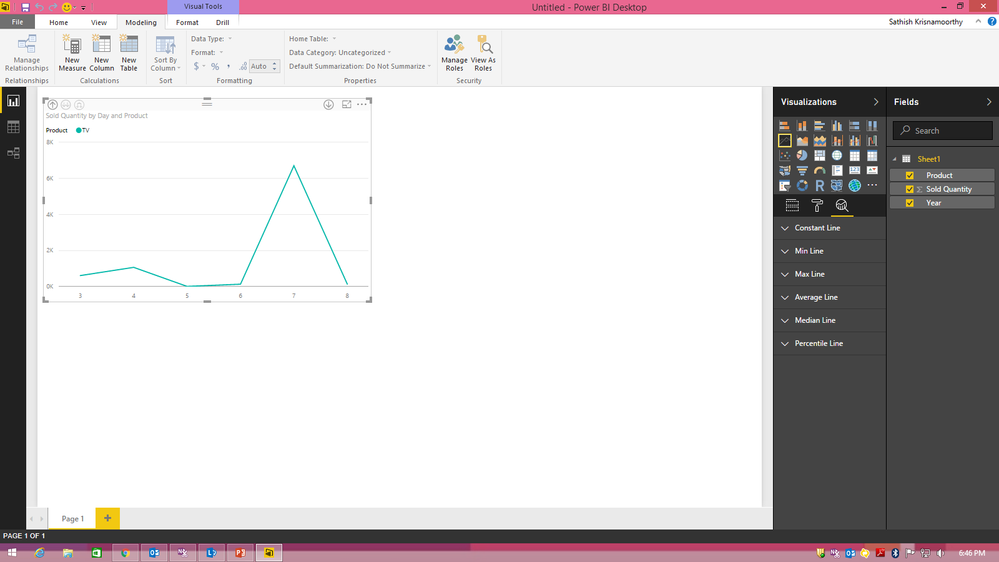
@Anonymous Please find the screenshot. I am using year as x-axis which is of date type.

- Mark as New
- Bookmark
- Subscribe
- Mute
- Subscribe to RSS Feed
- Permalink
Hi All,
I am new in the forum and sorry for comment in this topic, maybe I had to open a new one, but as my problem is the same as discussed here, I think I can get a good result. I have made a dashboard with a graphic, but I don't see the Forecasting feature option, as you can see in the printscreen. I am using the last version (february 2018). Any hints?

- Mark as New
- Bookmark
- Subscribe
- Mute
- Subscribe to RSS Feed
- Permalink
Hi,
I am trying to do a forecast as it is described in this article:
https://powerbi.microsoft.com/en-us/documentation/powerbi-desktop-analytics-pane/
But i cannot see the Forecast group. I see all the other groups like Max line, Min line etc. but not the Forecast group.
Any ideas?
I am using the line chart and a dataset with dates/values.


- Mark as New
- Bookmark
- Subscribe
- Mute
- Subscribe to RSS Feed
- Permalink
Did you enabled Forecasting in options as described there?
excel-inside.pro

Helpful resources

FabCon & SQLCon – Barcelona 2026
Join us in Barcelona for FabCon and SQLCon, the Fabric, Power BI, SQL, and AI community event. Save €200 with code FABCMTY200.

Power BI DataViz World Championships - June 2026
A new Power BI DataViz World Championship is coming this June! Don't miss out on submitting your entry.

| User | Count |
|---|---|
| 21 | |
| 21 | |
| 14 | |
| 14 | |
| 13 |


| User | Count |
|---|---|
| 47 | |
| 35 | |
| 24 | |
| 20 | |
| 19 |


