cancel
Showing results for 
Search instead for 
Did you mean: 

Try your skills in the Power BI Dataviz World Championship! Round one ends June 26. Join now

Reply
Anitha
New Member

Forecasting feature

Hi,
I am working with Power BI Desktop from the past week.
I want to forecast the count of next 24 hours. I have the data with 24 hours with their ResponseCount.Now I want to forecast the ResponseCount of next 24 hours.While I am trying this scenario I am unable to get the 'POINTS' like hourly, daily, monthly etc Option enable. Is this feature is available in power Bi desktop version?
Please help me out to solve this issue.

Thanks

1 ACCEPTED SOLUTION
Anonymous
Not applicable

Hi @Anitha,


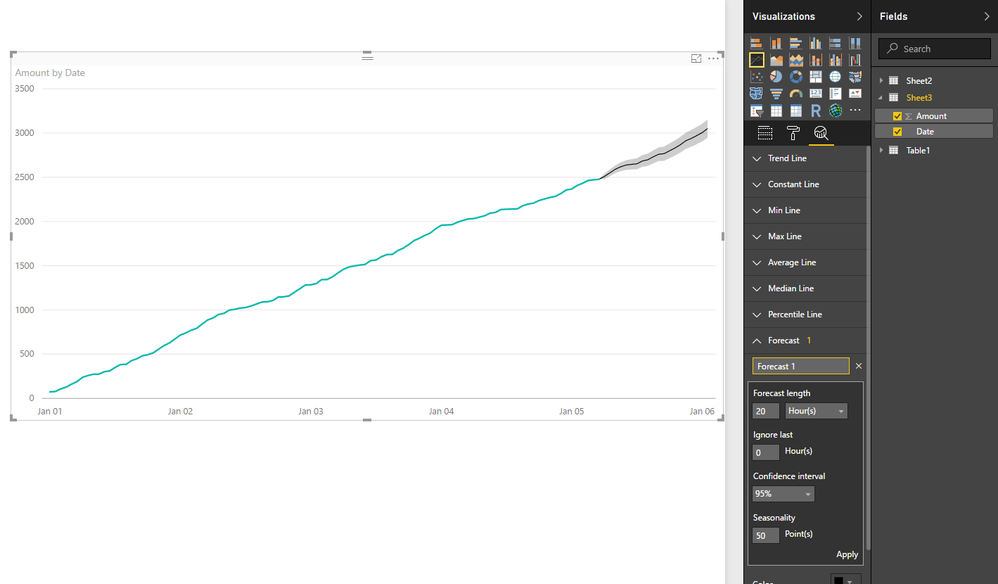
The forecasting feature of line chart support to analysis hourly data, you should drag date column into axis fields and ensure your data are regular enough.(date interval)


8.PNG


Reference:
Forecasting for Power BI Desktop


Regards,

Xiaoxin Sheng

View solution in original post

2 REPLIES 2
Syeda
New Member

Hi i am trying to use forecasting feature past a week. i want to forecast the trend of webinar attendees month wise 

Anonymous
Not applicable

Hi @Anitha,


The forecasting feature of line chart support to analysis hourly data, you should drag date column into axis fields and ensure your data are regular enough.(date interval)


8.PNG


Reference:
Forecasting for Power BI Desktop


Regards,

Xiaoxin Sheng

Helpful resources

Announcements
Fabric Data Days is here Carousel

Fabric Data Days 2026

Don't miss out on Data Days, June 15 through August 7. Learn Fabric, Power BI, SQL, AI and more.

Power BI DataViz World Championships carousel

Power BI DataViz World Championships - June 2026

A new Power BI DataViz World Championship is coming this June! Don't miss out on submitting your entry.