Join us at FabCon Atlanta from March 16 - 20, 2026, for the ultimate Fabric, Power BI, AI and SQL community-led event. Save $200 with code FABCOMM.
Register now!The Power BI Data Visualization World Championships is back! Get ahead of the game and start preparing now! Learn more
Hi all,
I would like to present actions by user in Sankey flow chart custom visual. This visual requires two columns: Source and Destination.
If we consider following dataset that has USER ID, timestamp and Action columns:
| User ID | timestamp | Action |
| 1 | 14/05/2020 01:55:46 | Select |
| 1 | 14/05/2020 01:56:03 | Delete |
| 2 | 14/05/2020 01:56:03 | Select |
| 3 | 13/05/2020 23:12:45 | Select |
| 3 | 13/05/2020 23:12:51 | Update |
| 3 | 14/05/2020 23:12:55 | Select |
I need to manipulate this dataset to looks like this:
| User ID | source | destination |
| 1 | select | delete |
| 2 | select | |
| 3 | select | update |
| 3 | update | select |
I tried with creating custom column using DAX but this way it runs out of memory due to a large dataset:
Destination =
var _cDate =Table[timestamp]
var _calc = CALCULATE(MIN(Table[Action]),FILTER(ALLEXCEPT(Table,Table[User ID]),Table[timestamp]>_cDate))
return _calc
Is there a way I can manipulate initial dataset in Power Query to get desired output?
Thanks in advance
Solved! Go to Solution.
Hi @destank ,
You may add Index column( From 0 ), then add another Index column(From 1), merge this table with original current table , setting more like below.
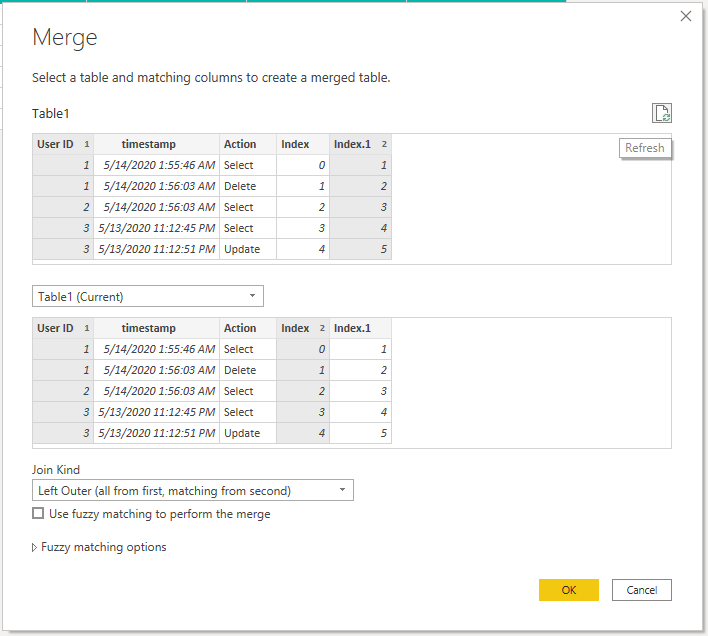
Let
Source = Table.FromRows(Json.Document(Binary.Decompress(Binary.FromText("i45WMlTSUTIw1Tc00TcyMDJQMDC0MjW1MjEDigan5qQmlyjF6mBVZGZlYAwUdQEqKkkFKzLCqQjJJGOoImOIIiNjK0MjKxNTIhSZghwRWpCSCLXOGNU6LCbFAgA=", BinaryEncoding.Base64), Compression.Deflate)), let _t = ((type nullable text) meta [Serialized.Text = true]) in type table [#"User ID" = _t, timestamp = _t, Action = _t]),
#"Changed Type" = Table.TransformColumnTypes(Source,{{"User ID", Int64.Type}, {"timestamp", type datetime}, {"Action", type text}}),
#"Added Index" = Table.AddIndexColumn(#"Changed Type", "Index", 0, 1, Int64.Type),
#"Added Index1" = Table.AddIndexColumn(#"Added Index", "Index.1", 1, 1, Int64.Type),
#"Merged Queries" = Table.NestedJoin(#"Added Index1", {"User ID", "Index.1"}, #"Added Index1", {"User ID", "Index"}, "Added Index1", JoinKind.LeftOuter),
#"Expanded Added Index1" = Table.ExpandTableColumn(#"Merged Queries", "Added Index1", {"Action"}, {"Added Index1.Action"}),
#"Sorted Rows" = Table.Sort(#"Expanded Added Index1",{{"User ID", Order.Ascending}}),
#"Removed Columns" = Table.RemoveColumns(#"Sorted Rows",{"Index", "Index.1"}),
#"Renamed Columns" = Table.RenameColumns(#"Removed Columns",{{"Action", "Source"}, {"Added Index1.Action", "destination"}})
in
#"Renamed Columns"
You can download the pbix form here.
Best Regards,
Amy
Community Support Team _ Amy
If this post helps, then please consider Accept it as the solution to help the other members find it more quickly.
Hi @destank ,
You may add Index column( From 0 ), then add another Index column(From 1), merge this table with original current table , setting more like below.

Let
Source = Table.FromRows(Json.Document(Binary.Decompress(Binary.FromText("i45WMlTSUTIw1Tc00TcyMDJQMDC0MjW1MjEDigan5qQmlyjF6mBVZGZlYAwUdQEqKkkFKzLCqQjJJGOoImOIIiNjK0MjKxNTIhSZghwRWpCSCLXOGNU6LCbFAgA=", BinaryEncoding.Base64), Compression.Deflate)), let _t = ((type nullable text) meta [Serialized.Text = true]) in type table [#"User ID" = _t, timestamp = _t, Action = _t]),
#"Changed Type" = Table.TransformColumnTypes(Source,{{"User ID", Int64.Type}, {"timestamp", type datetime}, {"Action", type text}}),
#"Added Index" = Table.AddIndexColumn(#"Changed Type", "Index", 0, 1, Int64.Type),
#"Added Index1" = Table.AddIndexColumn(#"Added Index", "Index.1", 1, 1, Int64.Type),
#"Merged Queries" = Table.NestedJoin(#"Added Index1", {"User ID", "Index.1"}, #"Added Index1", {"User ID", "Index"}, "Added Index1", JoinKind.LeftOuter),
#"Expanded Added Index1" = Table.ExpandTableColumn(#"Merged Queries", "Added Index1", {"Action"}, {"Added Index1.Action"}),
#"Sorted Rows" = Table.Sort(#"Expanded Added Index1",{{"User ID", Order.Ascending}}),
#"Removed Columns" = Table.RemoveColumns(#"Sorted Rows",{"Index", "Index.1"}),
#"Renamed Columns" = Table.RenameColumns(#"Removed Columns",{{"Action", "Source"}, {"Added Index1.Action", "destination"}})
in
#"Renamed Columns"
You can download the pbix form here.
Best Regards,
Amy
Community Support Team _ Amy
If this post helps, then please consider Accept it as the solution to help the other members find it more quickly.
Thanks Amy!
The Power BI Data Visualization World Championships is back! Get ahead of the game and start preparing now!
| User | Count |
|---|---|
| 41 | |
| 38 | |
| 36 | |
| 31 | |
| 28 |
| User | Count |
|---|---|
| 128 | |
| 88 | |
| 79 | |
| 68 | |
| 63 |