cancel
Showing results for 
Search instead for 
Did you mean: 

Learn from the best! Meet the four finalists headed to the FINALS of the Power BI Dataviz World Championships! Register now

Reply
destank
Microsoft Employee
Microsoft Employee

Flow Chart - structuring data

Hi all,


I would like to present actions by user in Sankey flow chart custom visual. This visual requires two columns: Source and Destination.


If we consider following dataset that has USER ID, timestamp and Action columns:

User IDtimestampAction
114/05/2020 01:55:46Select
114/05/2020 01:56:03Delete
214/05/2020 01:56:03Select
313/05/2020 23:12:45Select
313/05/2020 23:12:51Update
314/05/2020 23:12:55Select


I need to manipulate this dataset to looks like this:

User IDsourcedestination
1selectdelete
2select 
3selectupdate
3updateselect


I tried with creating custom column using DAX but this way it runs out of memory due to a large dataset:

Destination =
var _cDate =Table[timestamp]

var _calc = CALCULATE(MIN(Table[Action]),FILTER(ALLEXCEPT(Table,Table[User ID]),Table[timestamp]>_cDate))

return _calc


Is there a way I can manipulate initial dataset in Power Query to get desired output?


Thanks in advance

1 ACCEPTED SOLUTION
v-xicai
Community Support
Community Support

Hi @destank ,


You may add Index column( From 0 ), then add another Index column(From 1), merge this table with original current table , setting more like below.
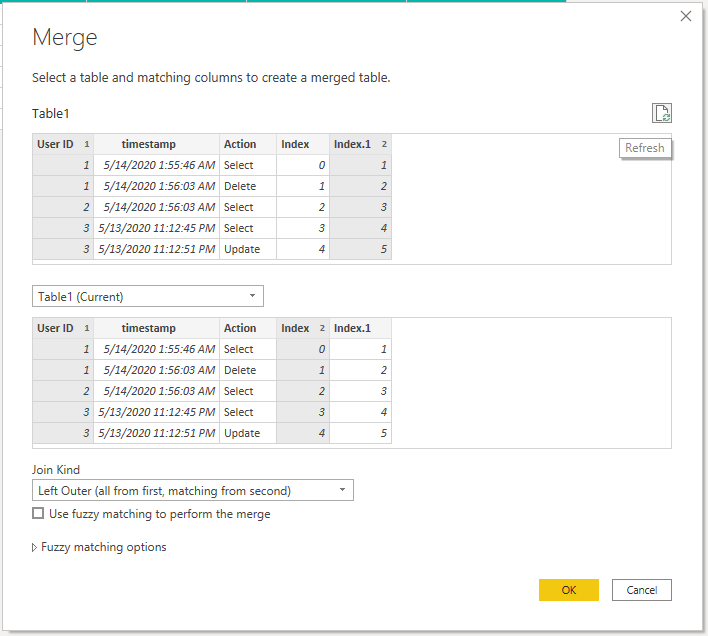

164.PNG


165.PNG


Let

    Source = Table.FromRows(Json.Document(Binary.Decompress(Binary.FromText("i45WMlTSUTIw1Tc00TcyMDJQMDC0MjW1MjEDigan5qQmlyjF6mBVZGZlYAwUdQEqKkkFKzLCqQjJJGOoImOIIiNjK0MjKxNTIhSZghwRWpCSCLXOGNU6LCbFAgA=", BinaryEncoding.Base64), Compression.Deflate)), let _t = ((type nullable text) meta [Serialized.Text = true]) in type table [#"User ID" = _t, timestamp = _t, Action = _t]),

    #"Changed Type" = Table.TransformColumnTypes(Source,{{"User ID", Int64.Type}, {"timestamp", type datetime}, {"Action", type text}}),

    #"Added Index" = Table.AddIndexColumn(#"Changed Type", "Index", 0, 1, Int64.Type),

    #"Added Index1" = Table.AddIndexColumn(#"Added Index", "Index.1", 1, 1, Int64.Type),

    #"Merged Queries" = Table.NestedJoin(#"Added Index1", {"User ID", "Index.1"}, #"Added Index1", {"User ID", "Index"}, "Added Index1", JoinKind.LeftOuter),

    #"Expanded Added Index1" = Table.ExpandTableColumn(#"Merged Queries", "Added Index1", {"Action"}, {"Added Index1.Action"}),

    #"Sorted Rows" = Table.Sort(#"Expanded Added Index1",{{"User ID", Order.Ascending}}),

    #"Removed Columns" = Table.RemoveColumns(#"Sorted Rows",{"Index", "Index.1"}),

    #"Renamed Columns" = Table.RenameColumns(#"Removed Columns",{{"Action", "Source"}, {"Added Index1.Action", "destination"}})

in

    #"Renamed Columns"


You can download the pbix form here.


Best Regards,

Amy 


Community Support Team _ Amy

If this post helps, then please consider Accept it as the solution to help the other members find it more quickly.

View solution in original post

2 REPLIES 2
v-xicai
Community Support
Community Support

Hi @destank ,


You may add Index column( From 0 ), then add another Index column(From 1), merge this table with original current table , setting more like below.

164.PNG


165.PNG


Let

    Source = Table.FromRows(Json.Document(Binary.Decompress(Binary.FromText("i45WMlTSUTIw1Tc00TcyMDJQMDC0MjW1MjEDigan5qQmlyjF6mBVZGZlYAwUdQEqKkkFKzLCqQjJJGOoImOIIiNjK0MjKxNTIhSZghwRWpCSCLXOGNU6LCbFAgA=", BinaryEncoding.Base64), Compression.Deflate)), let _t = ((type nullable text) meta [Serialized.Text = true]) in type table [#"User ID" = _t, timestamp = _t, Action = _t]),

    #"Changed Type" = Table.TransformColumnTypes(Source,{{"User ID", Int64.Type}, {"timestamp", type datetime}, {"Action", type text}}),

    #"Added Index" = Table.AddIndexColumn(#"Changed Type", "Index", 0, 1, Int64.Type),

    #"Added Index1" = Table.AddIndexColumn(#"Added Index", "Index.1", 1, 1, Int64.Type),

    #"Merged Queries" = Table.NestedJoin(#"Added Index1", {"User ID", "Index.1"}, #"Added Index1", {"User ID", "Index"}, "Added Index1", JoinKind.LeftOuter),

    #"Expanded Added Index1" = Table.ExpandTableColumn(#"Merged Queries", "Added Index1", {"Action"}, {"Added Index1.Action"}),

    #"Sorted Rows" = Table.Sort(#"Expanded Added Index1",{{"User ID", Order.Ascending}}),

    #"Removed Columns" = Table.RemoveColumns(#"Sorted Rows",{"Index", "Index.1"}),

    #"Renamed Columns" = Table.RenameColumns(#"Removed Columns",{{"Action", "Source"}, {"Added Index1.Action", "destination"}})

in

    #"Renamed Columns"


You can download the pbix form here.


Best Regards,

Amy 


Community Support Team _ Amy

If this post helps, then please consider Accept it as the solution to help the other members find it more quickly.

destank
Microsoft Employee
Microsoft Employee

Thanks Amy!

Helpful resources

Announcements
Join our Fabric User Panel

Join our Fabric User Panel

Share feedback directly with Fabric product managers, participate in targeted research studies and influence the Fabric roadmap.

March Power BI Update Carousel

Power BI Community Update - March 2026

Check out the March 2026 Power BI update to learn about new features.