Get certified for free when you join Fabric Data Days 2026 and dive into Fabric, Power BI, SQL, AI, and other essential data skills.
Join nowJuly 7 - July 17 | Round 2 of the Power BI Dataviz World Championships. Don't miss your chance! Learn more
Hi All,
I have dataset with 3columns i.e. (Group, Category,Resource ID)
| group | category | resource ID |
| GA | CA | 1254 |
| GA | CA | 2568 |
| GA | CA | 6359 |
| GB | CA | 3598 |
| GB | CB | 1478 |
| GC | CA | 9852 |
I want to create 2different measures. i.e. counts by Group & Counts by Category;
WHEN i will drop groupcount measure without any filter on the canvas it should give me 6.
WHEN i will drop categorycount measure without any filter on the canvas it should give me 6.
However, when I will drop groupcount and categorycount together and there is a slicer on catergory in the same canvas e.g.'CA" , it should give me count of 6 for groupcount measure and 5 for categorycount measure.
In other words I want only same attribute slicer should change the number of that attribute otherwise it should display static number always.
e.g. groupcount should give me 2 when i select GB from slicer and there is no slicer of category so categorycount should still reflect 6.
Kindly provide me with the measure formula 🙂
Regards,
Raheel
Solved! Go to Solution.
Hi @RAHEEL
This is kind a easy:
group = COUNTROWS('tablename'[group])
category = COUNTROWS('tablename'[category])When you have a filter and select CA, it should give you 5 for category
etc.
Kind regards
Dear @RAHEEL,
You can follow solution of @miltenburger.
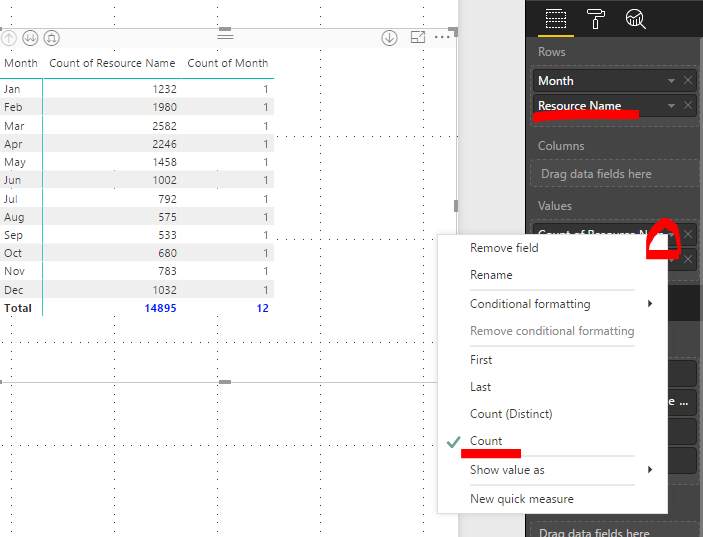
Or you can simply drag column Category into Values field, choose Count (or Count Distinct).
Then drage column Group as the same Category.
Then change the name.
Like this:
Dear @RAHEEL,
You can follow solution of @miltenburger.
Or you can simply drag column Category into Values field, choose Count (or Count Distinct).
Then drage column Group as the same Category.
Then change the name.
Like this:
Hi @RAHEEL
This is kind a easy:
group = COUNTROWS('tablename'[group])
category = COUNTROWS('tablename'[category])When you have a filter and select CA, it should give you 5 for category
etc.
Kind regards
Hi @miltenburger,
COUNTROWS is not taking columnname as input..it is only taking tablename as input
Join us in Barcelona for FabCon and SQLCon, the Fabric, Power BI, SQL, and AI community event. Save €200 with code FABCMTY200.
Join Data Days 2026: 60 days of free live/on-demand sessions, challenges, study groups, and certification opportunities.
| User | Count |
|---|---|
| 29 | |
| 23 | |
| 18 | |
| 18 | |
| 15 |
| User | Count |
|---|---|
| 50 | |
| 44 | |
| 43 | |
| 39 | |
| 33 |