cancel
Showing results for 
Search instead for 
Did you mean: 

We've captured the moments from FabCon & SQLCon that everyone is talking about, and we are bringing them to the community, live and on-demand. Starts on April 14th. Register now

Reply
RAHEEL
Helper I
Helper I

Fixed Measure Calculation

Hi All, 

I have dataset with 3columns i.e. (Group, Category,Resource ID)


groupcategoryresource ID
GACA1254
GACA2568
GACA6359
GBCA3598
GBCB1478
GCCA9852


I want to create 2different measures. i.e. counts by Group & Counts by Category;

WHEN i will drop groupcount measure without any filter on the canvas it should give me 6.

WHEN i will drop categorycount measure without any filter on the canvas it should give me 6.


However, when I will drop groupcount and categorycount  together and there is a slicer on catergory in the same canvas e.g.'CA" , it should give me count of 6 for groupcount measure and 5 for categorycount measure. 

In other words I want only same attribute slicer should change the number of that attribute otherwise it should display static number always. 


e.g. groupcount should give me 2 when i select GB from slicer and there is no slicer of category so categorycount should still reflect 6.


Kindly provide me with the measure formula 🙂


Regards,

Raheel 


2 ACCEPTED SOLUTIONS
miltenburger
Helper V
Helper V

Hi @RAHEEL


This is kind a easy:


group = COUNTROWS('tablename'[group])

category = COUNTROWS('tablename'[category])

When you have a filter and select CA, it should give you 5 for category

etc.


Kind regards

View solution in original post

Anonymous
Not applicable

Dear @RAHEEL,


You can follow solution of @miltenburger.


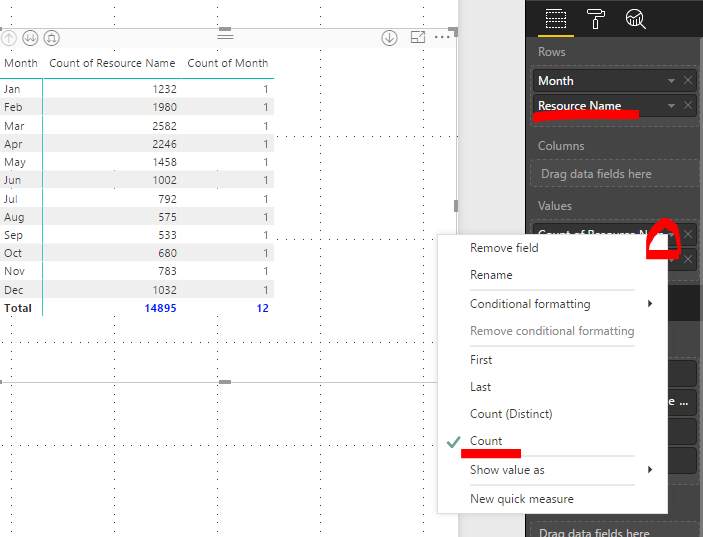
Or you can simply drag column Category into Values field, choose Count (or Count Distinct).

Then drage column Group as the same Category.

Then change the name.


Like this:

image.png

View solution in original post

3 REPLIES 3
Anonymous
Not applicable

Dear @RAHEEL,


You can follow solution of @miltenburger.


Or you can simply drag column Category into Values field, choose Count (or Count Distinct).

Then drage column Group as the same Category.

Then change the name.


Like this:

image.png

miltenburger
Helper V
Helper V

Hi @RAHEEL


This is kind a easy:


group = COUNTROWS('tablename'[group])

category = COUNTROWS('tablename'[category])

When you have a filter and select CA, it should give you 5 for category

etc.


Kind regards

Hi @miltenburger

COUNTROWS is not taking columnname as input..it is only taking tablename as input

Helpful resources

Announcements
New to Fabric survey Carousel

New to Fabric Survey

If you have recently started exploring Fabric, we'd love to hear how it's going. Your feedback can help with product improvements.

Power BI DataViz World Championships carousel

Power BI DataViz World Championships - June 2026

A new Power BI DataViz World Championship is coming this June! Don't miss out on submitting your entry.

Join our Fabric User Panel

Join our Fabric User Panel

Share feedback directly with Fabric product managers, participate in targeted research studies and influence the Fabric roadmap.

March Power BI Update Carousel

Power BI Community Update - March 2026

Check out the March 2026 Power BI update to learn about new features.