Don't miss your chance to take the Fabric Data Engineer (DP-600) exam for FREE! Find out how by watching the DP-600 session on-demand now through April 28th.
Learn moreJoin the FabCon + SQLCon recap series. Up next: Power BI, Real-Time Intelligence, IQ and AI, and Data Factory take center stage. All sessions are available on-demand after the live show. Register now
Hi,
I am trying to find the peak/concurrent usage of an application during the day.
From my table named: wrl_tbl_log_1
| luid | begin_time | end_time |
| 2099 | 3/5/2020 4:03:02 PM | 3/5/2020 4:06:45 PM |
| 2099 | 3/5/2020 4:25:32 PM | 3/5/2020 4:27:25 PM |
| 2100 | 3/5/2020 1:11:57 PM | 3/5/2020 8:42:07 PM |
| 2099 | 3/5/2020 3:29:30 PM | null |
| 2100 | 3/5/2020 3:35:38 PM | null |
| 2099 | 3/5/2020 6:38:09 PM | 3/5/2020 7:04:04 PM |
I am stumped trying to determine how the dates all overlap over eachother.
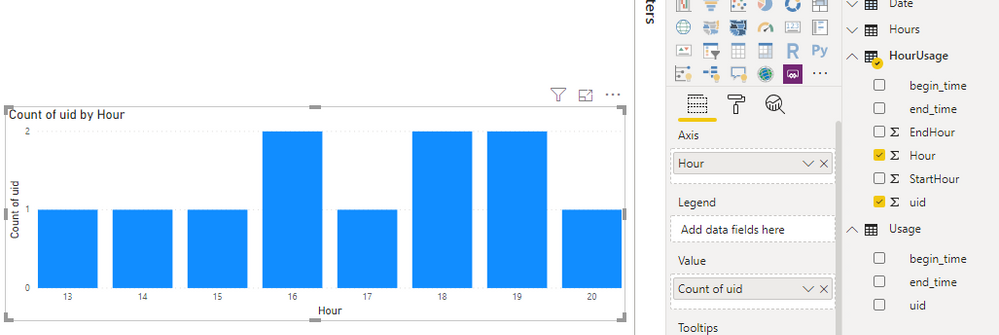
My end goal is to find the overlap during a day and make a graph like the following.
If someone could point me in the correct direction, I would really appreciate it.
-M
Solved! Go to Solution.
You could create a list of all the hours with an active Usage record.
You can either have a table of hours or generate them in M
let
Source = List.Generate(()=>0, each _ < 24, each _ + 1),
#"Converted to Table" = Table.FromList(Source, Splitter.SplitByNothing(), null, null, ExtraValues.Error),
#"Changed Type" = Table.TransformColumnTypes(#"Converted to Table",{{"Column1", Int64.Type}}),
#"Renamed Columns" = Table.RenameColumns(#"Changed Type",{{"Column1", "Hour"}})
in
#"Renamed Columns"
Now we can cross join the Usage data and filter just the hours that are between the start and end.
Create a New Dax Table (under Modeling)
HourUsage = FILTER(CROSSJOIN(Hours,'Usage'), AND(Hours[Hour]>=Hour(Usage[begin_time]), Hours[Hour]<=HOUR(Usage[end_time]) ))
You can then chart the hours and count distinct uids.
You could create a list of all the hours with an active Usage record.
You can either have a table of hours or generate them in M
let
Source = List.Generate(()=>0, each _ < 24, each _ + 1),
#"Converted to Table" = Table.FromList(Source, Splitter.SplitByNothing(), null, null, ExtraValues.Error),
#"Changed Type" = Table.TransformColumnTypes(#"Converted to Table",{{"Column1", Int64.Type}}),
#"Renamed Columns" = Table.RenameColumns(#"Changed Type",{{"Column1", "Hour"}})
in
#"Renamed Columns"
Now we can cross join the Usage data and filter just the hours that are between the start and end.
Create a New Dax Table (under Modeling)
HourUsage = FILTER(CROSSJOIN(Hours,'Usage'), AND(Hours[Hour]>=Hour(Usage[begin_time]), Hours[Hour]<=HOUR(Usage[end_time]) ))
You can then chart the hours and count distinct uids.
Thanks! This solves the small problem. You taught me how CROSSJOIN works. Now I can expand the problem and learn how to perform my larger task.
Glad it works.
Curbal has some more details/videos on the different dax joins
https://curbal.com/blog/glossary/crossjoin-dax
Check out Open Tickets. It was designed for this. https://community.powerbi.com/t5/Quick-Measures-Gallery/Open-Tickets/m-p/409364#M147
Check out the April 2026 Power BI update to learn about new features.
If you have recently started exploring Fabric, we'd love to hear how it's going. Your feedback can help with product improvements.
A new Power BI DataViz World Championship is coming this June! Don't miss out on submitting your entry.
| User | Count |
|---|---|
| 48 | |
| 40 | |
| 38 | |
| 20 | |
| 17 |
| User | Count |
|---|---|
| 68 | |
| 65 | |
| 30 | |
| 26 | |
| 25 |